









Restart-Safe Expert Advisor Template for MT4/MT5
Info
The Restart-Safe Expert Advisor Template for MT4/MT5 is a Expert Advisor for MetaTrader 5 that restart-safe ea template is a well-structured expert advisor foundation demonstrating essential execution practices often overlooked. The primary issue it addresses is the erroneous opening of duplicate trades after MetaTrader or the VPS restarts, where the EA might reprocess the same signal.
Usage
This tool is typically used for automated trading on major forex pairs and gold.
Platform
This Expert Advisor works exclusively on MetaTrader 5 (both build 600+ and newer versions).
Setup
Place the downloaded file in MQL5/Experts folder via File ? Open Data Folder in MetaTrader 5.
How to Install and Use Restart-Safe Expert Advisor Template for MT4/MT5
1. Installation: Open the "File" menu, select "Open Data Folder," navigate to MQL/Experts, paste your file, and restart the terminal.
2. Activation: Drag the EA from the Navigator onto a chart, ensure "Allow live trading" is checked in the Common tab, and verify the AutoTrading button is green.
3. Optimization: Right-click your chart, choose "Expert List," click "Properties" to adjust inputs, and save your preferred setup as a set file for future use.
4. Maintenance: Regularly check the "Experts" tab in the terminal window to monitor trade logs and potential execution errors.
Frequently Asked Questions
Q: Why is my EA not opening trades? A: Check the "AutoTrading" button, ensure "Allow live trading" is enabled, and verify your broker allows automated trading on your account type.
Q: Can I run multiple EAs on one chart? A: No, each chart can only host one active EA; however, you can open multiple charts for different currency pairs to run several EAs.
Q: What does the "smiley face" icon mean? A: A smiley face in the top-right corner of the chart indicates the EA is successfully running; a frowny face means it is disabled.
What this tool does
Restart-Safe EA Template is a well-structured Expert Advisor foundation demonstrating essential execution practices often overlooked.
Typical Use Case
This Expert Advisor excels in automated trading and technical analysis on MetaTrader 5.
Compatible Platform & Setup
This Expert Advisor works on MetaTrader 5. Place the file in the MQL5/Experts folder and restart the terminal.
Description & Settings
Related: Seven-Bar Pressure Flip (SBPF) Sell-Only Expert Advisor for MetaTrader 5 - another powerful expert for MetaTrader 5 traders.
Restart-Safe EA Template is a well-structured Expert Advisor foundation demonstrating essential execution practices often overlooked.Also recommended: Gold Trend Breakout Lite: Educational XAUUSD Trend-Following Expert Advisor - similar expert with strong performance on MetaTrader 5.
The primary issue it addresses is the erroneous opening of duplicate trades after MetaTrader or the VPS restarts, where the EA might reprocess the same signal.
Signals are processed exclusively on closed bars and are evaluated only once per bar.
To prevent re-processing, the last processed bar's ID is stored in a terminal global variable, ensuring that restarts do not lead to duplicate signal handling.
The template enforces a single open position per symbol and magic number, which is correctly recognized even after an EA restart.
Additional features include spread filtering, broker stop-level validation, and volume normalization.
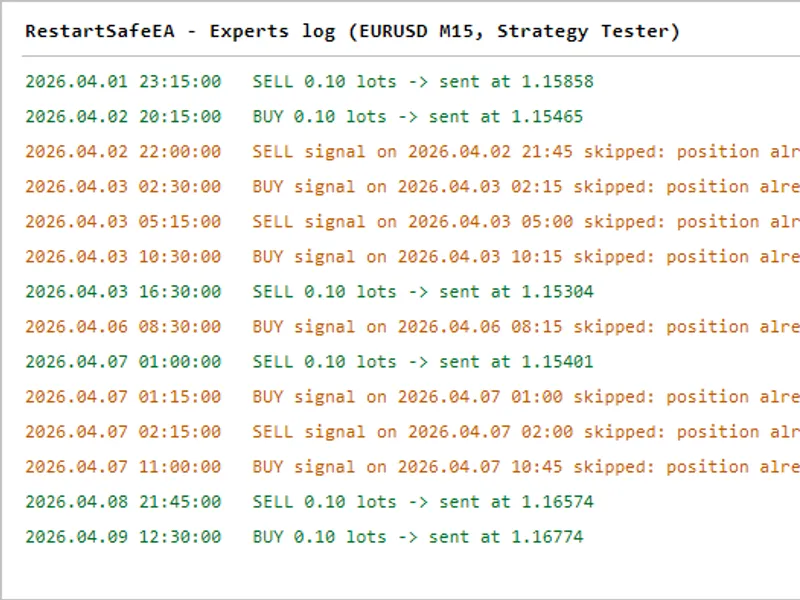
Comprehensive logging is provided, detailing every decision made by the EA. This includes entries executed, signals skipped and the reasons for skipping, and broker return codes, all recorded in the Experts log.
The provided signal logic is a basic moving average cross implemented solely for demonstration purposes. Users should replace the GetSignal() function with their specific trading rules. This template is intended for educational use and testing, not as a pre-built profitable strategy. A recommended setting for testing is EURUSD on the M15 timeframe.
Inputs
The template includes configurable inputs for the demo signal: fast and slow Moving Average periods and the MA method.
Other configurable inputs are:
- Lot size
- Stop Loss in points (0 indicates no Stop Loss)
- Take Profit in points (0 indicates no Take Profit)
- Maximum spread in points
- Magic number for trade identification
- Maximum slippage (deviation) in points
A screenshot is available within the Strategy Tester's Experts log, illustrating entries and skipped signals with their corresponding reasons.
You may also like: Moving Average Crossover Expert Advisor for Gold (XAUUSD) - excellent alternative for expert users on MetaTrader 5.
Source Code
#property copyright "RobotFX"
#property version   "1.00"
#property description "This code is educational. Feel free to use, modify and upgrade as you wish. Visit ROBOTFX.ORG for professional trading tools"
#include <Trade\Trade.mqh>
input group "Signal (demo)"
input int             InpFastMA     = 20;
input int             InpSlowMA     = 50;
input ENUM_MA_METHOD  InpMAMethod   = MODE_EMA;
input group "Orders"
input double          InpLots       = 0.10;
.......
⚠ Limitations & Risk Warning
- This tool is provided for educational and testing purposes only.
- Past performance does not guarantee future results.
- Trading involves substantial risk of loss. Use on a demo account first.
- Results may vary depending on market conditions, broker, and settings.
- We recommend thorough backtesting and forward testing before using with real funds.