









Seven-Bar Pressure Flip (SBPF) Sell-Only Expert Advisor for MetaTrader 5
Info
The Seven-Bar Pressure Flip (SBPF) Sell-Only Expert Advisor for MetaTrader 5 is a Expert Advisor for MetaTrader 5 that seven-bar pressure flip (sbpf) is a sell-only expert advisor for meta trader 5. Strategy LogicThe strategy is based on measuring recent buying pressure using the signed body-to-range ratio of each candle: (Close - Open) / max(High - Low).
Usage
This tool is typically used for automated trading on major forex pairs and gold.
Platform
This Expert Advisor works exclusively on MetaTrader 5 (both build 600+ and newer versions).
Setup
Place the downloaded file in MQL5/Experts folder via File ? Open Data Folder in MetaTrader 5.
How to Install and Use Seven-Bar Pressure Flip (SBPF) Sell-Only Expert Advisor for MetaTrader 5
1. Installation: Open the "File" menu, select "Open Data Folder," navigate to MQL/Experts, paste your file, and restart the terminal.
2. Activation: Drag the EA from the Navigator onto a chart, ensure "Allow live trading" is checked in the Common tab, and verify the AutoTrading button is green.
3. Optimization: Right-click your chart, choose "Expert List," click "Properties" to adjust inputs, and save your preferred setup as a set file for future use.
4. Maintenance: Regularly check the "Experts" tab in the terminal window to monitor trade logs and potential execution errors.
Frequently Asked Questions
Q: Why is my EA not opening trades? A: Check the "AutoTrading" button, ensure "Allow live trading" is enabled, and verify your broker allows automated trading on your account type.
Q: Can I run multiple EAs on one chart? A: No, each chart can only host one active EA; however, you can open multiple charts for different currency pairs to run several EAs.
Q: What does the "smiley face" icon mean? A: A smiley face in the top-right corner of the chart indicates the EA is successfully running; a frowny face means it is disabled.
What this tool does
Seven-Bar Pressure Flip (SBPF) is a sell-only Expert Advisor for Meta Trader 5.
Typical Use Case
This Expert Advisor excels in automated trading and technical analysis on MetaTrader 5.
Compatible Platform & Setup
This Expert Advisor works on MetaTrader 5. Place the file in the MQL5/Experts folder and restart the terminal.
Description & Settings
Related: detecting the start of a new bar or candle - another powerful expert for MetaTrader 5 traders.
Seven-Bar Pressure Flip (SBPF) is a sell-only Expert Advisor for Meta Trader 5.Also recommended: Coensio Trader1 v06: An Advanced Multi-Currency Trading System - similar expert with strong performance on MetaTrader 5.
Strategy Logic
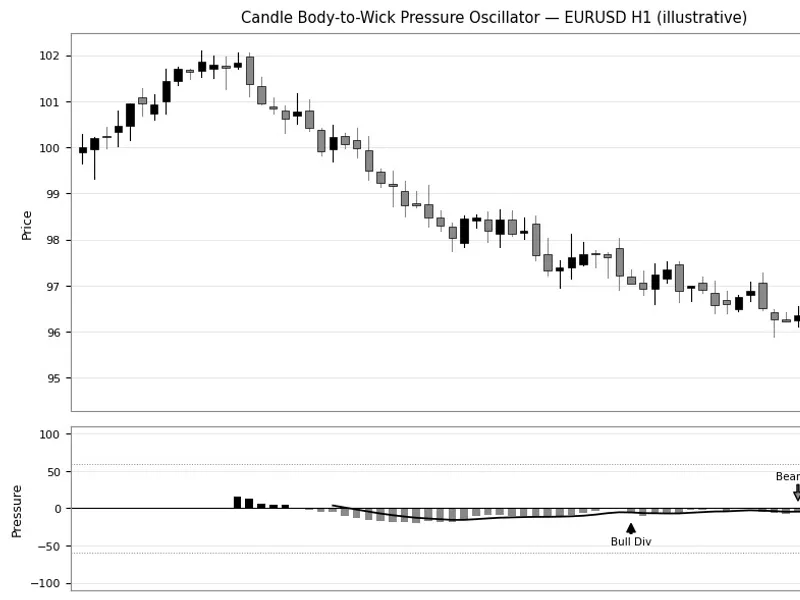
The strategy is based on measuring recent buying pressure using the signed body-to-range ratio of each candle: (Close - Open) / max(High - Low). This average is calculated over the seven closed candles preceding the signal candle (the signal candle itself is excluded by default).
A positive average indicates that bullish candle bodies have dominated this measure over the selected window. The Expert Advisor then searches for a bearish candle that meets specific criteria: a sufficiently large body and range, a close near its low, and a close below the preceding candle's open. The Average True Range (ATR) of the closed signal candle is used for both signal qualification and stop-loss distance calculation.
Position sizing is managed through a fixed lot input. This strategy does not employ grid entries, martingale sizing, trailing stops, or breakeven adjustments.
Signal Interpretation
The Expert Advisor evaluates the most recently closed M15 candle once, at the first available tick of a new bar. A sell setup is triggered when all of the following conditions are met (using default inputs):
- The average signed body-to-range ratio of the seven candles preceding the signal is at least 0.30.
- The signal candle is bearish, with a body that is at least 0.70 times ATR(14) and a total range that is at least 0.90 times ATR(14).
- The signal candle closes within the bottom 25% of its range and strictly below the open price of the preceding candle.
Recommended Symbols and Timeframes
The intended research instrument is XAUUSD, including broker-specific gold variations (e.g., XAUUSDm). The Expert Advisor utilizes the chart's symbol, not a hardcoded name.
For testing, it is recommended to select the broker's gold symbol and the M15 timeframe in the MT5 Strategy Tester. Ensure you use real ticks and verify trading costs, contract specifications, and execution logs. It is advised to test on a demo account before considering live trading. This is an educational research example and does not guarantee future performance. This tool was last updated in 2026.
You may also like: Automated ADX Expert Advisor - excellent alternative for expert users on MetaTrader 5.
Source Code
#property strict
#property version   "1.10"
#property description "This code is educational. Feel free to use, modify and upgrade as you wish. Visit ROBOTFX.ORG for professional trading tools"
#include <Trade/Trade.mqh>
input ENUM_TIMEFRAMES InpSignalTimeframe = PERIOD_M15;
input double InpLots                   = 0.01;
input bool   InpUseBrokerMinVolume     = true;
input int    InpATRPeriod              = 14;
input int    InpPressureBars           = 7;
input double InpPressureThreshold      = 0.30;
.......
⚠ Limitations & Risk Warning
- This tool is provided for educational and testing purposes only.
- Past performance does not guarantee future results.
- Trading involves substantial risk of loss. Use on a demo account first.
- Results may vary depending on market conditions, broker, and settings.
- We recommend thorough backtesting and forward testing before using with real funds.