




high-performance i time series for time-sensitive applications
Info
The high-performance i time series for time-sensitive applications is a Library for MetaTrader 5 that one of the major issues with mql5 was the removal of the built in time-series functions. while doing so gave programmers a more finite level of development latitude, it also slowed things down due to the necessary step of creating and destroying new memory locations every-time one needs to access some time-series data.
Usage
This tool is typically used for enhancing chart analysis and decision making.
Platform
This Library works exclusively on MetaTrader 5 (both build 600+ and newer versions).
Setup
Place the downloaded file in MQL5/Libraries folder via File ? Open Data Folder in MetaTrader 5.
How to Install and Use high-performance i time series for time-sensitive applications
1. Storage: Place library files in the MQL/Libraries directory to ensure they are accessible to your projects.
2. Implementation: Include the library in your code using the #import directive, ensuring you match the exact function names and parameters.
3. Compilation: Ensure the library is present in the directory before you compile your main EA or script, as the compiler links them during this phase.
4. Management: Keep libraries organized in sub-folders if you manage many custom functions to maintain a clean project structure.
Frequently Asked Questions
Q: What is a library file used for? A: Libraries store reusable code modules, allowing you to centralize common logic used by multiple EAs or indicators.
Q: Is a library executable? A: No, libraries are non-executable files containing functions; they must be imported into an EA, indicator, or script to function.
Q: Can I update a library while the platform is running? A: You should compile your EA or script after updating a library to ensure the latest code changes are integrated.
What this tool does
one of the major issues with mql5 was the removal of the built in time-series functions.
Typical Use Case
This Library excels in automated trading and technical analysis on MetaTrader 5.
Compatible Platform & Setup
This Library works on MetaTrader 5. Place the file in the MQL5/Libraries folder and restart the terminal.
Description & Settings
Related: session time filter library - another powerful library for MetaTrader 5 traders.
one of the major issues with mql5 was the removal of the built in time-series functions. while doing so gave programmers a more finite level of development latitude, it also slowed things down due to the necessary step of creating and destroying new memory locations every-time one needs to access some time-series data.
Also recommended: as q telegram notifier: real-time trade alerts and performance insights - similar library with strong performance on MetaTrader 5.
let's look at a popular ibarshift algorithm. in order to return the index of a bar by its datetime - we first have to call ::copytime(...) which creates a dynamic array, resizes it, copies data, and then destroy it in memory. this is not an issue for a few casual calls, but since time series functions are typically called more than just a few times on many different time-frames, this memory overhead can add up so a significant slow-down. ponder for a moment all of the potential bloated-overhead and wasted resources required to allocate new memory each and every-time a program calls for any time-series data using these type of methods.in order to speed things up this library implements the standard-library's cobject and carrayobj classes to copy the rates-array once and then re-access it from all time-series calls for that specific symbol and period. this can be a double-edged sword because the initialization phase takes longer than your typical implementation but all subsequent calls can access data in about 1/100th the time. in the example of ibarshift(), this new algorithm works faster by creating an int[] array which stores the index-integer of the bar in the array and then accesses it by using the time (casted to type int) as the array address. so in other words, you pass the time in as a direct address to access the data.
this brings us to a couple of caveats:
a bulk of the time is consumed during the initialization phase. if you don't plan on accessing time-series data more than a few thousand (aggregate) times
per period bar
you may want to consider an alternative method.
objects of the citimeseries class are set to automatically refresh the stored data when a new bar is formed.
setting this to "false" will put the object into high-performance mode
allowing lightning fast calls from the mission-critical "hot-path",
but a manual-refresh is required during a subsequent maintenance cycle.
example:
additionally, you can call the global functions directly (just as you would in mql4) without instantiating an object of citimeseries, but the first access time will be slow because it will have to first initialize a global object behind the scenes. using the library this way can be slower if you only call any of the time-series functions a few times, however, there is a distinct performance advantage when your algorithm needs to call (>) several thousand iterations of time-series data from the same symbol+period set.
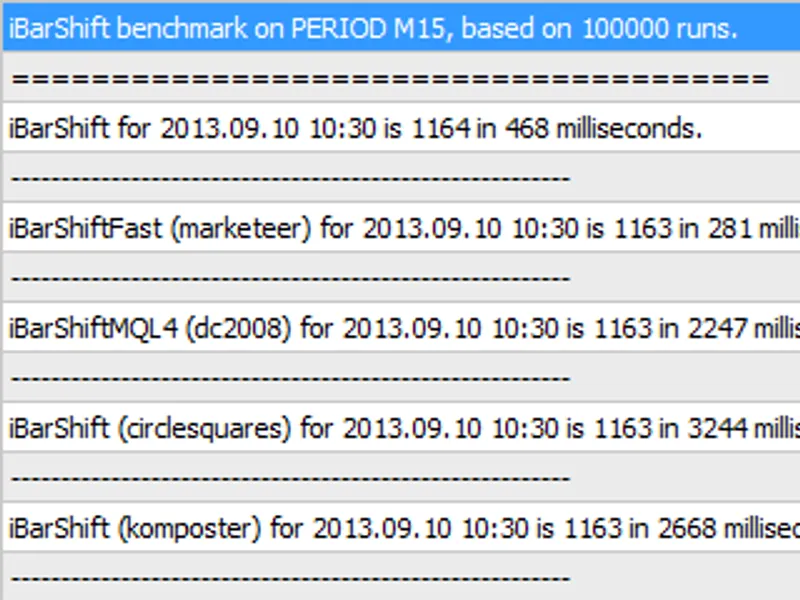
the developer of the (currently) most popular ibarshift algorithm did a competitive benchmark test for "ibarshift" which you may find here .
since this was the most accurate and fastest method (at the time of this post) i decided to use it as the benchmark for testing.
the resulting computation time of 100,000 direct (global) function calls is
50x faster
than that of the fastest method currently available, while calling the public method after initialization in "performance mode" is
over 100x faster
.
available public methods and global functions:
note: global functions are the same as metatrader 4 e.g. ibarshift, itime, etc.
.open = iopen
.high = ihigh
.low = ilow
.close = iclose
.highest = ihighest
.lowest = ilowest
.volume = ivolume
.barstotal = ibars
.time = itime
.shift = ibarshift
You may also like: high-performance json library for llms - excellent alternative for library users on MetaTrader 5.
Source Code
#property copyright "robotfx"
#property link "https://robotfx.org"
#property version   "1.00"
#include <itimeseries_nicholishen_v2.mqh>
void onstart()
{
   citimeseries ibar;
   datetime          time     = d'2017.04.11 19:56:37';     //testing date
   string            symbol   = symbol();                   //symbol
   enum_timeframes   period   = period();                   //period
.......
⚠ Limitations & Risk Warning
- This tool is provided for educational and testing purposes only.
- Past performance does not guarantee future results.
- Trading involves substantial risk of loss. Use on a demo account first.
- Results may vary depending on market conditions, broker, and settings.
- We recommend thorough backtesting and forward testing before using with real funds.