










high-performance json library for llms
Info
The high-performance json library for llms is a Library for MetaTrader 5 that high-performance json (v3. 5.
Usage
This tool is typically used for enhancing chart analysis and decision making.
Platform
This Library works exclusively on MetaTrader 5 (both build 600+ and newer versions).
Setup
Place the downloaded file in MQL5/Libraries folder via File ? Open Data Folder in MetaTrader 5.
How to Install and Use high-performance json library for llms
1. Storage: Place library files in the MQL/Libraries directory to ensure they are accessible to your projects.
2. Implementation: Include the library in your code using the #import directive, ensuring you match the exact function names and parameters.
3. Compilation: Ensure the library is present in the directory before you compile your main EA or script, as the compiler links them during this phase.
4. Management: Keep libraries organized in sub-folders if you manage many custom functions to maintain a clean project structure.
Frequently Asked Questions
Q: What is a library file used for? A: Libraries store reusable code modules, allowing you to centralize common logic used by multiple EAs or indicators.
Q: Is a library executable? A: No, libraries are non-executable files containing functions; they must be imported into an EA, indicator, or script to function.
Q: Can I update a library while the platform is running? A: You should compile your EA or script after updating a library to ensure the latest code changes are integrated.
What this tool does
high-performance json (v3.
Typical Use Case
This Library excels in automated trading and technical analysis on MetaTrader 5.
Compatible Platform & Setup
This Library works on MetaTrader 5. Place the file in the MQL5/Libraries folder and restart the terminal.
Description & Settings
Related: JSON Serialization and Deserialization (Native MQL) - another powerful library for MetaTrader 5 traders.
high-performance json (v3.5.0)Also recommended: High-Performance Time Series for Time-Sensitive Applications - similar library with strong performance on MetaTrader 5.
a json library tailored for llms, autonomous trading, and ultra-low latency.
the challenge
integrating ai models (e.g., gpt-4o, claude 3.5, deepseek) into metatrader 5 exposed critical issues with standard libraries: memory allocation and serialisation latency. recursion and temporary strings led to bottlenecks, freezing the terminal during ai response processing. this architecture aims to address these performance challenges.
fast_json architecture
designed with performance as the top priority:
- zero-allocation architecture: parsing via tape (contiguous buffer long[]) and direct serialisation in buffer uchar[]. payload is processed directly without creating unnecessary objects.
- hybrid numeric parsing: introduced in v3.4.0, this method uses long (native alu) and static exp10 lookup tables for precise floating-point calculations.
- iterative state machine: recursion is replaced with a linear parser, preventing stack overflow in deeply nested jsons.
- swar scanning: simd reading (8 bytes per cycle) efficiently skips whitespace and long strings.
performance
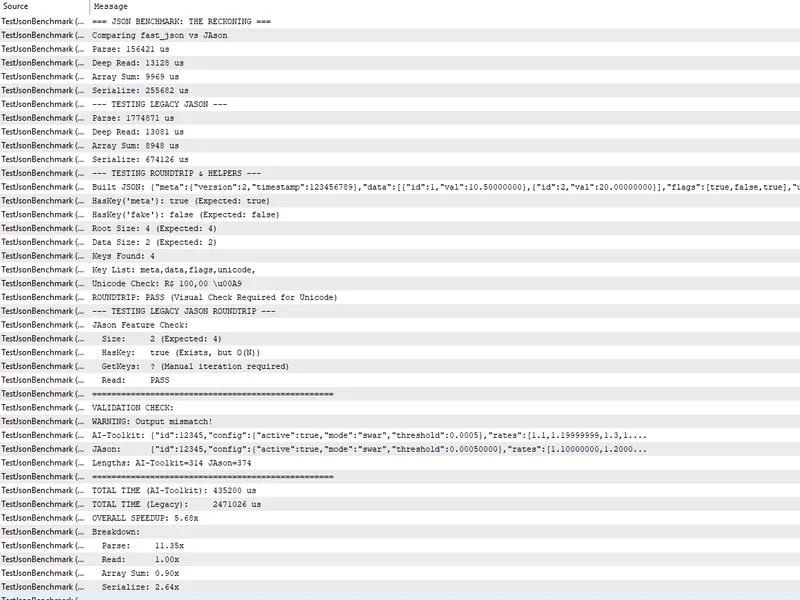
tested on standard x64 hardware with a complex 50,000-node payload:
- results can be verified using the included testjsonbenchmark.mq5 script.
key features
- hft resilience: deterministic memory allocation ensures the garbage collector doesn't interfere during parsing.
- o(1) introspection: instantly check haskey() and size() without scanning the entire structure.
- type safety: strict type access (getint, getdouble, getstring) prevents silent bugs caused by magic variants.
- accurate error reporting: provides exact row and column information in case of failures.
usage example: reading openai response
example: building request (optimised builder)
this library forms the core of the ai-toolkit framework.
You may also like: high-performance time functions (time utils) - excellent alternative for library users on MetaTrader 5.
Source Code
#property script_show_inputs
#include <fast_json.mqh>
#include <jason.mqh>
input int loops = 50000;
void onstart() {
print("=== json benchmark: the reckoning ===");
print("comparing ai-toolkit v2 (production) vs jason");
string json =
"{"
"\"id\": 12345,"
.......
⚠ Limitations & Risk Warning
- This tool is provided for educational and testing purposes only.
- Past performance does not guarantee future results.
- Trading involves substantial risk of loss. Use on a demo account first.
- Results may vary depending on market conditions, broker, and settings.
- We recommend thorough backtesting and forward testing before using with real funds.