

asq recovery engine
Info
The asq recovery engine is a Library for MetaTrader 5 that asq recovery engine v1. 2 — free, open-sourceyou've just experienced three consecutive trade losses.
Usage
This tool is typically used for enhancing chart analysis and decision making.
Platform
This Library works exclusively on MetaTrader 5 (both build 600+ and newer versions).
Setup
Place the downloaded file in MQL5/Libraries folder via File ? Open Data Folder in MetaTrader 5.
How to Install and Use asq recovery engine
1. Storage: Place library files in the MQL/Libraries directory to ensure they are accessible to your projects.
2. Implementation: Include the library in your code using the #import directive, ensuring you match the exact function names and parameters.
3. Compilation: Ensure the library is present in the directory before you compile your main EA or script, as the compiler links them during this phase.
4. Management: Keep libraries organized in sub-folders if you manage many custom functions to maintain a clean project structure.
Frequently Asked Questions
Q: What is a library file used for? A: Libraries store reusable code modules, allowing you to centralize common logic used by multiple EAs or indicators.
Q: Is a library executable? A: No, libraries are non-executable files containing functions; they must be imported into an EA, indicator, or script to function.
Q: Can I update a library while the platform is running? A: You should compile your EA or script after updating a library to ensure the latest code changes are integrated.
What this tool does
asq recovery engine v1.
Typical Use Case
This Library excels in automated trading and technical analysis on MetaTrader 5.
Compatible Platform & Setup
This Library works on MetaTrader 5. Place the file in the MQL5/Libraries folder and restart the terminal.
Description & Settings
Related: channel proximity engine: advanced signal generation - another powerful library for MetaTrader 5 traders.
asq recovery engine v1.2 — free, open-sourceAlso recommended: asq risk analytics engine: comprehensive risk assessment for trading strategies - similar library with strong performance on MetaTrader 5.
you've just experienced three consecutive trade losses. your next move is crucial: will you lose more or recover?
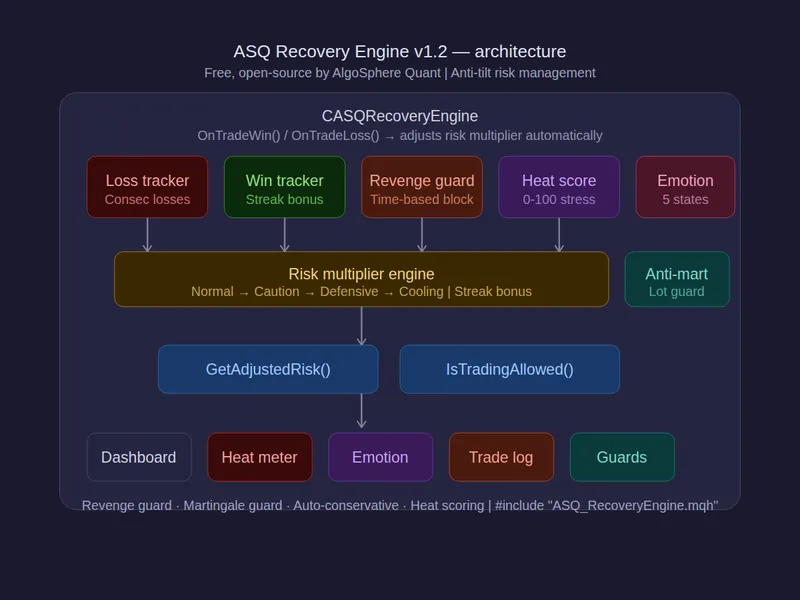
the asq recovery engine is designed to help you make that next move wisely. it automatically adjusts your risk after losses, gradually restoring it after wins. by tracking your emotional state and scoring your session stress level, it helps you avoid revenge trades and martingale impulses that can lead to account blowouts.
features:
- automatic risk reduction after consecutive losses, with gradual restoration after wins.
- revenge trading guard: blocks trades placed within 2 minutes of a loss (configurable).
- martingale guard: prevents lot size increases after 2 or more consecutive losses.
- session heat score: a 0-100 stress gauge that rises on losses and decays on wins.
- emotional state tracking: calm, focused (streak), stressed (losing), tilted (3+ losses), reckless (revenge detected).
- auto-conservative switch: automatically switches to conservative mode when session drawdown exceeds a threshold.
- cooling-off periods: customizable duration and threshold after big losses.
- win streak capitalization: includes a bonus multiplier.
- anti-tilt protection: defensive mode reduces risk to a minimum after 3+ losses.
- trade mini-log: records the last 10 results with w/l, profit, and risk multiplier at the time of trade.
- presets: conservative (slow recovery, long cooling), moderate, aggressive (fast recovery, streak bonus).
- daily reset option with mode restoration.
demo ea included:
attach to any chart to automatically detect closed trades from account history:
- recovery state and emotional state indicators.
- heat score gauge with progress bar (green→yellow→red).
- risk multiplier, adjusted risk %, and adjusted lot size.
- consecutive wins/losses with max tracking.
- session w/l count and p/l.
- trade log (last n results as w/l sequence).
- revenge guard status with daily block counter.
- martingale guard status.
- cooling timer and trading allowed/blocked indicator.
- contextual recommendation messages.
usage:
#include "asq_recoveryengine.mqh"
casqrecoveryengine recovery;
recovery.initialize(1.0, 0.01, accountbalance());
recovery.setmode(asq_recovery_moderate);
recovery.ontradewin(profit, pips); // after each win
recovery.ontradeloss(loss, pips); // after each loss
double adjrisk = recovery.getadjustedrisk();
double adjlot = recovery.getadjustedlot();
place both files in the same folder for instant compilation, no subfolder setup required.
files:
- asq_recoveryengine.mqh — library (748 lines)
- asq_recoveryengine_demo.mq5 — demo ea (354 lines)
compatible with metatrader 5, all brokers, all instruments, and all timeframes.
1,102 lines of production mql5.
algosphere quant — precision before profit.
You may also like: kelly-va p s risk engine for metatrader - excellent alternative for library users on MetaTrader 5.
Source Code
#property copyright "robotfx"
#property link "https://robotfx.org"
#property version     "1.20"
#property description "This code is provided AS IS and intended for educational purposes only. Professional trading EAs and indicators - robotfx www.robotfx.org"
#property description "This code is provided AS IS and intended for educational purposes only. Professional trading EAs and indicators - robotfx www.robotfx.org"
#property description "This code is provided AS IS and intended for educational purposes only. Professional trading EAs and indicators - robotfx www.robotfx.org"
#property description "This code is provided AS IS and intended for educational purposes only. Professional trading EAs and indicators - robotfx www.robotfx.org"
#property description "This code is provided AS IS and intended for educational purposes only. Professional trading EAs and indicators - robotfx www.robotfx.org"
#include "asq_recoveryengine.mqh"
input group "═══ recovery settings ═══"
.......
⚠ Limitations & Risk Warning
- This tool is provided for educational and testing purposes only.
- Past performance does not guarantee future results.
- Trading involves substantial risk of loss. Use on a demo account first.
- Results may vary depending on market conditions, broker, and settings.
- We recommend thorough backtesting and forward testing before using with real funds.