Tandem Instrument
This professional-grade solution for MetaTrader 5 helps traders achieve greater efficiency in their daily workflow. This technical indicator acts as a specialized analysis tool designed to visualize market data. It helps traders identify emerging trends, momentum shifts, and key support or resistance levels by plotting statistical calculations directly onto price charts.
How to Setup and Use Tandem Instrument
1. Installation: Place your file in the MQL/Indicators folder via "Open Data Folder" and restart your terminal.
2. Loading: Find the indicator in the Navigator, drag it onto your chart, and configure the input parameters in the popup window.
3. Customization: Press Ctrl+I to open the indicator list, select your tool, and click "Properties" to change colors, levels, or visual styles.
4. Updating: Replace the old file in the Indicators folder with the new version and restart the platform to apply changes.
Frequently Asked Questions
Q: Why is my indicator not showing? A: Verify the file is in the MQL/Indicators folder, or try right-clicking the "Indicators" tree in the Navigator and clicking "Refresh."
Q: Do custom indicators slow down the platform? A: Too many complex indicators can impact performance; remove unused ones via the "Indicator List" (Ctrl+I).
Q: Can I use MT4 indicators on MT5? A: No, MQL4 and MQL5 are distinct languages; ensure the indicator is compiled specifically for your platform version.
Description & Settings
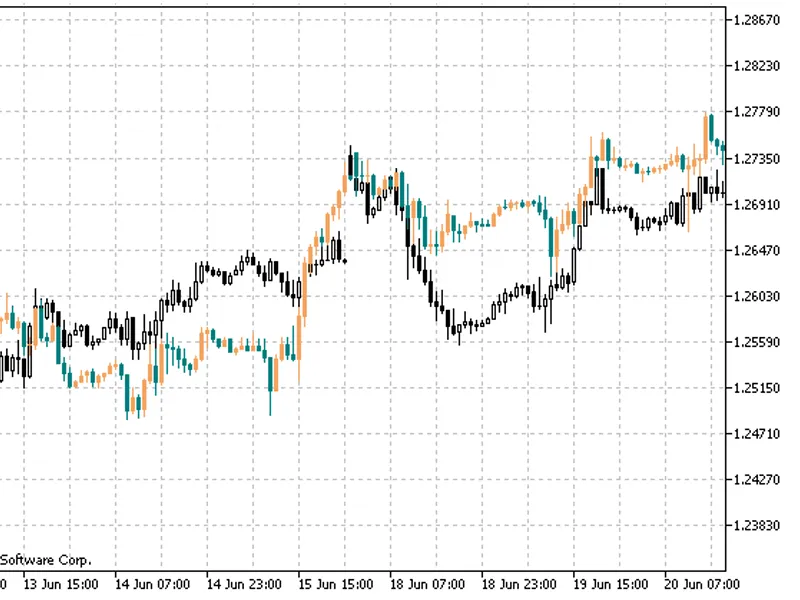
This indicator implements visualization of pair trading method (searching for divergences). Tandem Expert Advisor uses the same method ().
Fig. 1. Overlaying EURUSD chart on GBPUSD. Common H1 timeframe
Fig.1 shows the example of the indicator application. It can clearly be seen that pairs diverged for a certain distance and started converging again. At the next similar divergence, the upper pair should be sold, while the lower one should be bought. When pairs start converging, both deals should be closed. One deal will be closed with a loss, while another one will fix a profit exceeding the loss. The following parameters were used in the above example:
Fig.2. TandemInstrument indicator parameters used in the example
History of changes:
September 8, 2012
improved the indicator code considering possible holes in an indirect symbol;
added data on an indirect symbol's density (the ratio, by which the sizes of an indirect symbol's candles are multiplied before they are displayed on the main symbol's chart) to the chart window comment.