Download ALL MT4 experts (893)

Similar MetaTrader Tools
vr---se t k a---3
Info
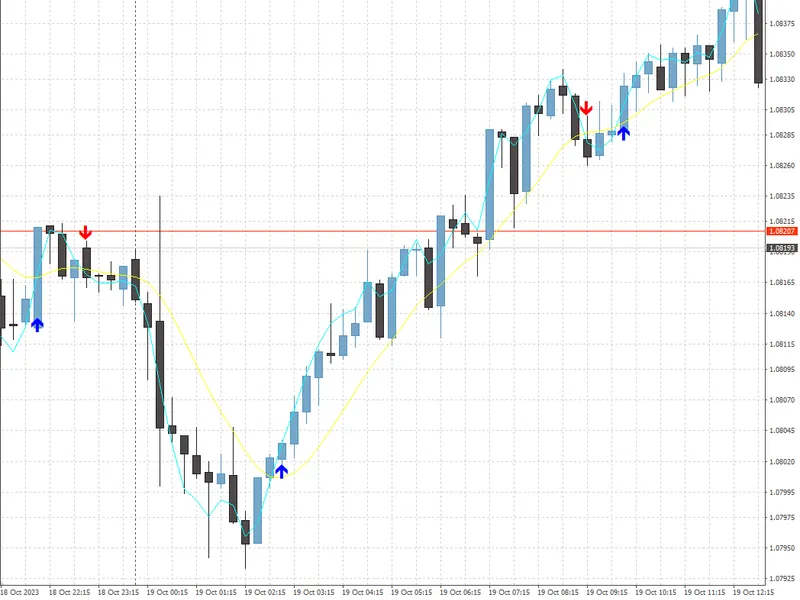
The vr---se t k a---3 is a Expert Advisor for MetaTrader 4 that hello dear traders,by popular demand, i present to you the advisor vr --- setka --- 3. This advisor is designed based on my extensive trading experience, recognizing the chaotic nature of the market and price movements.
Usage
This tool is typically used for automated trading on major forex pairs and gold.
Platform
This Expert Advisor works exclusively on MetaTrader 4 (both build 600+ and newer versions).
Setup
Place the downloaded file in MQL4/Experts folder via File ? Open Data Folder in MetaTrader 4.
How to Install and Use vr---se t k a---3
1. Installation: Open the "File" menu, select "Open Data Folder," navigate to MQL/Experts, paste your file, and restart the terminal.
2. Activation: Drag the EA from the Navigator onto a chart, ensure "Allow live trading" is checked in the Common tab, and verify the AutoTrading button is green.
3. Optimization: Right-click your chart, choose "Expert List," click "Properties" to adjust inputs, and save your preferred setup as a set file for future use.
4. Maintenance: Regularly check the "Experts" tab in the terminal window to monitor trade logs and potential execution errors.
Frequently Asked Questions
Q: Why is my EA not opening trades? A: Check the "AutoTrading" button, ensure "Allow live trading" is enabled, and verify your broker allows automated trading on your account type.
Q: Can I run multiple EAs on one chart? A: No, each chart can only host one active EA; however, you can open multiple charts for different currency pairs to run several EAs.
Q: What does the "smiley face" icon mean? A: A smiley face in the top-right corner of the chart indicates the EA is successfully running; a frowny face means it is disabled.
What this tool does
Hello dear traders,By popular demand, I present to you the advisor vr --- setka --- 3.
Typical Use Case
This Expert Advisor excels in automated trading and technical analysis on MetaTrader 4.
Compatible Platform & Setup
This Expert Advisor works on MetaTrader 4. Place the file in the MQL4/Experts folder and restart the terminal.
Description & Settings
Related: vr---se t k a=2=01032026 - another powerful expert for MetaTrader 4 traders.
Hello dear traders,By popular demand, I present to you the advisor vr --- setka --- 3.
This advisor is designed based on my extensive trading experience, recognizing the chaotic nature of the market and price movements. While the market may seem unpredictable, there is an underlying pattern of regular sequences and constants within the chaos. My goal was to capture these movements and capitalize on them.
Also recommended: bollinger bands based ea - similar expert with strong performance on MetaTrader 4.
The advisor is built upon three key components:
1. A good market entry strategy:
I meticulously analyzed numerous trading tactics to identify a strategy with a high success rate. The goal was to find a tactic with at least 8 successful entries for every 2 failures. This strategy ensures a favorable entry point into the market.
2. Holding the position for planned profit:
Once a position is opened, the advisor holds it until the desired profit is achieved. This approach ensures that we capitalize on positive trades.
3. Positive profit management and minimizing losses:
The advisor employs a unique strategy to turn losing trades into zero-loss trades, preventing disappointment from closing orders at zero. This is achieved by averaging or martingale methods.
Let's delve deeper into each component:
1. A good market entry:
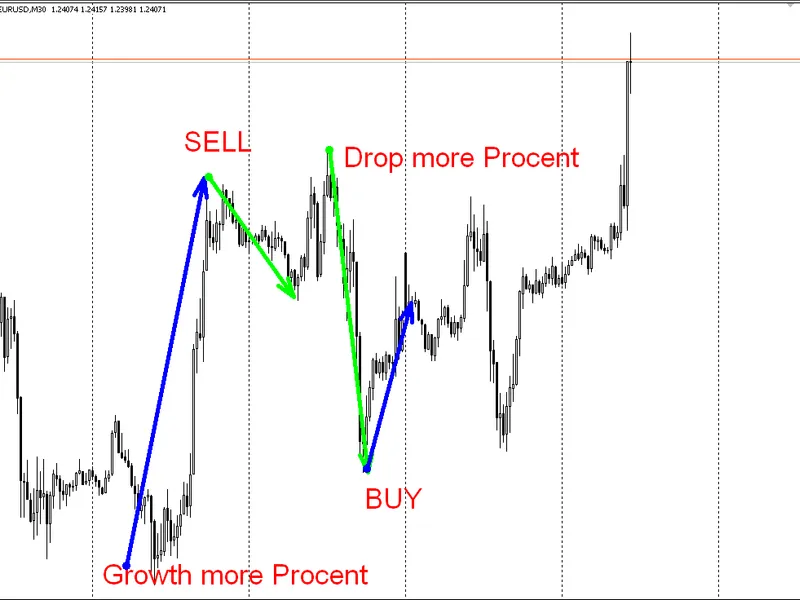
I have studied the statistics of trading tactics in overbought or oversold markets. We identify the minimum or maximum price of a currency for the day and set a threshold for buying or selling. For example, if the minimum price is 1.23000, and the current price is 1.25000, the advisor will sell when the price rises by 1.3% (calculated as ((current price * 100) / minimum day) - 100 >= 1.3%).
Buy signals are determined similarly, ensuring we capture pullbacks from strong price movements.
This strategy consistently outperforms other tactics with a success ratio of 8/2 or better.
2. Holding the position:
The advisor allows the position to run its course without intervention, aiming for a positive result on the first order. If the price moves in our favor, the advisor waits for the take profit execution. By using a dynamic lot size calculation, each new transaction has a slightly larger lot size, increasing potential profits.
3. Positive profit management and minimizing losses:
Unprofitable transactions are managed using averaging or martingale methods. Averaging involves adding a new position of the same type and size to the current position, aiming to bring the overall profit to zero. This requires a rollback of 50-52% of the price movement, depending on spread and commissions.
Martingale, on the other hand, is a riskier approach, requiring a smaller rollback of 20-22% but demanding more funds on deposit due to the potential for larger price movements.
The expert advisor includes an option to choose between these methods, allowing for flexibility in strategy.
In summary, this advisor is a powerful tool for navigating the chaotic market, offering a structured approach to capitalize on price movements. I plan to release an updated version, vr --- setka --- mql5, for MetaTrader 5 in the near future.
You may also like: places a retrace limit buy,limit sell order basic on parabolic sars value - excellent alternative for expert users on MetaTrader 4.
Source Code
#property copyright "robotfx"
#property link "https://robotfx.org"
extern string  comment_1 = "settings";
extern int     plus= 50;
extern int     takeprofit = 300;
extern int     distanciya = 300;
extern double  lots    = 0.00;
extern double  percent    = 1;
extern bool    martin     = true;
extern string  comment_2 = "signalma";
.......
⚠ Limitations & Risk Warning
- This tool is provided for educational and testing purposes only.
- Past performance does not guarantee future results.
- Trading involves substantial risk of loss. Use on a demo account first.
- Results may vary depending on market conditions, broker, and settings.
- We recommend thorough backtesting and forward testing before using with real funds.