AC C+BA L+MA R G-IN D I
This software component for MetaTrader 4 is built to enhance the capabilities of your trading environment. This technical indicator acts as a specialized analysis tool designed to visualize market data. It helps traders identify emerging trends, momentum shifts, and key support or resistance levels by plotting statistical calculations directly onto price charts.
How to Setup and Use AC C+BA L+MA R G-IN D I
1. Installation: Place your file in the MQL/Indicators folder via "Open Data Folder" and restart your terminal.
2. Loading: Find the indicator in the Navigator, drag it onto your chart, and configure the input parameters in the popup window.
3. Customization: Press Ctrl+I to open the indicator list, select your tool, and click "Properties" to change colors, levels, or visual styles.
4. Updating: Replace the old file in the Indicators folder with the new version and restart the platform to apply changes.
Frequently Asked Questions
Q: Why is my indicator not showing? A: Verify the file is in the MQL/Indicators folder, or try right-clicking the "Indicators" tree in the Navigator and clicking "Refresh."
Q: Do custom indicators slow down the platform? A: Too many complex indicators can impact performance; remove unused ones via the "Indicator List" (Ctrl+I).
Q: Can I use MT4 indicators on MT5? A: No, MQL4 and MQL5 are distinct languages; ensure the indicator is compiled specifically for your platform version.
Description & Settings
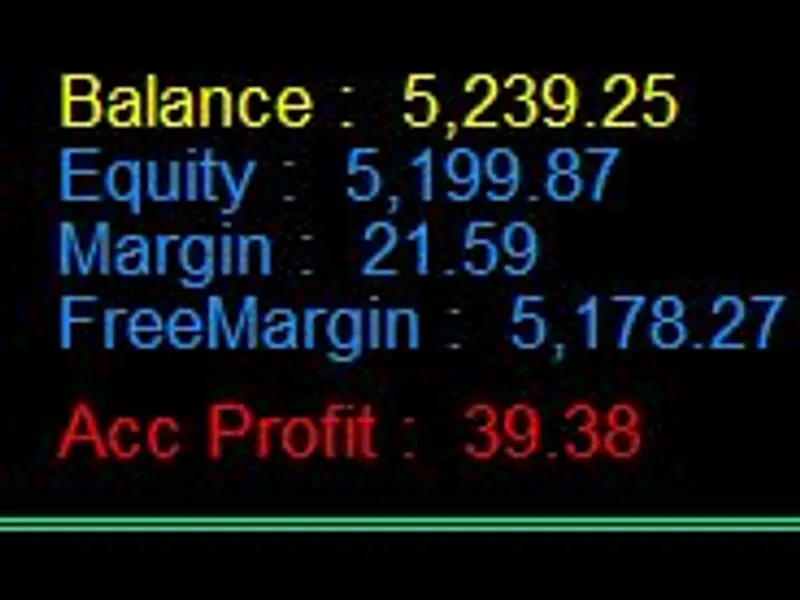
The indicator shows Account Balance, Equity, Margin, Free Margin and Account Profit.
Position anywhere on chart - Hide any item - Insert Currency Symbol.
Vertical Positioning
Inputs Window - Option Settings:
Acc_Currency_Symbol= Axx_Corner =2;
Acx_X_distance_Control_All_X= true;
Acc_Xdistance_Set_All_X= 1350;
Acc_Y_distance_Control_All_Y= false ;
Acc_Y_distance_Set_All_Y= 1 ;
Acc_Font_type= Verdana.
Notes:
All above text is offset from corner 2 (bottom-left) at position X = 1350. (Acc_X_Control_All_X = true so all text justified.)
For all text to be justified on the vertical the following settings must exist - (Acx_X_distance_Control_All_X = true) and (Acc_Y_distance_Control_All_Y = false). Text is justified in relation to the designated corner. ie as above corner 2 (bottom-left) will left margin justify text.
Corner 0 (left-top) will left margin justify text. Corner 1 (top-right) will right margin justify text and corner 3 (bottom-right) will right margin justify text.
Horizontal Positioning
Inputs Window - Option Settings:
Acc_Currency_Symbol= £
Axx_Corner =2
Acx_X_distance_Control_All_X= false
Acc_Xdistance_Set_All_X= 1350
Acc_Y_distance_Control_All_Y= true
Acc_Y_distance_Set_All_Y= 1
Acc_Font_type= Arial Bold
All above text is aligned along the horizontal, at vertical offset Y = 1.
For all text to be positioned at the same horizontal the following settings must exist - (Acc_Y_distance_Control_All_Y = true) and (Acx_X_distance_Control_All_X = false).
The British Pound symbol is inserted (insert deposited currency symbol - $, £, € etc - via the Inputs Window options).
Acc_Font_Type - is set to Bold i.e Arial Bold (note:case sensitive)
Available Options
-
see below +++ START OF DEFAULT OPTIONS ++++
PERMANENTLY CHANGE DEFAULT OPTIONS
(click link and scroll down)
Open ACC+BAL+MARG-INDI.mql4 in MetaEditor to modify Default Options
Locate for the below code at top of ACC+BAL+MARG-INDI.mql4 file.
/ ++++++++++++++++++++++++++++++++ START OF DEFAULT OPTIONS ++++++++++++++++++++++++++++++++++++++++++++++++++++++++
// Account: Balance - Equity - Margin - FreeMargin - Profit
extern string ACCOUNT_OPTIONS;
extern string Acc_Currency_Symbol = "£";
extern int Acc_Corner = 2;
extern string ______ = "";
extern bool Acc_X_distance_Control_All_X = true;
extern int Acc_X_distance_Set_All_X= 1350;
extern string _______= "";
extern int Acc_X_distance_Balance = 420;
extern int Acc_X_distance_Equity = 650;
extern int Acc_X_distance_Margin = 850;
extern int Acc_X_distance_Free_Margin = 1050;
extern int Acc_X_distance_Profit =1310;
extern string ________ = "";
extern string ACC_Y_DISTANCE_VIRTICAL;
extern bool Acc_Y_distance_Control_All_Y = false;
extern int Acc_Y_distance_Set_All_Y=1;
extern string _________ = "";
extern int Acc_Y_distance_Balance = 86;
extern int Acc_Y_distance_Equity = 69;
extern int Acc_Y_distance_Margin = 52;
extern int Acc_Y_distance_Free_Margin = 35;
extern int Acc_Y_distance_Profit =10;
extern string __________ = "";
extern color Acc_Color_Balance = Yellow;
extern color Acc_Color_Equity = DodgerBlue;
extern color Acc_Color_Margin = DodgerBlue;
extern color Acc_Color_Free_Margin = DodgerBlue;
extern color Acc_Color_Profit = LimeGreen;
extern color Acc_Color_Loss = Red;
extern color Acc_Color_PnL_Closed =LightSlateGray;
extern string ___________ = "";
extern int Acc_Font_Size=11;
extern string Acc_Font_Type="Arial";
extern string ____________ = "";
extern bool Acc_HIDE_ALL=false;
extern bool Acc_HIDE_Balance=false;
extern bool Acc_HIDE_Equity=false;
extern bool Acc_HIDE_Margin=false;
extern bool Acc_HIDE_Free_Margin=false;
extern bool Acc_HIDE_Profit=false;
// ++++++++++++++++++++++++++++++++ END OF DEFAULT OPTIONS ++++++++++++++++++++++++++++++++++++++++++++++++++++++++++