






Rolling VWAP Deviation Regime Filter
Info
The Rolling VWAP Deviation Regime Filter is a Indicator for MetaTrader 5 that the idea behind itmost vwap implementations reset at the start of each trading session, which makes them awkward to use on markets that trade around the clock, like forex pairs. This indicator instead computes a rolling VWAP over a fixed number of bars, continuously sliding the window forward bar by bar rather than resetting at midnight or at the open.
Usage
This tool is typically used for enhancing chart analysis and decision making.
Platform
This Indicator works exclusively on MetaTrader 5 (both build 600+ and newer versions).
Setup
Place the downloaded file in MQL5/Indicators folder via File ? Open Data Folder in MetaTrader 5.
How to Install and Use Rolling VWAP Deviation Regime Filter
1. Installation: Place your file in the MQL/Indicators folder via "Open Data Folder" and restart your terminal.
2. Loading: Find the indicator in the Navigator, drag it onto your chart, and configure the input parameters in the popup window.
3. Customization: Press Ctrl+I to open the indicator list, select your tool, and click "Properties" to change colors, levels, or visual styles.
4. Updating: Replace the old file in the Indicators folder with the new version and restart the platform to apply changes.
Frequently Asked Questions
Q: Why is my indicator not showing? A: Verify the file is in the MQL/Indicators folder, or try right-clicking the "Indicators" tree in the Navigator and clicking "Refresh."
Q: Do custom indicators slow down the platform? A: Too many complex indicators can impact performance; remove unused ones via the "Indicator List" (Ctrl+I).
Q: Can I use MT4 indicators on MT5? A: No, MQL4 and MQL5 are distinct languages; ensure the indicator is compiled specifically for your platform version.
What this tool does
The Idea Behind ItMost VWAP implementations reset at the start of each trading session, which makes them awkward to use on markets that trade around the clock, like forex pairs.
Typical Use Case
This Indicator excels in automated trading and technical analysis on MetaTrader 5.
Compatible Platform & Setup
This Indicator works on MetaTrader 5. Place the file in the MQL5/Indicators folder and restart the terminal.
Description & Settings
Related: Candle Pattern Statistics: Engulfing, Pin Bar, and Inside Bar with Rolling Hit Rate - another powerful indicator for MetaTrader 5 traders.
The Idea Behind ItAlso recommended: ORB Box + VWAP Stats: Opening Range, Targets, and Historical Break Analysis - similar indicator with strong performance on MetaTrader 5.
Most VWAP implementations reset at the start of each trading session, which makes them awkward to use on markets that trade around the clock, like forex pairs. This indicator instead computes a rolling VWAP over a fixed number of bars, continuously sliding the window forward bar by bar rather than resetting at midnight or at the open. The rolling VWAP gives a volume-weighted "fair value" anchor that adapts to the most recent trading activity rather than an arbitrary calendar boundary.
From there, the indicator takes the raw deviation between the current close and the rolling VWAP and normalizes it into a Z-Score using the rolling standard deviation of that same deviation series. A Z-Score lets the same threshold mean the same thing across instruments and volatility regimes — a 1.5 reading is "1.5 standard deviations away from fair value" whether you're on EURUSD or a thinly traded index CFD. The indicator then watches for the Z-Score to stay beyond a configurable threshold for several consecutive bars before declaring a trend regime; isolated spikes that snap back immediately are treated as noise and left in the ranging regime bucket. This two-stage filter (threshold + persistence) is what separates it from a plain Bollinger-style mean-reversion band.
How to Interpret It
Z-Score line (blue)
— the raw, continuously updating measure of how many standard deviations the close sits above or below the rolling VWAP. Values oscillate around zero; the further from zero, the more stretched price is relative to recent volume-weighted fair value.
Regime histogram
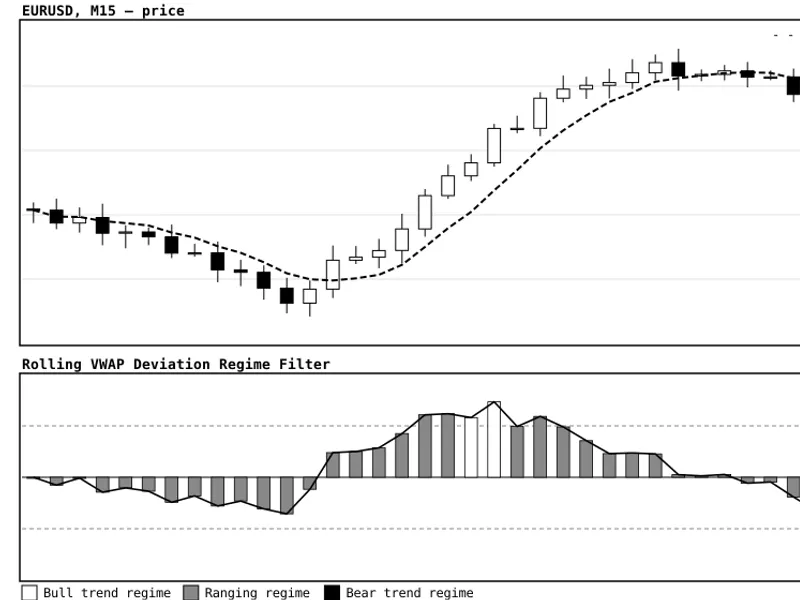
— mirrors the Z-Score value but is colored by the confirmed market state: green for a confirmed bull trend regime, silver/gray for a ranging/mean-reverting regime, and crimson for a confirmed bear trend regime. The color only flips once the consecutive-bar confirmation condition is met, which keeps it from flickering on every tick.
Threshold confirmation logic
— a regime is only confirmed once the Z-Score has closed beyond InpZThreshold for InpConsecutiveBars bars in a row. This dual condition (magnitude + persistence) is what filters out single-bar spikes that would otherwise generate false trend signals on a simple threshold-cross indicator.
Practical Usage
— in trend-following setups, treat a fresh flip to the green or crimson histogram as a signal that the market has broken out of its recent fair-value band with enough conviction to follow; in mean-reversion setups, the gray/ranging state combined with a Z-Score approaching ±1.5 without confirming a trend can flag a stretched-but-not-trending condition worth fading back toward the VWAP.
External Variables (Inputs)
Input
Default
Purpose
InpVWAPPeriod
50
Number of bars in the rolling, volume-weighted VWAP window.
InpStdDevPeriod
50
Lookback used to compute the rolling standard deviation that normalizes the deviation into a Z-Score.
InpZThreshold
1.5
Z-Score magnitude a bar must close beyond to count as a "breach" toward confirming a trend regime.
InpConsecutiveBars
3
Number of consecutive breaching bars (same direction) required before the regime flips to trending.
InpAppliedPrice
Typical (H+L+C)/3
Price source used inside the VWAP calculation — Typical, Close, Median, or Weighted.
InpUseRealVolume
false
When true, uses real exchange volume in the VWAP weighting instead of tick volume (useful on instruments where real volume is reliably reported, such as futures).
Recommended Use
Attach the indicator to its own subwindow below the price chart and keep the rolling VWAP visible as context (the figure below shows a suggested layout, with the VWAP drawn as a dashed overlay on the price panel for reference). On lower timeframes such as M15, the defaults of a 50-bar VWAP and 50-bar standard-deviation window roughly track an intraday fair-value band; widen both periods on higher timeframes or less liquid instruments to avoid over-triggering the consecutive-bar confirmation. Combine a fresh trend-regime flip with simple price-action confirmation (a break of the prior swing high/low, or a close beyond a key level) before treating it as an entry trigger, and use the ranging/gray state as a filter to sit out or switch to a mean-reversion approach rather than trend-following.
Fig. 1. Top panel: price candles with the rolling VWAP plotted as a dashed line. Bottom panel: the Z-Score oscillator (solid line) with the ±1.5 confirmation thresholds (dashed gray), and the regime histogram shaded white for a confirmed bull trend, gray for ranging, and black for a confirmed bear trend.
You may also like: Prior Bar Break Odds with Level Bars and Rolling Hit Rate - excellent alternative for indicator users on MetaTrader 5.
Source Code
#property copyright "RobotFX"
#property link "https://robotfx.org"
#property version   "1.00"
#property description "This code is educational. Feel free to use, modify and upgrade as you wish. Visit ROBOTFX.ORG for professional trading tools"
#property indicator_separate_window
#property indicator_buffers 4
#property indicator_plots   2
#property indicator_level1  0.0
#property indicator_label1  "VWAP Deviation Z-Score"
#property indicator_type1   DRAW_LINE
.......
⚠ Limitations & Risk Warning
- This tool is provided for educational and testing purposes only.
- Past performance does not guarantee future results.
- Trading involves substantial risk of loss. Use on a demo account first.
- Results may vary depending on market conditions, broker, and settings.
- We recommend thorough backtesting and forward testing before using with real funds.