

ORB Box + VWAP Stats: Opening Range, Targets, and Historical Break Analysis
Info
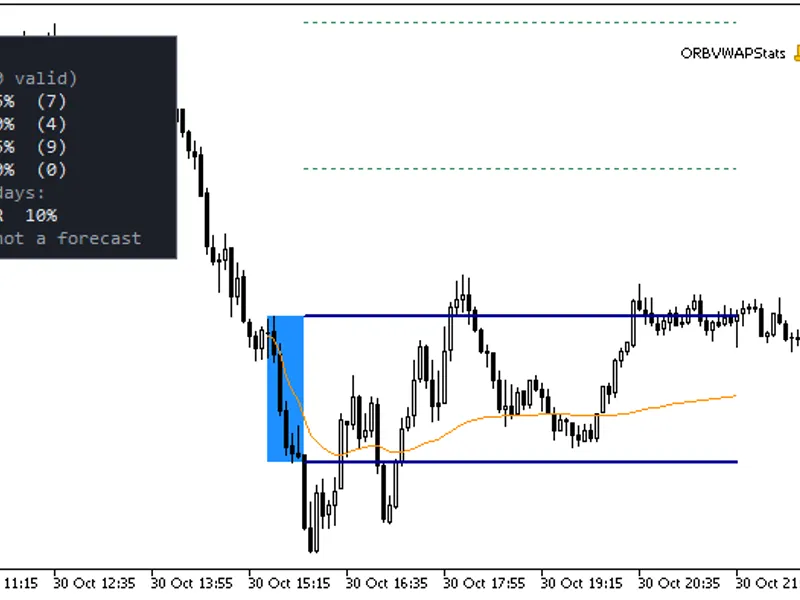
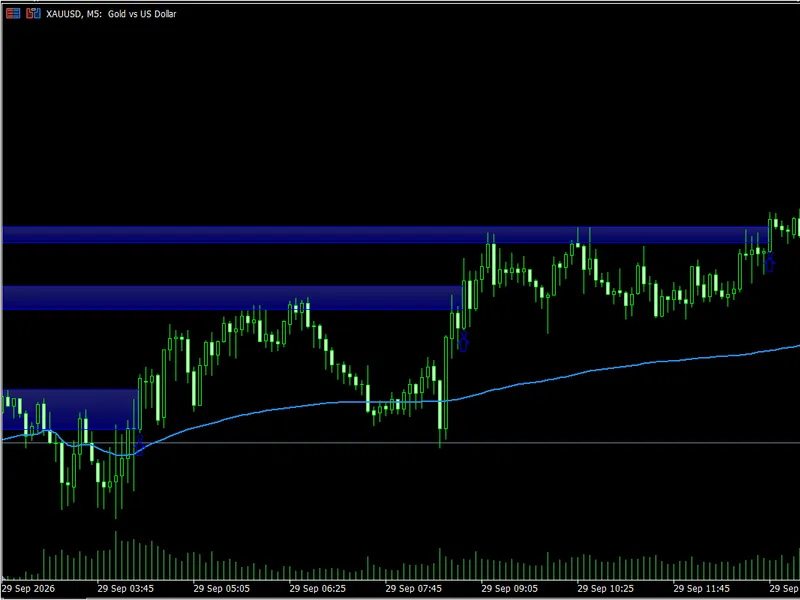
The ORB Box + VWAP Stats: Opening Range, Targets, and Historical Break Analysis is a Indicator for MetaTrader 5 that what it doesfor each trading session, this indicator identifies the high and low of the opening range (default 13:30 gmt, for 30 minutes, typically the first half-hour of the us cash session) and displays a box representing this range. Once the opening range concludes, the high and low levels are extended until the end of the session (default 20:00 GMT), along with calculated price targets.
Usage
This tool is typically used for enhancing chart analysis and decision making.
Platform
This Indicator works exclusively on MetaTrader 5 (both build 600+ and newer versions).
Setup
Place the downloaded file in MQL5/Indicators folder via File ? Open Data Folder in MetaTrader 5.
How to Install and Use ORB Box + VWAP Stats: Opening Range, Targets, and Historical Break Analysis
1. Installation: Place your file in the MQL/Indicators folder via "Open Data Folder" and restart your terminal.
2. Loading: Find the indicator in the Navigator, drag it onto your chart, and configure the input parameters in the popup window.
3. Customization: Press Ctrl+I to open the indicator list, select your tool, and click "Properties" to change colors, levels, or visual styles.
4. Updating: Replace the old file in the Indicators folder with the new version and restart the platform to apply changes.
Frequently Asked Questions
Q: Why is my indicator not showing? A: Verify the file is in the MQL/Indicators folder, or try right-clicking the "Indicators" tree in the Navigator and clicking "Refresh."
Q: Do custom indicators slow down the platform? A: Too many complex indicators can impact performance; remove unused ones via the "Indicator List" (Ctrl+I).
Q: Can I use MT4 indicators on MT5? A: No, MQL4 and MQL5 are distinct languages; ensure the indicator is compiled specifically for your platform version.
What this tool does
What it doesFor each trading session, this indicator identifies the high and low of the opening range (default 13:30 GMT, for 30 minutes, typically the first half-hour of the US cash session) and displays a box representing this range.
Typical Use Case
This Indicator excels in automated trading and technical analysis on MetaTrader 5.
Compatible Platform & Setup
This Indicator works on MetaTrader 5. Place the file in the MQL5/Indicators folder and restart the terminal.
Description & Settings
Related: Rolling VWAP Deviation Regime Filter - another powerful indicator for MetaTrader 5 traders.
What it doesFor each trading session, this indicator identifies the high and low of the opening range (default 13:30 GMT, for 30 minutes, typically the first half-hour of the US cash session) and displays a box representing this range. Once the opening range concludes, the high and low levels are extended until the end of the session (default 20:00 GMT), along with calculated price targets.
Also recommended: Momentum VWAP Barrier Breakout Indicator - similar indicator with strong performance on MetaTrader 5.
The targets are derived using the opening range box height as a reference unit 'R'. Specifically, for a long position, the 1R target is the range high plus R, and the 2R target is the range high plus 2R. For a short position, the 1R target is the range low minus R, and the 2R target is the range low minus 2R. (A trade initiated at the box edge with the opposite edge as a stop-loss would risk exactly 1R).
Session VWAP is calculated as the cumulative typical price ((High + Low + Close) / 3) weighted by volume, and it resets at the start of each session. By default, it uses tick volume. With the 'real volume' option enabled, it utilizes actual trading volume if available for the symbol; otherwise, it reverts to tick volume (the 'Experts' tab will indicate which volume type is being used).
Session hours are set in GMT and adjusted by a Server time offset (GMT + N hours). To input the server time directly, set the offset to 0. The indicator supports sessions that span across midnight.
The length of the opening range must be a multiple of the chart's timeframe. For instance, a 30-minute range is compatible with M1, M5, M10, M15, or M30 timeframes, and a 15-minute range works with M5 or M15 timeframes.
Statistics Panel (Historical Data)
Over the last N completed sessions (default is 20) that have a full opening range, the panel displays the percentage of sessions where a bar CLOSED:
- Exclusively above the opening range high.
- Exclusively below the opening range low.
- On both sides (i.e., extending beyond both the high and the low at different times within the session).
- On neither side (i.e., price remained within the range for the entire session after the initial break).
Additionally, for sessions that experienced a break, it shows the percentage of those sessions where the price subsequently reached the 1R and 2R targets in the direction of the initial break. This calculation considers bars after the break bar until the session end.
It is crucial to interpret these statistics accurately. They represent historical occurrences within the sampled data and do not predict future movements. They do not account for trading costs or slippage. Furthermore, 'reached 1R' does not verify if the opposite side of the opening range was breached first, so it does not represent a win rate. The currently active session is not included in these statistics.
No Repainting
The opening range, target levels, and break status are calculated solely based on closed bars. The range levels are displayed only after the bars within the opening range are complete and remain fixed thereafter. The Session VWAP buffer for the currently forming bar reflects the value of the last closed bar; each closed bar retains its final calculated value.
Break alerts are triggered only on closed bars. An alert is issued once per direction per session. Historical alerts are not generated when the indicator is initially attached or reloaded.
Buffers for Expert Advisors (iCustom Integration)
Buffer
Content
0
Opening range high
1
Opening range low
2
Long 1R target (range high + 1R)
3
Long 2R target (range high + 2R)
4
Short 1R target (range low - 1R)
5
Short 2R target (range low - 2R)
6
Session VWAP
7
Break state: +1 indicates the first close outside the box was above, -1 indicates below, 0 indicates no break yet.
Buffers 0 through 5 and buffer 7 are set to EMPTY_VALUE until the opening range is completed (from the first bar opening at or after the range end) and again after the session concludes. Buffer 6 begins with the first closed bar of the session and continues until the session ends. Reading shift 1 provides the value applicable to the last closed bar. Buffers 0 through 6 are plotted as lines; buffer 7 is not visually rendered (refer to the Data Window for its values).
Example of Expert Advisor usage, retrieving the range high and VWAP for the last closed bar:
int h = iCustom(_Symbol, PERIOD_M5, "ORBVWAPStats");
double hi[1], vw[1];
if(CopyBuffer(h, 0, 1, 1, hi) == 1 && hi[0] != EMPTY_VALUE &&
CopyBuffer(h, 6, 1, 1, vw) == 1 && vw[0] != EMPTY_VALUE)
Print("OR high: ", hi[0], " VWAP: ", vw[0]);
Specifying only the indicator name uses its default input parameters.
Inputs
Session Settings: GMT offset (default 2), opening range start time (default 13:30), range duration (30 minutes), session end time (20:00).
VWAP Settings: Option to display VWAP, volume type selection (tick / real if available).
Statistics Settings: Number of historical sessions to analyze (default 20), option to show the statistics panel, panel corner positioning, and offsets, optional printing of statistics to the Experts log.
Display Settings: Number of past sessions to draw (default 10), fill option, color selection, and line width.
Alert Settings: Options for popup alerts, push notifications, sound alerts, and custom file names for alerts.
Notes
Timeframes above M30 are not supported and will result in a message in the Experts tab. Bars are assigned to the opening range or the session based on their open time.
The server offset is determined by the user. Brokers and exchanges may adjust their offsets due to daylight saving time (e.g., the US cash session open can shift between 13:30 and 14:30 GMT). Users must update the input parameter accordingly, as past data is not automatically adjusted.
Trading days follow the broker's server time and the hours specified in the inputs. Weekends and holidays without trading activity are automatically skipped.
Tick volume is an approximation and differs from exchange-traded volume; consequently, the VWAP calculated using tick volume is also an approximation.
This indicator is not financial advice. It serves solely to mark price levels and tally historical events.
Testing Verification
The indicator was tested in the Strategy Tester using EURUSD on an M5 timeframe from September to October 2026, utilizing broker data. An independent calculation based on raw rates confirmed the accuracy of the opening range levels, targets, VWAP, and break states across approximately 200,000 data points. Live buffer value readings on each closed bar matched the final calculated values, confirming no repainting. The statistics panel displayed the expected counts, and break alerts corresponded accurately with the raw data analysis. This testing was conducted in 2026.
You may also like: Simple Anchored VWAP - Institutional Volume Benchmark - excellent alternative for indicator users on MetaTrader 5.
Source Code
#property copyright "RobotFX"
#property version   "1.00"
#property description "This code is educational. Feel free to use, modify and upgrade as you wish. Visit ROBOTFX.ORG for professional trading tools"
#property indicator_chart_window
#property indicator_buffers 15
#property indicator_plots   8
#property indicator_label1  "OR High"
#property indicator_label2  "OR Low"
#property indicator_label3  "Long 1R"
#property indicator_label4  "Long 2R"
.......
⚠ Limitations & Risk Warning
- This tool is provided for educational and testing purposes only.
- Past performance does not guarantee future results.
- Trading involves substantial risk of loss. Use on a demo account first.
- Results may vary depending on market conditions, broker, and settings.
- We recommend thorough backtesting and forward testing before using with real funds.