




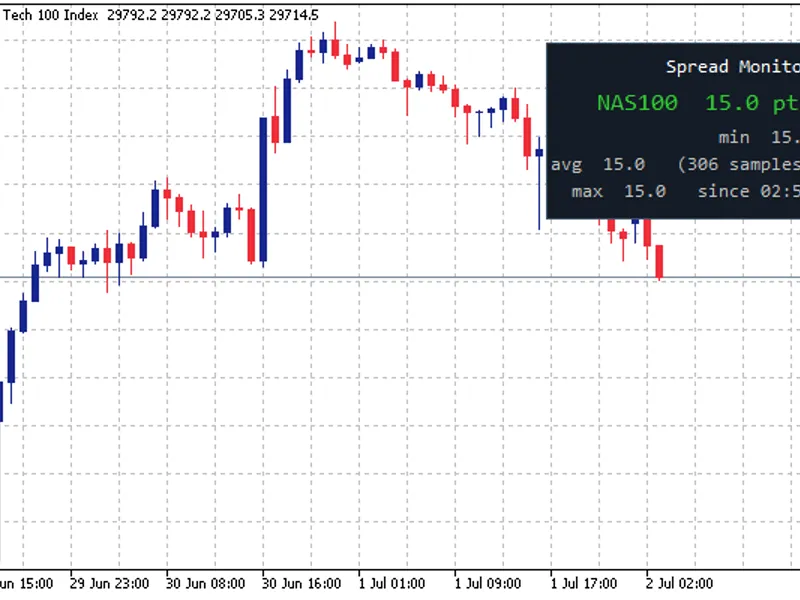
news spread risk dashboard (spike and gap monitor)
Info
The news spread risk dashboard (spike and gap monitor) is a Indicator for MetaTrader 5 that full description (marketing + explanation) overview news spread risk dashboardis a lightweight chart-overlay indicatordesigned to help traders immediately recognize dangerous market conditionswhere spread expansion can destroy entries, exits, and risk control—especially during high-impact news, rollover, session transitions, and illiquid periods(weekend open, holidays, thin books). instead of guessing whether the market is “safe to trade,” the indicator continuously measures the real ask–bid differenceand visualizes spread risk as a clean, compact panel on the chart.
Usage
This tool is typically used for enhancing chart analysis and decision making.
Platform
This Indicator works exclusively on MetaTrader 5 (both build 600+ and newer versions).
Setup
Place the downloaded file in MQL5/Indicators folder via File ? Open Data Folder in MetaTrader 5.
How to Install and Use news spread risk dashboard (spike and gap monitor)
1. Installation: Place your file in the MQL/Indicators folder via "Open Data Folder" and restart your terminal.
2. Loading: Find the indicator in the Navigator, drag it onto your chart, and configure the input parameters in the popup window.
3. Customization: Press Ctrl+I to open the indicator list, select your tool, and click "Properties" to change colors, levels, or visual styles.
4. Updating: Replace the old file in the Indicators folder with the new version and restart the platform to apply changes.
Frequently Asked Questions
Q: Why is my indicator not showing? A: Verify the file is in the MQL/Indicators folder, or try right-clicking the "Indicators" tree in the Navigator and clicking "Refresh."
Q: Do custom indicators slow down the platform? A: Too many complex indicators can impact performance; remove unused ones via the "Indicator List" (Ctrl+I).
Q: Can I use MT4 indicators on MT5? A: No, MQL4 and MQL5 are distinct languages; ensure the indicator is compiled specifically for your platform version.
What this tool does
full description (marketing + explanation) overview news spread risk dashboardis a lightweight chart-overlay indicatordesigned to help traders immediately recognize dangerous market conditionswhere spread expansion can destroy entries, exits, and risk control—especially during high-impact news, rollover, session transitions, and illiquid periods(weekend open, holidays, thin books).
Typical Use Case
This Indicator excels in automated trading and technical analysis on MetaTrader 5.
Compatible Platform & Setup
This Indicator works on MetaTrader 5. Place the file in the MQL5/Indicators folder and restart the terminal.
Description & Settings
Related: Spread Monitor: Analyze Market Spread in Real-Time - another powerful indicator for MetaTrader 5 traders.
full description (marketing + explanation) overviewAlso recommended: Clock (Spread) Indicator for MT5 - similar indicator with strong performance on MetaTrader 5.
news spread risk dashboardis a lightweight
chart-overlay indicator
designed to help traders immediately recognize
dangerous market conditions
where spread expansion can destroy entries, exits, and risk control—especially during
high-impact news
,
rollover
,
session transitions
, and
illiquid periods
(weekend open, holidays, thin books).
instead of guessing whether the market is “safe to trade,” the indicator continuously measures the
real ask–bid difference
and visualizes spread risk as a clean, compact panel on the chart.
what you get on the chart
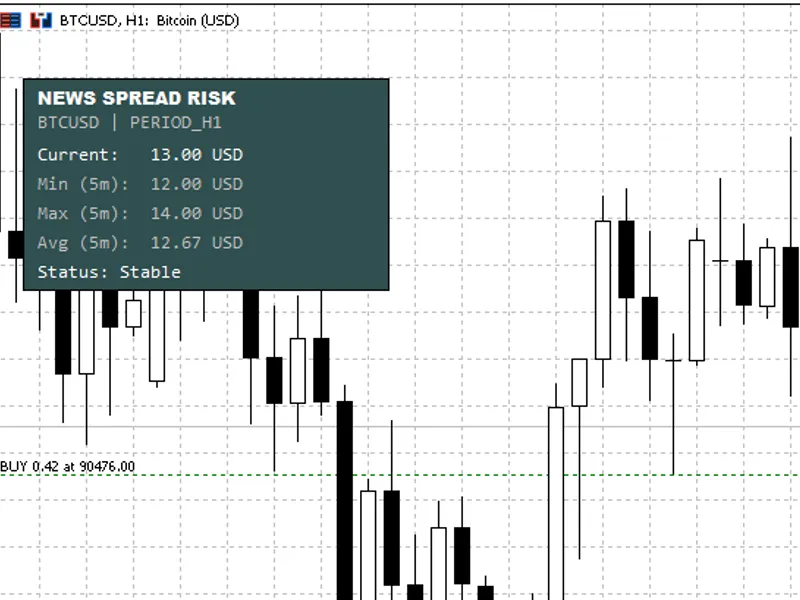
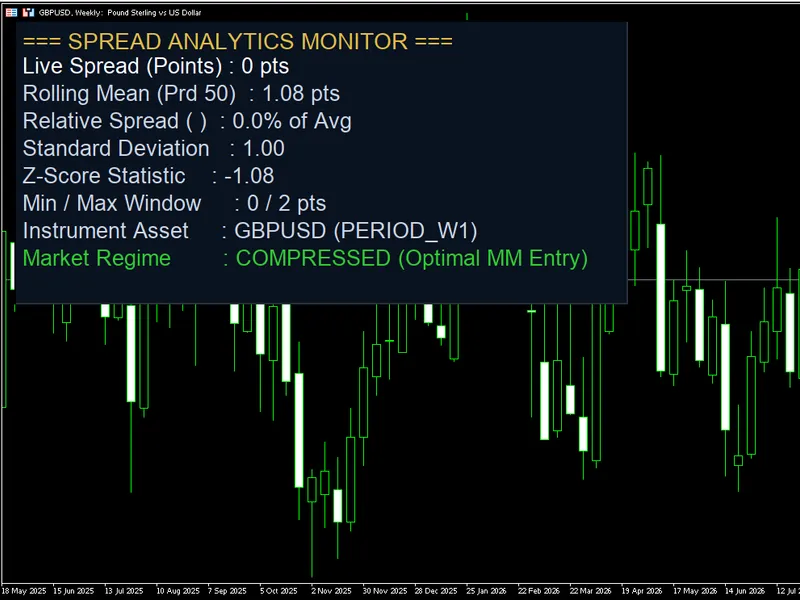
the dashboard shows a rolling snapshot of spread conditions:
current spread
(live)
min (window)
spread
max (window)
spread
avg (window)
spread
status
line: stable or risk with the reason
the background automatically switches color when a warning condition is detected—so the signal is visible at a glance.
why this matters (practical use cases)
spread spikes often occur exactly when traders are most vulnerable:
news releases:
spreads widen before and after the event
liquidity gaps:
session open/close, rollover, holidays
fast markets:
sudden volatility can cause spread “bursts”
scalping & tight stops:
even small spikes can invalidate trade logic
this dashboard is a
risk filter
: it helps you decide when to wait, reduce size, widen stops, or skip entries.
warning logic (two modes)
you can choose how the warning triggers:
1) relative spike detection (recommended)
the indicator warns when the live spread becomes a multiple of its own recent behavior:
warning if
current ≥ avg × risk multiplier
example: multiplier
1.5
means “warn when spread is 1.5× the recent average”
this is robust across different symbols because it adapts to normal spread conditions.
2) absolute threshold (fixed limit)
the indicator warns when the live spread reaches a fixed limit:
warning if
current ≥ threshold
supports
symbol-specific thresholds
(per instrument)
example format: eurusd:3.0,gbpusd:3.5,usdjpy:2.5,usdcad:3.2,xauusd:30.0,us30:8.0
this is ideal if you already know exactly what spread level makes a setup invalid for each market.
display units (forex, crypto, metals, indices)
to keep readings meaningful, the indicator supports multiple display modes:
smart auto
forex:
pips
non-forex:
price difference
(ask–bid)
price difference
(always)
spread percentage
(universal risk metric)
classic pips
(forced)
raw points
(forced) alerts (optional)
when a risk condition is detected, you can enable alerts with a cooldown to prevent spam:
popup alert
sound alert
push notification performance & stability
uses a
millisecond timer
for smooth updates (useful for crypto and fast feeds)
stores samples in a rolling window (default
300 seconds
)
includes a
minimum sample interval
and a safety cap to prevent “array explosion”
debug logging can be enabled for diagnostics (not recommended for live) recommended settings
start with:
display mode:
smart auto
warning mode:
relative
risk multiplier:
1.5 to 2.0
window:
300 seconds
if you trade specific symbols consistently, enable
symbol-specific thresholds
and tune values per instrument. notes / limitations
this indicator measures
spread behavior
, not slippage or execution quality directly.
spread values depend on your broker’s feed and symbol contract specification.
for very illiquid symbols, consider increasing the minimum sample interval or reducing update speed.
You may also like: Spread Monitor Panel: Live Spread and Spike Alerts - excellent alternative for indicator users on MetaTrader 5.
Source Code
#property copyright "robotfx"
#property link "https://robotfx.org"
#property version   "2.20"
#property indicator_chart_window
#property indicator_plots 0
#include <arrays\arrayobj.mqh>
enum enum_display_mode
{
mode_smart_auto,
mode_price_difference,
.......
⚠ Limitations & Risk Warning
- This tool is provided for educational and testing purposes only.
- Past performance does not guarantee future results.
- Trading involves substantial risk of loss. Use on a demo account first.
- Results may vary depending on market conditions, broker, and settings.
- We recommend thorough backtesting and forward testing before using with real funds.