
Real Cost Spread P95 Logger MT5
Info
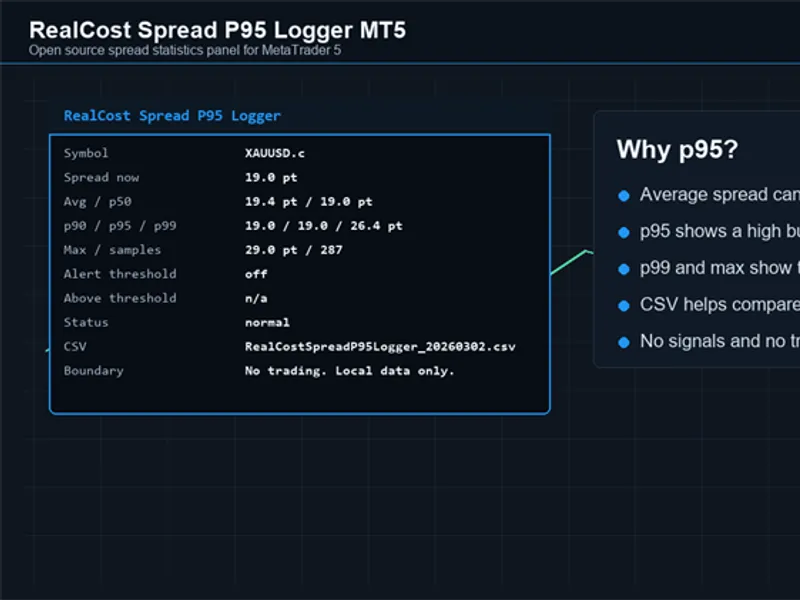
The Real Cost Spread P95 Logger MT5 is a Expert Advisor for MetaTrader 5 that realcost spread p95 logger mt5 is an open source utility for measuring spread behavior on the current metatrader 5 chart symbol. What it doesThe Expert Advisor samples the current spread and displays a compact chart panel with current spread, average spread, p50, p90, p95, p99, maximum spread, sample count, optional alert status, the percentage of samples above the configured threshold and the optional local CSV file name.
Usage
This tool is typically used for automated trading on major forex pairs and gold.
Platform
This Expert Advisor works exclusively on MetaTrader 5 (both build 600+ and newer versions).
Setup
Place the downloaded file in MQL5/Experts folder via File ? Open Data Folder in MetaTrader 5.
How to Install and Use Real Cost Spread P95 Logger MT5
1. Installation: Open the "File" menu, select "Open Data Folder," navigate to MQL/Experts, paste your file, and restart the terminal.
2. Activation: Drag the EA from the Navigator onto a chart, ensure "Allow live trading" is checked in the Common tab, and verify the AutoTrading button is green.
3. Optimization: Right-click your chart, choose "Expert List," click "Properties" to adjust inputs, and save your preferred setup as a set file for future use.
4. Maintenance: Regularly check the "Experts" tab in the terminal window to monitor trade logs and potential execution errors.
Frequently Asked Questions
Q: Why is my EA not opening trades? A: Check the "AutoTrading" button, ensure "Allow live trading" is enabled, and verify your broker allows automated trading on your account type.
Q: Can I run multiple EAs on one chart? A: No, each chart can only host one active EA; however, you can open multiple charts for different currency pairs to run several EAs.
Q: What does the "smiley face" icon mean? A: A smiley face in the top-right corner of the chart indicates the EA is successfully running; a frowny face means it is disabled.
What this tool does
RealCost Spread P95 Logger MT5 is an open source utility for measuring spread behavior on the current MetaTrader 5 chart symbol.
Typical Use Case
This Expert Advisor excels in automated trading and technical analysis on MetaTrader 5.
Compatible Platform & Setup
This Expert Advisor works on MetaTrader 5. Place the file in the MQL5/Experts folder and restart the terminal.
Description & Settings
Related: Data Snooping: Robustness Testing with SPA, Reality Check, StepM, and Model Confidence Set - another powerful expert for MetaTrader 5 traders.
RealCost Spread P95 Logger MT5 is an open source utility for measuring spread behavior on the current MetaTrader 5 chart symbol.Also recommended: Telegram Trade Notifier: Real-time Alerts and Daily Summaries - similar expert with strong performance on MetaTrader 5.
What it does
The Expert Advisor samples the current spread and displays a compact chart panel with current spread, average spread, p50, p90, p95, p99, maximum spread, sample count, optional alert status, the percentage of samples above the configured threshold and the optional local CSV file name.
This tool is intended for spread observation and session comparison. It does not open trades, modify orders, close positions, send data to external services or provide buy or sell signals.
Why p95 spread is useful
Average spread can hide short spikes. A symbol may look normal most of the time, but a few spread spikes around rollover, news, session changes or thin liquidity can still affect short-term systems.
p95 spread answers a practical question: what spread level covers most of the observed samples while ignoring the single worst outlier? p99 and maximum spread give extra context when you want to inspect tail behavior.
Typical use cases
- Compare spread behavior between symbols.
- Watch rollover, news windows or session changes.
- Collect local CSV data before running a manual plan, EA, scalper, grid system or copy-trading setup.
- Check whether the current trading environment matches the assumptions of a strategy.
Inputs
- InpSampleSeconds - spread sample interval in seconds.
- InpMaxSamples - maximum number of samples kept in memory.
- InpAlertSpreadPoints - alert if spread is at or above this value. Set it to 0 to disable alerts.
- InpAlertCooldownSeconds - minimum seconds between repeated alerts.
- InpPopupAlerts - enable popup alerts.
- InpPushNotifications - enable mobile push notifications.
- InpWriteCsv - write a local CSV file.
- InpUseCommonFilesFolder - write the CSV file to the common terminal files folder.
- InpFilePrefix - CSV file prefix.
- InpCsvWriteSeconds - CSV write interval.
- InpShowPanel - show the chart panel.
- InpPanelCorner, InpPanelX and InpPanelY - panel placement.
- Panel color inputs - panel background, text, accent and warning colors.
CSV columns
time, symbol, bid, ask, spread_points, sample_count, avg_spread_points, p50_spread_points, p90_spread_points, p95_spread_points, p99_spread_points, max_spread_points, alert_threshold_points, above_threshold_percent
How to use
1. Compile the MQ5 file in MetaEditor.
2. Attach the Expert Advisor to the chart symbol you want to measure.
3. Leave it running during the session you care about.
4. Check the panel values on the chart.
5. Use the exported CSV file if you want to compare multiple sessions later.
Notes
- The utility uses local terminal files only.
- It does not require DLLs or WebRequest.
- It is a monitoring and educational example, not a trading system.
You may also like: Session Reality Auditor: Verifying Broker Session Data Against Historical Price Activity - excellent alternative for expert users on MetaTrader 5.
Source Code
#property copyright "RobotFX"
#property link "https://robotfx.org"
#property version   "1.00"
#property strict
#property description "This code is educational. Feel free to use, modify and upgrade as you wish. Visit ROBOTFX.ORG for professional trading tools"
enum ENUM_RCP95_CORNER
  {
   RCP95_TOP_LEFT=CORNER_LEFT_UPPER,
   RCP95_TOP_RIGHT=CORNER_RIGHT_UPPER,
   RCP95_BOTTOM_LEFT=CORNER_LEFT_LOWER,
.......
⚠ Limitations & Risk Warning
- This tool is provided for educational and testing purposes only.
- Past performance does not guarantee future results.
- Trading involves substantial risk of loss. Use on a demo account first.
- Results may vary depending on market conditions, broker, and settings.
- We recommend thorough backtesting and forward testing before using with real funds.