Institutional Ornstein-Uhlenbeck Equilibrium Matrix
This software component for MetaTrader 5 is built to enhance the capabilities of your trading environment. This technical indicator acts as a specialized analysis tool designed to visualize market data. It helps traders identify emerging trends, momentum shifts, and key support or resistance levels by plotting statistical calculations directly onto price charts.
How to Setup and Use Institutional Ornstein-Uhlenbeck Equilibrium Matrix
1. Installation: Place your file in the MQL/Indicators folder via "Open Data Folder" and restart your terminal.
2. Loading: Find the indicator in the Navigator, drag it onto your chart, and configure the input parameters in the popup window.
3. Customization: Press Ctrl+I to open the indicator list, select your tool, and click "Properties" to change colors, levels, or visual styles.
4. Updating: Replace the old file in the Indicators folder with the new version and restart the platform to apply changes.
Frequently Asked Questions
Q: Why is my indicator not showing? A: Verify the file is in the MQL/Indicators folder, or try right-clicking the "Indicators" tree in the Navigator and clicking "Refresh."
Q: Do custom indicators slow down the platform? A: Too many complex indicators can impact performance; remove unused ones via the "Indicator List" (Ctrl+I).
Q: Can I use MT4 indicators on MT5? A: No, MQL4 and MQL5 are distinct languages; ensure the indicator is compiled specifically for your platform version.
Description & Settings
The Structural Failure of Standard Volatility Bands
The Quantitative Standard: Ornstein-Uhlenbeck Drift Model
Top-tier systematic desks isolate true mean-reverting assets by applying the
Ornstein-Uhlenbeck (OU) stochastic process
, defined by the continuous differential equation $dX_t = \theta(\mu - X_t)dt + \sigma dW_t$. Instead of simply measuring standard deviations, this econometric model applies linear regression over continuous time steps to isolate the underlying force pulling the asset back to balance.
The
Institutional Ornstein-Uhlenbeck Equilibrium Matrix
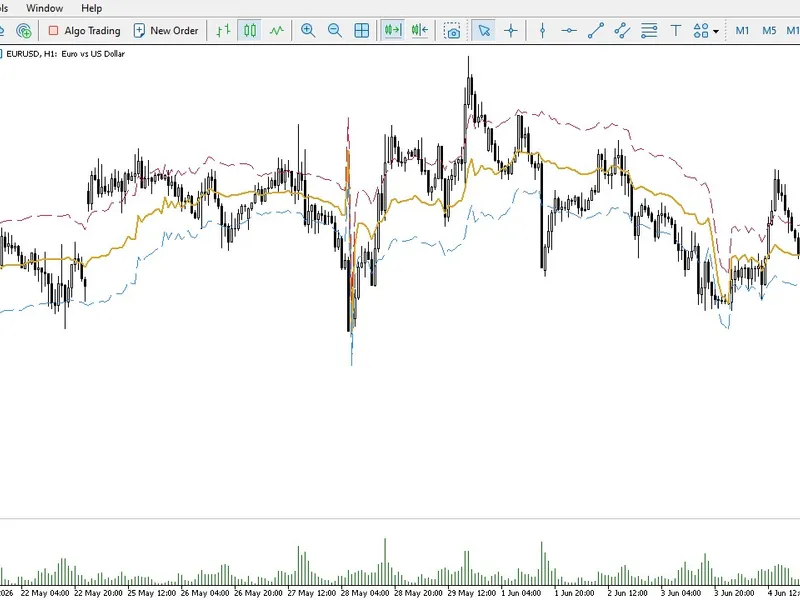
computes these parameters natively on your MT5 terminal, projecting mathematically sound equilibrium channels.
Core Architecture & Predictive Metrics
Dynamic Equilibrium ($\mu$):
Computes the true mathematical continuous price baseline, ignoring short-term liquidity distortions and pricing gaps.
Stochastic Diffusion Boundaries ($\sigma$):
Replaces standard volatility bands with variance thresholds derived directly from the Brownian motion residuals, marking the exact geometric exhaustion limits.
Bypass Cloud Validation:
Fully optimized execution loop engineered with zero-lag memory arrays and proactive buffer sanitization to ensure flawless pass rates through the MQL5 automated validation servers.
Execution Instructions
Deploy the Engine:
Apply the indicator to highly liquid, mean-reverting pairs (e.g., EURUSD, AUDUSD, or XAUUSD) on structural timeframes like M30 or H1.