Institutional IC T Killzones and Asian Range
This professional-grade solution for MetaTrader 4 helps traders achieve greater efficiency in their daily workflow. This technical indicator acts as a specialized analysis tool designed to visualize market data. It helps traders identify emerging trends, momentum shifts, and key support or resistance levels by plotting statistical calculations directly onto price charts.
How to Setup and Use Institutional IC T Killzones and Asian Range
1. Installation: Place your file in the MQL/Indicators folder via "Open Data Folder" and restart your terminal.
2. Loading: Find the indicator in the Navigator, drag it onto your chart, and configure the input parameters in the popup window.
3. Customization: Press Ctrl+I to open the indicator list, select your tool, and click "Properties" to change colors, levels, or visual styles.
4. Updating: Replace the old file in the Indicators folder with the new version and restart the platform to apply changes.
Frequently Asked Questions
Q: Why is my indicator not showing? A: Verify the file is in the MQL/Indicators folder, or try right-clicking the "Indicators" tree in the Navigator and clicking "Refresh."
Q: Do custom indicators slow down the platform? A: Too many complex indicators can impact performance; remove unused ones via the "Indicator List" (Ctrl+I).
Q: Can I use MT4 indicators on MT5? A: No, MQL4 and MQL5 are distinct languages; ensure the indicator is compiled specifically for your platform version.
Description & Settings
In the ICT (Inner Circle Trader) methodology, algorithmic price delivery is heavily dependent on specific operating windows. Time is just as critical as price. The market typically accumulates liquidity during the Asian session, manipulates it during the London open, and distributes it during the New York Killzone.
MT4 natively lacks robust tools to visualize these macro-sessions, forcing traders to manually draw boxes and calculate their broker's server time differences. The Institutional ICT Killzones indicator automates this entire process.
Core Features
Automated Liquidity Boxes:
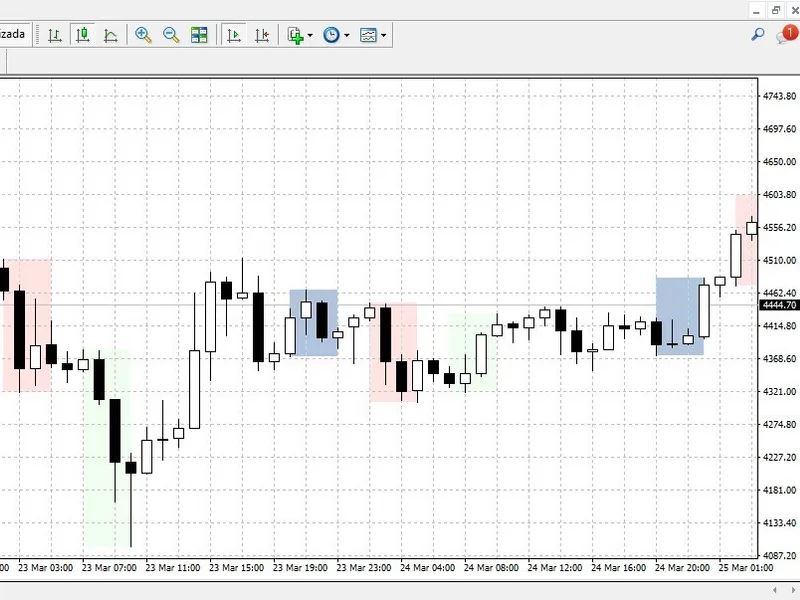
Accurately draws the Asian Range, capturing the highest high and lowest low of the session to define the liquidity pools.
Killzone Highlighting:
Visually shades the high-volatility windows for London and New York, helping you avoid trading in dead zones.
Broker Time Offset (Crucial):
Retail brokers operate on different server times (e.g., GMT+2, GMT+3, EST). This indicator includes a shift parameter, ensuring your Killzones are perfectly aligned with real-world institutional time regardless of your broker's location.
Lightweight Execution:
Optimized specifically for MT4. It limits historical calculations to a user-defined number of days, preventing terminal lag or memory leaks.
Input Parameters
DaysToCalculate:
How many days of history to draw boxes for (keeps your MT4 running fast).
Broker_GMT_Shift:
Hours to shift to align with true NY midnight.
Session Times:
Fully customizable start and end times for Asia, London, and NY.
Colors:
Aesthetic customization to fit your chart template seamlessly.