



inside bar indicator for metatrader
Info
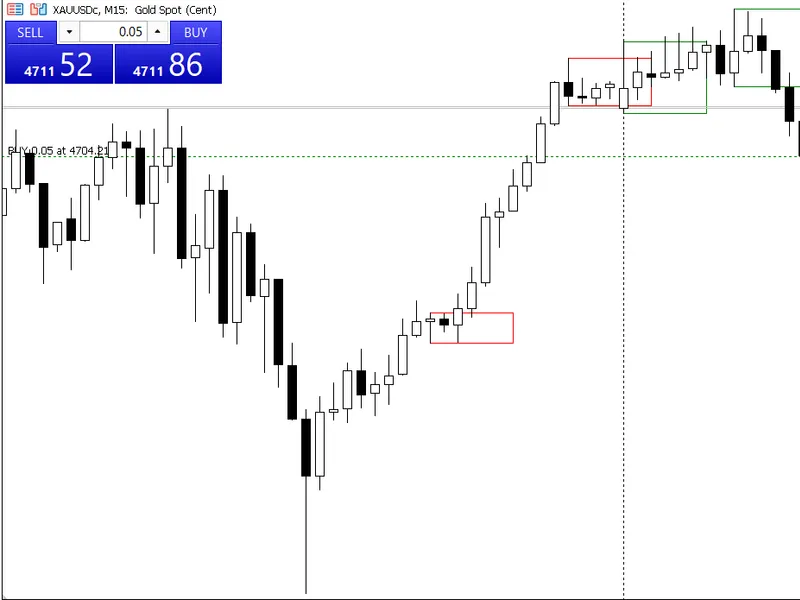
The inside bar indicator for metatrader is a Indicator for MetaTrader 5 that the inside bar indicator is a powerful tool for price action traders, offering a comprehensive set of features to identify and capitalize on this reliable candlestick pattern. key features:- auto pattern detection: automatically identifies inside bars, eliminating the need for manual scanning.
Usage
This tool is typically used for enhancing chart analysis and decision making.
Platform
This Indicator works exclusively on MetaTrader 5 (both build 600+ and newer versions).
Setup
Place the downloaded file in MQL5/Indicators folder via File ? Open Data Folder in MetaTrader 5.
How to Install and Use inside bar indicator for metatrader
1. Installation: Place your file in the MQL/Indicators folder via "Open Data Folder" and restart your terminal.
2. Loading: Find the indicator in the Navigator, drag it onto your chart, and configure the input parameters in the popup window.
3. Customization: Press Ctrl+I to open the indicator list, select your tool, and click "Properties" to change colors, levels, or visual styles.
4. Updating: Replace the old file in the Indicators folder with the new version and restart the platform to apply changes.
Frequently Asked Questions
Q: Why is my indicator not showing? A: Verify the file is in the MQL/Indicators folder, or try right-clicking the "Indicators" tree in the Navigator and clicking "Refresh."
Q: Do custom indicators slow down the platform? A: Too many complex indicators can impact performance; remove unused ones via the "Indicator List" (Ctrl+I).
Q: Can I use MT4 indicators on MT5? A: No, MQL4 and MQL5 are distinct languages; ensure the indicator is compiled specifically for your platform version.
What this tool does
the inside bar indicator is a powerful tool for price action traders, offering a comprehensive set of features to identify and capitalize on this reliable candlestick pattern.
Typical Use Case
This Indicator excels in automated trading and technical analysis on MetaTrader 5.
Compatible Platform & Setup
This Indicator works on MetaTrader 5. Place the file in the MQL5/Indicators folder and restart the terminal.
Description & Settings
Related: Trading Session Boxes Indicator for MT4/MT5 - another powerful indicator for MetaTrader 5 traders.
the inside bar indicator is a powerful tool for price action traders, offering a comprehensive set of features to identify and capitalize on this reliable candlestick pattern.Also recommended: ICT Kill Zones Indicator: Asian, London, New York in New York Time (2026) - similar indicator with strong performance on MetaTrader 5.
key features:
- auto pattern detection: automatically identifies inside bars, eliminating the need for manual scanning.
- smart direction filter: determines the potential direction of the breakout (bullish or bearish) based on the small candle's close vs open.
- projection rectangle: visualizes the potential breakout range by drawing a rectangle from the mother candle's high/low, extending forward by a customizable number of bars.
- color coding: indicates the direction bias with green for bullish, red for bearish, and blue for neutral. custom colors can also be set.
- clean chart labels: adds clear text labels, 'inside bar bullish / bearish', next to each rectangle for easy identification.
- keep last n bars: maintains a clean chart by displaying rectangles only for the most recent n bars (e.g., last 50 bars).
- symbol and timeframe flexibility: works across various symbols and timeframes, from forex to commodities, m1 to mn1.
- lightweight and fast: optimized to process only visible and recent bars, ensuring efficient performance.
input parameters:
- barstokeep: specify the number of past candles to display rectangles, keeping the chart organized.
- forwardbars: define how far to extend the projection rectangle from the mother candle.
- rectanglefill: enable or disable filling the rectangle with color.
- autocolorbydirection: automatically color-code the rectangles based on direction bias.
- bullishcolor, bearishcolor, neutralcolor: set custom colors when auto-color mode is enabled.
- rectanglefillcolor: choose the fill color when auto mode is disabled.
- enablealert: turn desktop and mobile alerts on or off.
- enablelabel: show or hide text labels on the chart.
- labelonlyonnewbar: display labels only for the most recent pattern to reduce clutter.
- filterdirection: filter out neutral patterns and focus on either bullish or bearish signals.
ideal for breakout traders, price action traders, and swing/day traders who require real-time notifications and multi-timeframe analysis. the indicator provides fixed signals once the bar closes, ensuring reliable trade decisions.
You may also like: Spread Monitor Indicator for MetaTrader 5 - excellent alternative for indicator users on MetaTrader 5.
Source Code
#property copyright "robotfx"
#property link "https://robotfx.org"
#property version   "1.00"
#property indicator_chart_window
#property indicator_buffers 0
#property indicator_plots   0
input int      barstokeep         = 50;
input int      forwardbars        = 5;
input bool     rectanglefill       = true;
input bool     autocolorbydirection = false;
.......
⚠ Limitations & Risk Warning
- This tool is provided for educational and testing purposes only.
- Past performance does not guarantee future results.
- Trading involves substantial risk of loss. Use on a demo account first.
- Results may vary depending on market conditions, broker, and settings.
- We recommend thorough backtesting and forward testing before using with real funds.