

G7 Institutional SMC Radar and AI Dashboard
Info
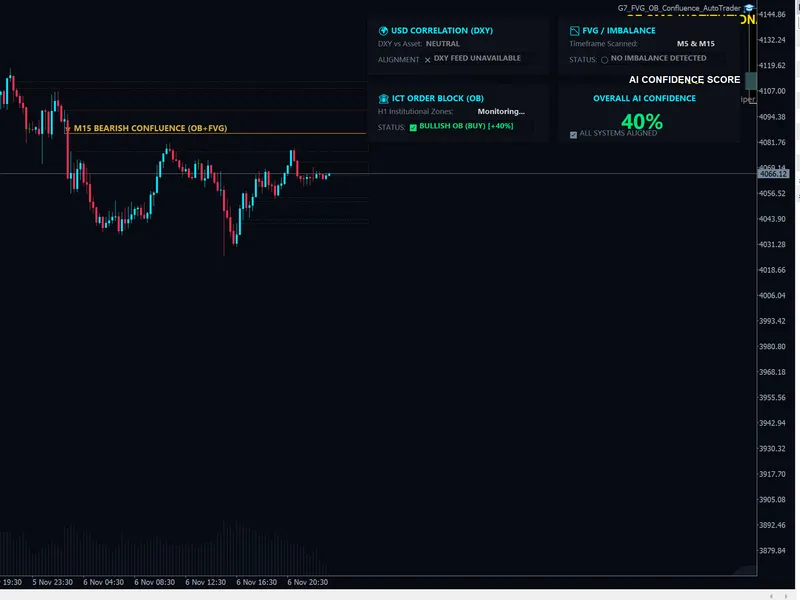
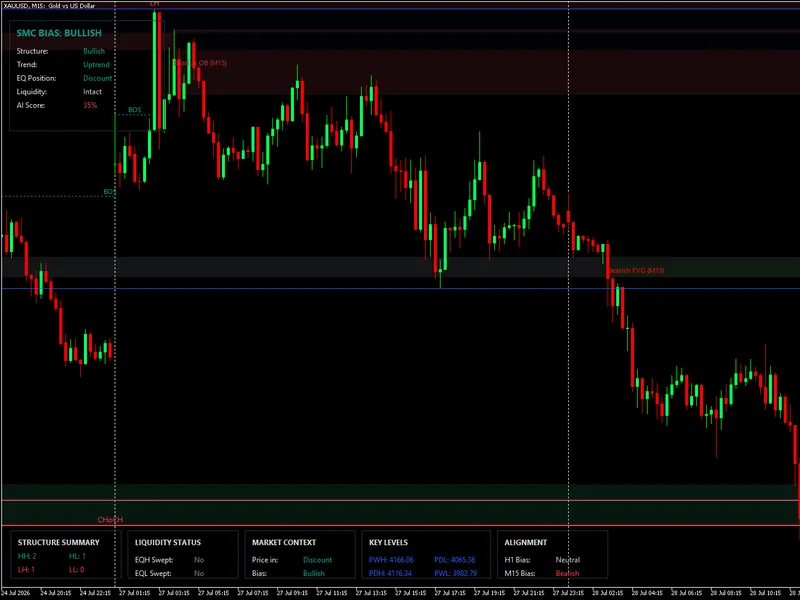
The G7 Institutional SMC Radar and AI Dashboard is a Indicator for MetaTrader 5 that trading smart money concepts (smc) requires constant chart monitoring across multiple timeframes. The G7 Institutional SMC Radar does the heavy lifting for you by transforming your MT5 terminal into a professional analytical workstation.
Usage
This tool is typically used for enhancing chart analysis and decision making.
Platform
This Indicator works exclusively on MetaTrader 5 (both build 600+ and newer versions).
Setup
Place the downloaded file in MQL5/Indicators folder via File ? Open Data Folder in MetaTrader 5.
How to Install and Use G7 Institutional SMC Radar and AI Dashboard
1. Installation: Place your file in the MQL/Indicators folder via "Open Data Folder" and restart your terminal.
2. Loading: Find the indicator in the Navigator, drag it onto your chart, and configure the input parameters in the popup window.
3. Customization: Press Ctrl+I to open the indicator list, select your tool, and click "Properties" to change colors, levels, or visual styles.
4. Updating: Replace the old file in the Indicators folder with the new version and restart the platform to apply changes.
Frequently Asked Questions
Q: Why is my indicator not showing? A: Verify the file is in the MQL/Indicators folder, or try right-clicking the "Indicators" tree in the Navigator and clicking "Refresh."
Q: Do custom indicators slow down the platform? A: Too many complex indicators can impact performance; remove unused ones via the "Indicator List" (Ctrl+I).
Q: Can I use MT4 indicators on MT5? A: No, MQL4 and MQL5 are distinct languages; ensure the indicator is compiled specifically for your platform version.
What this tool does
Trading Smart Money Concepts (SMC) requires constant chart monitoring across multiple timeframes.
Typical Use Case
This Indicator excels in automated trading and technical analysis on MetaTrader 5.
Compatible Platform & Setup
This Indicator works on MetaTrader 5. Place the file in the MQL5/Indicators folder and restart the terminal.
Description & Settings
Related: Margin Call Radar: Account Risk Analysis - another powerful indicator for MetaTrader 5 traders.
Trading Smart Money Concepts (SMC) requires constant chart monitoring across multiple timeframes.Also recommended: Simple Anchored VWAP - Institutional Volume Benchmark - similar indicator with strong performance on MetaTrader 5.
The G7 Institutional SMC Radar does the heavy lifting for you by transforming your MT5 terminal into a professional analytical workstation.
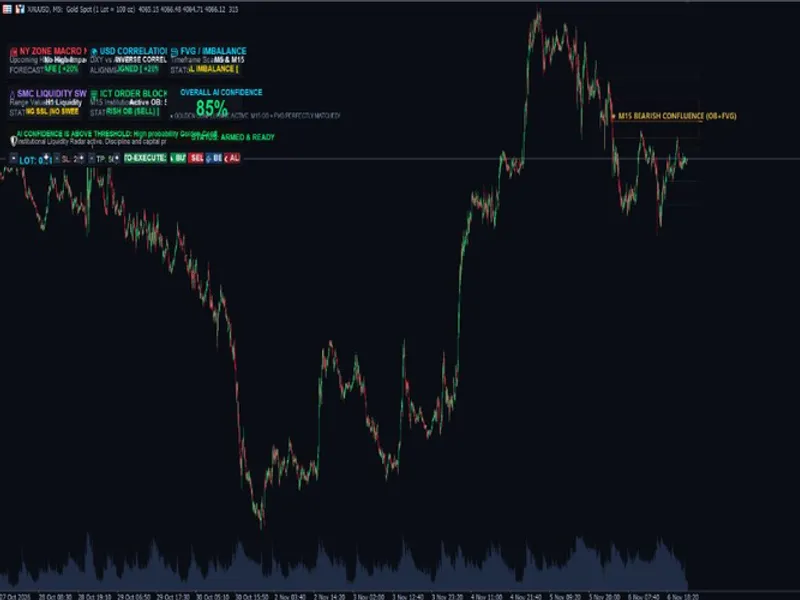
Designed specifically for Gold (XAUUSD) scalpers and Prop-Firm traders, this lightweight utility automatically detects high-probability liquidity zones and cross-references them to generate an "AI Confidence Score" before you take a trade.
Key Features:
Auto-Drawing Zones:
Automatically identifies and extends Bullish/Bearish Fair Value Gaps (FVGs) and ICT Order Blocks directly on your chart.
Dynamic Mitigation:
Smartly deletes old supply/demand zones the moment price action mitigates them, keeping your charts perfectly clean.
AI Confidence HUD:
Calculates a real-time confluence percentage (0% to 100%) based on structural alignment between FVGs and Order Blocks.
DXY Correlation Engine:
Monitors the US Dollar Index (DXY) in the background to confirm macro directional bias.
Premium Obsidian UI:
Features a sleek, non-intrusive dark-mode dashboard that does not interfere with your manual trading.
How to Use:
Simply attach the indicator to your chart (M15 or H1 recommended).
The system will automatically apply a clean dark-mode template and begin scanning.
Wait for the AI Confidence Score to align (e.g., 70%+) before executing your manual entries.
UPGRADE TO AUTO-EXECUTION:
This free utility is purely an analytical dashboard for manual traders.
If you are looking for a fully automated, stress-tested trading engine that trades safely without using dangerous grids or martingale, check out my premium G7 No Grid Gold Sniper EA on my MQL5 profile!
Join the Official G7 Community:
Connect with other funded traders, download my personal chart templates, and get direct support in our Telegram channel:
@G7PROVIP
You may also like: Sniper Gold SMC Pro Plus: Institutional Smart Money Concepts Indicator for MT5 - excellent alternative for indicator users on MetaTrader 5.
Source Code
#property copyright "RobotFX"
#property link "https://robotfx.org"
#property version   "8.51"
#property indicator_chart_window
#property indicator_buffers 2
#property indicator_plots   2
#property indicator_label1  "Bullish POI"
#property indicator_type1   DRAW_NONE
#property indicator_color1  clrDodgerBlue
#property indicator_label2  "Bearish POI"
.......
⚠ Limitations & Risk Warning
- This tool is provided for educational and testing purposes only.
- Past performance does not guarantee future results.
- Trading involves substantial risk of loss. Use on a demo account first.
- Results may vary depending on market conditions, broker, and settings.
- We recommend thorough backtesting and forward testing before using with real funds.