Tick Compressor - with compression of 1 tick to 2-3 bytes on average
This software component for MetaTrader 5 is built to enhance the capabilities of your trading environment. This library provides a collection of modular, reusable code. It is utilized by developers to organize common functions, allowing for the integration of complex logic across multiple Expert Advisors, indicators, or scripts without the need for code duplication.
How to Setup and Use Tick Compressor - with compression of 1 tick to 2-3 bytes on average
1. Storage: Place library files in the MQL/Libraries directory to ensure they are accessible to your projects.
2. Implementation: Include the library in your code using the #import directive, ensuring you match the exact function names and parameters.
3. Compilation: Ensure the library is present in the directory before you compile your main EA or script, as the compiler links them during this phase.
4. Management: Keep libraries organized in sub-folders if you manage many custom functions to maintain a clean project structure.
Frequently Asked Questions
Q: What is a library file used for? A: Libraries store reusable code modules, allowing you to centralize common logic used by multiple EAs or indicators.
Q: Is a library executable? A: No, libraries are non-executable files containing functions; they must be imported into an EA, indicator, or script to function.
Q: Can I update a library while the platform is running? A: You should compile your EA or script after updating a library to ensure the latest code changes are integrated.
Description & Settings
Compression of tick data for storage in a compact form up to 3.5 times more compact than .tcs MQ files. And for fast work with them, as it takes less time to read 3 bytes than 60 bytes of MqlTick structure.
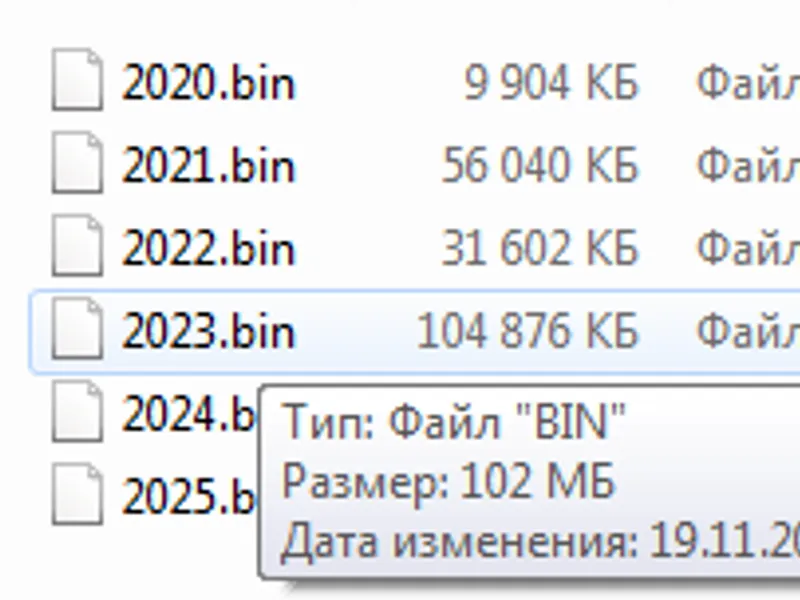
The file size for 2023 with Ask, Bid, time with additional ZIP compression of data blocks can be seen on the screenshot:
File size in .tcs format for 2023:
3.56 times compression.
To store ticks, the differences of Ask and Bid prices from the previous price are used. Often (up to 50...70% of all ticks) it does not exceed (-8...7) points, and it can be recorded with 4 bits. Ask and Bid are combined into 1 byte. Plus 1 byte to store time difference from 0 to 255 milliseconds (in the code up to 229, values above 229 are used to encode ticks that are beyond -8...7 points).
If prices or times differ by larger values, they are packed into a larger number of bytes.
For additional compression you can apply ZIP archiving. The size of the data is reduced by up to 2 times.
Alternatively, compression to 3 bytes can be done, with Ask and Bid from -129 to 128 compressed to 8 bits or 1 byte each. Plus 1 byte for time - totalling 3 bytes for most ticks. Sometimes, if there are more ticks compressed to 2 bytes than to 4 bytes, it is more efficient to compress to 3 bytes. You have to look at the instrument statistics. You can switch the maximum compression to 3 bytes with the command:
Tick elements for storage in compressed form
3 variants of tick elements for storage are programmed:
Ask, Bid, time_msc
Ask, Bid, time_msc, volume_real
All elements Ask, Bid, Last, time_msc, volume_real, flags (int volume is calculated from volume_real).
They can also be additionally compressed in ZIP. There will be 6 variants in total
Before starting the compression, you need to pass the variant of ticks storage and some standard parameters used for calculations and normalisation of prices to the class.
If the Expert Advisor uses flags, they can be restored from price changes by the command
The Expert Advisor for compression test is attached, it will give statistics on speed and compression rate. You can see an example of compression and decompression of ticks in it.
An example of the Expert Advisor for trading can be viewed here .
Statistics for 2 and 3 bytes compression:
Code examples
Tick compression
Block by block:
If you set the number of ticks in 1 block to be greater than the total number of ticks in the array, it will be compressed into 1 block.
If you always need compression into 1 block, you can use
But the speed of decompression of such a large or very large block may be 2 times slower. Also there will be a large memory consumption for a large block.
Unpacking ticks
When unpacking it is desirable to know the number of packed ticks. The receiver array must have this size.
The size can be saved in a file, for example. And then use it when unpacking.
If the size is unknown, you can change the size inside the loop by the number of ticks in the block
This code gets ticks block by block. If there is only 1 big block, it counts it correctly too. Ticks are not collected into a large array, but can be processed immediately by your Strategy(Ticks3[j]) strategy;
Collects ticks from all blocks into one big array:
Or a single line. Only 1 block should be recorded. If more - use the 2 code variants above.