AT CF
This is a powerful addition to your MetaTrader 5 toolkit designed to optimize market analysis and performance. This technical indicator acts as a specialized analysis tool designed to visualize market data. It helps traders identify emerging trends, momentum shifts, and key support or resistance levels by plotting statistical calculations directly onto price charts.
How to Setup and Use AT CF
1. Installation: Place your file in the MQL/Indicators folder via "Open Data Folder" and restart your terminal.
2. Loading: Find the indicator in the Navigator, drag it onto your chart, and configure the input parameters in the popup window.
3. Customization: Press Ctrl+I to open the indicator list, select your tool, and click "Properties" to change colors, levels, or visual styles.
4. Updating: Replace the old file in the Indicators folder with the new version and restart the platform to apply changes.
Frequently Asked Questions
Q: Why is my indicator not showing? A: Verify the file is in the MQL/Indicators folder, or try right-clicking the "Indicators" tree in the Navigator and clicking "Refresh."
Q: Do custom indicators slow down the platform? A: Too many complex indicators can impact performance; remove unused ones via the "Indicator List" (Ctrl+I).
Q: Can I use MT4 indicators on MT5? A: No, MQL4 and MQL5 are distinct languages; ensure the indicator is compiled specifically for your platform version.
Description & Settings
Vladimir Kravchuk
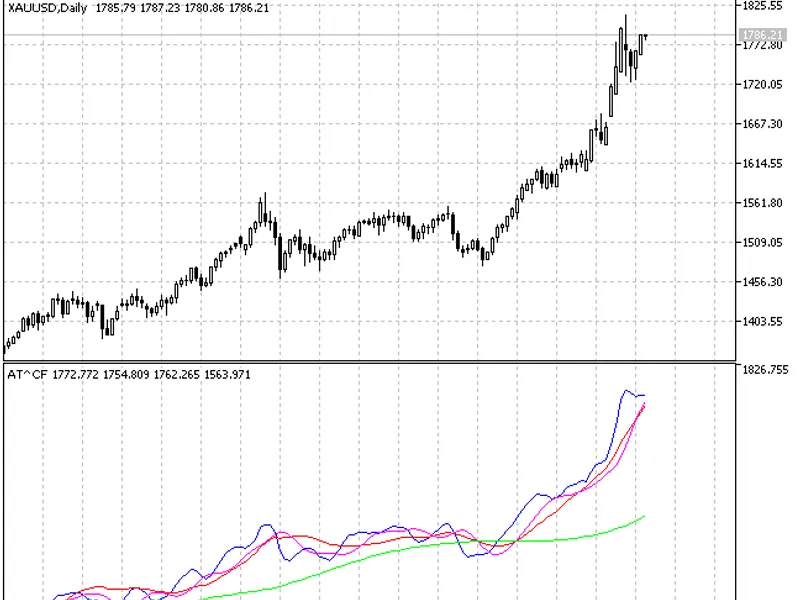
This indicator presents all four digital filters (, , ) that form the basis of the V. Kravchuk's AT&CF method in one separate window.
The main objective of the AT&CF method is creation of the minimum number of technical tools possessing set properties. There must be enough of this tools to build a trading algorithm that would provide maximum possible profitability, while possessing the least possible risk level, for some definite market.
Basic rules of the interpretation of the tools specified above:
Rising SATL line indicates the bullish market trend. SATL local minimum point is a point of the beginning of the bearish trend reverse. The point, at which STLM changed from negative to positive, indicates the end of the bearish trend reverse.
Falling SATL line indicates the bearish market trend. SATL local maximum point is a point of the beginning of the bullish trend reverse. The point, at which STLM changed from positive to negative, indicates the end of the bullish trend reverse.
SATL form that is close to the horizontal one indicates the neutral position.
STLM interpretation requires special attention. Positive STLM value indicates the bullish trend and negative one indicates the bearish trend. STLM is a leading indicator. STLM local minimum always goes before SATL local minimum. STLM local maximum always goes before SATL local maximum.
Reaching of its extreme points by STLM is necessary but not sufficient condition of SATL curve reaching a top or a bottom. Rising STLM in case of the rising SATL indicates bullish trend acceleration. Horizontal and positive STLM in case of the rising SATL indicates steady bullish trend. The more is the STLM absolute value, the stronger is the bullish trend. Falling STLM in case of the falling SATL indicates bearish trend acceleration.
Horizontal and negative STLM in case of the rising SATL indicates steady bearish trend. The more is the STLM absolute value, the stronger is the bearish trend.
Rising "fast" FATL trend line in case of the rising "slow" SATL trend line indicates a strong bullish market trend.
Falling "fast" FATL line in case of the falling "slow" SATL line indicates a strong bearish market trend.
Rising FATL line in case of the SATL falling line indicates either bullish correction during a bearish trend, or consolidation.
Falling FATL line in case of the rising SATL line indicates either bearish correction during a bullish trend, or consolidation.
In case FATL and SATL lines start or resume moving in one direction, it indicates either a trend reverse, or end of correction and continuation of the price movement towards SATL.