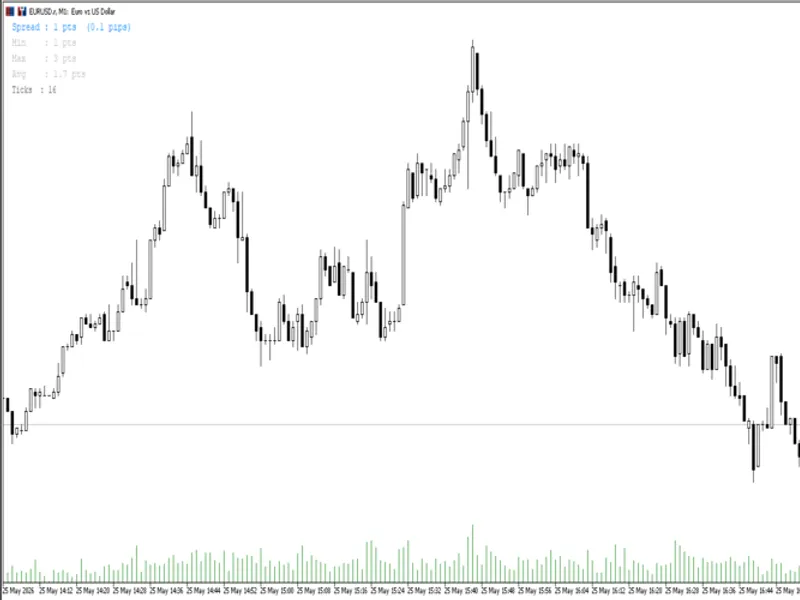
Real-Time Spread Monitor with Session Statistics
This is a powerful addition to your MetaTrader 5 toolkit designed to optimize market analysis and performance. This technical indicator acts as a specialized analysis tool designed to visualize market data. It helps traders identify emerging trends, momentum shifts, and key support or resistance levels by plotting statistical calculations directly onto price charts.
How to Setup and Use Real-Time Spread Monitor with Session Statistics
1. Installation: Place your file in the MQL/Indicators folder via "Open Data Folder" and restart your terminal.
2. Loading: Find the indicator in the Navigator, drag it onto your chart, and configure the input parameters in the popup window.
3. Customization: Press Ctrl+I to open the indicator list, select your tool, and click "Properties" to change colors, levels, or visual styles.
4. Updating: Replace the old file in the Indicators folder with the new version and restart the platform to apply changes.
Frequently Asked Questions
Q: Why is my indicator not showing? A: Verify the file is in the MQL/Indicators folder, or try right-clicking the "Indicators" tree in the Navigator and clicking "Refresh."
Q: Do custom indicators slow down the platform? A: Too many complex indicators can impact performance; remove unused ones via the "Indicator List" (Ctrl+I).
Q: Can I use MT4 indicators on MT5? A: No, MQL4 and MQL5 are distinct languages; ensure the indicator is compiled specifically for your platform version.
Description & Settings
This indicator places a compact information panel in the top-left corner of the chart (position is configurable) showing four key spread metrics updated on every tick: - Current spread in points and in pips - Session minimum spread (lowest recorded since attach) - Session maximum spread (highest recorded since attach) - Session average spread (running arithmetic mean) The current spread value changes color when it crosses a user-defined "wide spread" threshold. This is useful for identifying moments when execution costs are elevated - for example during news events, session opens, or low-liquidity periods. All statistics reset when the indicator is reattached or MetaTrader is restarted. Input Parameters: - Color Normal Spread: color displayed when spread is below the threshold (default: DodgerBlue) - Color Wide Spread: color displayed when spread meets or exceeds the threshold (default: OrangeRed) - Wide Spread Threshold (points): the point value above which the wide-spread color activates (default: 20) - Font Size: size of the display text (default: 10) - X Position: horizontal offset of the panel from the corner (default: 15) - Y Position: vertical offset of the panel from the corner (default: 20) The indicator uses OBJ_LABEL objects and does not paint any buffers on the price
chart. It is compatible with all symbols and all timeframes.
You May Also Like
RobotFX does not own any of the code provided on this platform. All tools are freely available on the internet; we simply index and re-offer them for download. We are not responsible for any financial losses that may occur. Trading responsibilities rely solely on the traders downloading and using the displayed Expert Advisors, indicators, and scripts. These tools are provided for educational purposes only and may require modification or optimization to align with a trader's specific strategy or needs.
© ROBOTFX - Best MetaTrader Expert Advisors & Indicators