




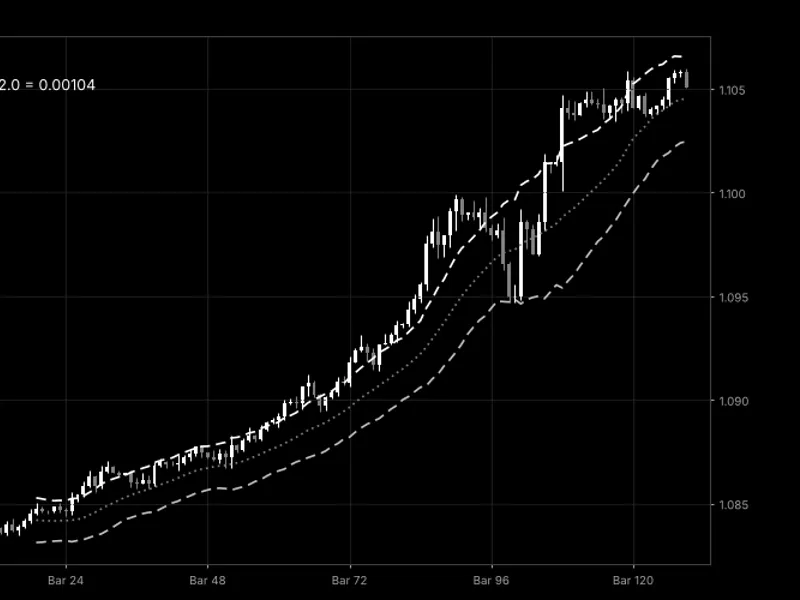
Noise Band Momentum: Intraday Nasdaq Breakout Strategy
Info
The Noise Band Momentum: Intraday Nasdaq Breakout Strategy is a Expert Advisor for MetaTrader 5 that noise band momentum is an intraday momentum expert advisor designed for the nasdaq 100. It operates based on the strategy rules detailed by Carlo Zarattini, Andrew Aziz, and Andrea Barbon in their 2026 research paper, "Beat the Market: An Effective Intraday Momentum Strategy for S&P500 ETF (SPY)" (Swiss Finance Institute Research Paper 24-97).
Usage
This tool is typically used for breakout trading when price moves beyond key support/resistance levels.
Platform
This Expert Advisor works exclusively on MetaTrader 5 (both build 600+ and newer versions).
Setup
Place the downloaded file in MQL5/Experts folder via File ? Open Data Folder in MetaTrader 5.
How to Install and Use Noise Band Momentum: Intraday Nasdaq Breakout Strategy
1. Installation: Open the "File" menu, select "Open Data Folder," navigate to MQL/Experts, paste your file, and restart the terminal.
2. Activation: Drag the EA from the Navigator onto a chart, ensure "Allow live trading" is checked in the Common tab, and verify the AutoTrading button is green.
3. Optimization: Right-click your chart, choose "Expert List," click "Properties" to adjust inputs, and save your preferred setup as a set file for future use.
4. Maintenance: Regularly check the "Experts" tab in the terminal window to monitor trade logs and potential execution errors.
Frequently Asked Questions
Q: Why is my EA not opening trades? A: Check the "AutoTrading" button, ensure "Allow live trading" is enabled, and verify your broker allows automated trading on your account type.
Q: Can I run multiple EAs on one chart? A: No, each chart can only host one active EA; however, you can open multiple charts for different currency pairs to run several EAs.
Q: What does the "smiley face" icon mean? A: A smiley face in the top-right corner of the chart indicates the EA is successfully running; a frowny face means it is disabled.
What this tool does
Noise Band Momentum is an intraday momentum Expert Advisor designed for the Nasdaq 100.
Typical Use Case
This Expert Advisor excels in automated trading and technical analysis on MetaTrader 5.
Compatible Platform & Setup
This Expert Advisor works on MetaTrader 5. Place the file in the MQL5/Experts folder and restart the terminal.
Description & Settings
Related: Fx Craft Example EA: Bollinger Bands Mean Reversion - another powerful expert for MetaTrader 5 traders.
Noise Band Momentum is an intraday momentum Expert Advisor designed for the Nasdaq 100. It operates based on the strategy rules detailed by Carlo Zarattini, Andrew Aziz, and Andrea Barbon in their 2026 research paper, "Beat the Market: An Effective Intraday Momentum Strategy for S&P500 ETF (SPY)" (Swiss Finance Institute Research Paper 24-97).Also recommended: bollinger bands ®-based expert advisor - similar expert with strong performance on MetaTrader 5.
How it Works
Noise Calculation: For each minute within the New York trading session, the noise is determined by averaging the absolute value of (close price / session open price - 1) over the preceding 14 regular trading sessions for that same minute.
Band Calculation: The upper band is calculated as max(open, previous close) multiplied by (1 + noise). The lower band is calculated as min(open, previous close) multiplied by (1 - noise). Adjusting with the previous close accounts for overnight price gaps.
Trading Logic: Trades are initiated every 30 minutes between 10:00 and 15:30 New York time, precisely at the close of the last 1-minute bar. A buy order is placed when the price breaks above the upper band, and a sell order is placed when the price falls below the lower band.
Position Closing: A long position is closed when the price returns below the maximum of the upper band or the session VWAP. A short position is closed when the price rises above the minimum of the lower band or the session VWAP.
Daily Close: The Expert Advisor ensures a flat position at 16:00 New York time. Take profit is not utilized, and the stop loss is optional, aligning with the original research paper's approach.
Input Parameters
Position Sizing: Choose between 'exposure' (notional value as a percentage of account balance, where 100 represents 1x leverage) or a fixed lot size, with an option to set a maximum lot size.
Stop Loss: An emergency stop can be configured as a percentage of the price (0 disables this feature).
Customization Options: Includes lookback period (default 14 sessions), session open time, start and end times for checks, interval between checks, flat time, and options to enable/disable VWAP trailing. Default settings mirror the parameters from the research paper.
Broker Settings: Options for broker server time (New York + 7, Central Europe, UTC, or automatic detection for live accounts), maximum spread, magic number, and order comment.
Performance Observations
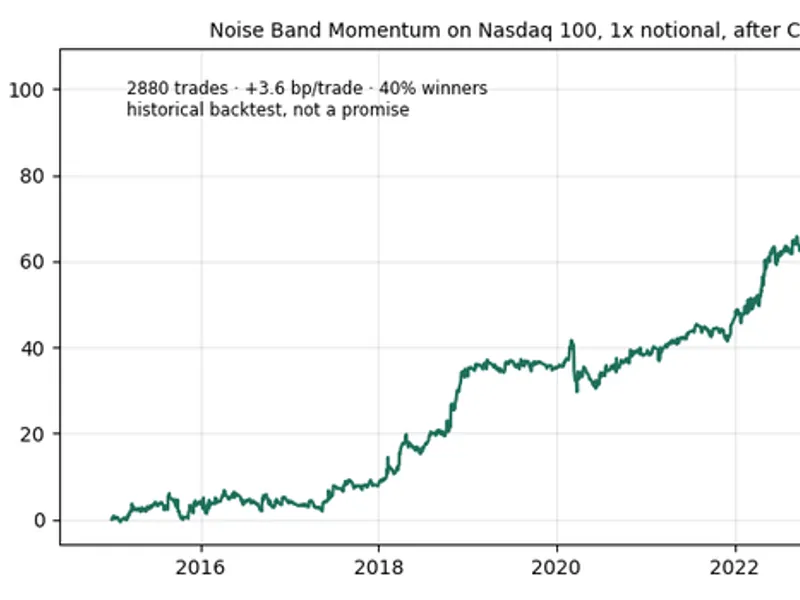
Testing results on Nasdaq 100 1-minute data, including CFD costs, using 1x notional exposure from 2015 to November 2026, show an average of 3.6 basis points per trade across 2,880 trades. The strategy achieved a 40% win rate, with positive performance in every calendar year: 2024 (+7.7%), 2025 (+8.1%), and 2026 (to November, +7.7%). The strategy was specifically identified as effective for the Nasdaq 100, as similar rules applied to the S&P 500 yielded weak results, and losses were observed in gold, silver, oil, Bitcoin, and eight FX pairs. A comparison against a Python backtest on the same dataset confirmed high accuracy, with 303 out of 312 entries matching in minute and direction.
Implementation Notes
To use the EA, attach it to a 1-minute chart of your Nasdaq 100 symbol and configure the broker's server time setting. The EA requires at least 14 sessions of 1-minute historical data to generate the first trades.
The EA monitors each new 1-minute bar. For VWAP calculation, it uses tick volume. If tick volume is unavailable, it defaults to a simple average of the typical price.
On days with early market closures (e.g., the day after Thanksgiving), positions might need to be manually closed before the official 16:00 flat time to avoid closure at the next market open.
It is strongly recommended to test this Expert Advisor on a demo account before live trading. This implementation is for educational purposes, based on published research, and does not constitute financial advice. Past performance is not indicative of future results.
You may also like: Exp Bbands Stop Expert Advisor - excellent alternative for expert users on MetaTrader 5.
Source Code
#property copyright "RobotFX"
#property version   "1.00"
#property description "This code is educational. Feel free to use, modify and upgrade as you wish. Visit ROBOTFX.ORG for professional trading tools"
#include <Trade\Trade.mqh>
enum ENUM_SERVER_CLOCK
  {
   CLOCK_NY7  = 0,
   CLOCK_EU   = 1,
   CLOCK_UTC  = 2,
   CLOCK_AUTO = 3
.......
⚠ Limitations & Risk Warning
- This tool is provided for educational and testing purposes only.
- Past performance does not guarantee future results.
- Trading involves substantial risk of loss. Use on a demo account first.
- Results may vary depending on market conditions, broker, and settings.
- We recommend thorough backtesting and forward testing before using with real funds.