




mql5 wizard: trade signals with dark cloud cover/piercing line and rsi confirmation
Info
The mql5 wizard: trade signals with dark cloud cover/piercing line and rsi confirmation is a Expert Advisor for MetaTrader 5 that this tool empowers users to create custom expert advisors (eas) by leveraging the provided client terminal classes. it facilitates rapid testing of trading ideas, requiring only the creation of a custom trading signals class.
Usage
This tool is typically used for automated trading on major forex pairs and gold.
Platform
This Expert Advisor works exclusively on MetaTrader 5 (both build 600+ and newer versions).
Setup
Place the downloaded file in MQL5/Experts folder via File ? Open Data Folder in MetaTrader 5.
How to Install and Use mql5 wizard: trade signals with dark cloud cover/piercing line and rsi confirmation
1. Installation: Open the "File" menu, select "Open Data Folder," navigate to MQL/Experts, paste your file, and restart the terminal.
2. Activation: Drag the EA from the Navigator onto a chart, ensure "Allow live trading" is checked in the Common tab, and verify the AutoTrading button is green.
3. Optimization: Right-click your chart, choose "Expert List," click "Properties" to adjust inputs, and save your preferred setup as a set file for future use.
4. Maintenance: Regularly check the "Experts" tab in the terminal window to monitor trade logs and potential execution errors.
Frequently Asked Questions
Q: Why is my EA not opening trades? A: Check the "AutoTrading" button, ensure "Allow live trading" is enabled, and verify your broker allows automated trading on your account type.
Q: Can I run multiple EAs on one chart? A: No, each chart can only host one active EA; however, you can open multiple charts for different currency pairs to run several EAs.
Q: What does the "smiley face" icon mean? A: A smiley face in the top-right corner of the chart indicates the EA is successfully running; a frowny face means it is disabled.
What this tool does
this tool empowers users to create custom expert advisors (eas) by leveraging the provided client terminal classes.
Typical Use Case
This Expert Advisor excels in automated trading and technical analysis on MetaTrader 5.
Compatible Platform & Setup
This Expert Advisor works on MetaTrader 5. Place the file in the MQL5/Experts folder and restart the terminal.
Description & Settings
Related: Xlsx Writer: Generate Excel .xlsx Files from MQL5 Without External Libraries - another powerful expert for MetaTrader 5 traders.
this tool empowers users to create custom expert advisors (eas) by leveraging the provided client terminal classes. it facilitates rapid testing of trading ideas, requiring only the creation of a custom trading signals class. the structure and an example of such a class are detailed in the accompanying article.Also recommended: Risk Guard Lite: A MQL5 EA for Controlled Risk Trading - similar expert with strong performance on MetaTrader 5.
the fundamental concept involves deriving a trading signals class from the base class, and then overriding the necessary virtual methods with your specific logic.
a reference book titled " (in russian)" explores numerous trading strategies. this guide focuses on reversal candlestick patterns, specifically confirmed by indicators like rsi and other oscillators.
it is recommended to create a separate class, derived from the base candlestick pattern class, for detecting candlestick patterns. for signal confirmation, a class derived from ccandlepattern can be extended to include additional features, such as oscillator confirmation.
this guide specifically examines trade signals based on the "dark cloud cover" and "piercing line" reversal candlestick patterns, confirmed by the rsi indicator. the trade signal module utilizes a class that serves as a straightforward example for creating trade signals with candlestick patterns.
1. dark cloud cover and piercing line reversal candlestick patterns
1.1. dark cloud cover
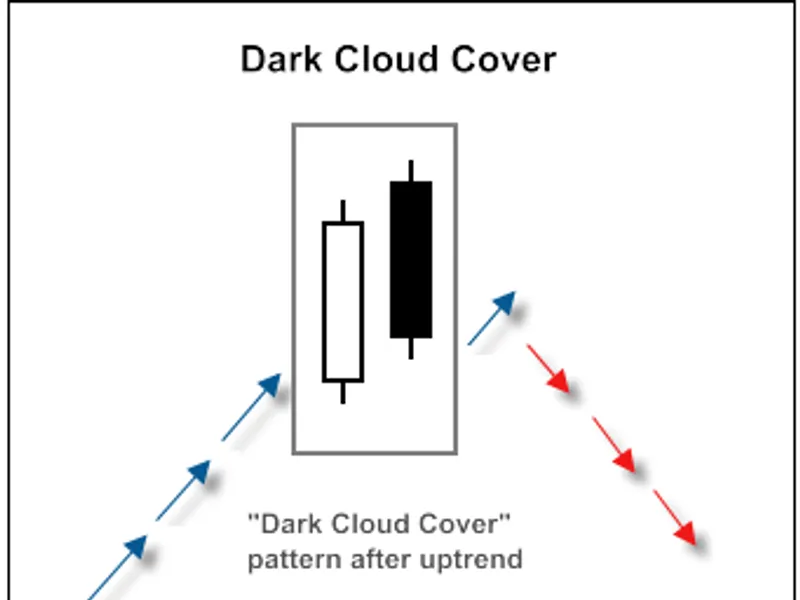
this is a bearish reversal pattern occurring at the end of an uptrend. it is characterized by a long white candlestick on the first day, followed by a gap up on the second day. the second day then closes below the midpoint of the first day's body.
figure 1. dark cloud cover candlestick pattern
the recognition of the "dark cloud cover" pattern is implemented within the checkpatterndarkcloudcover() method of the relevant class.
the checkcandlestickpattern(candle_pattern_dark_cloud_cover) method of the class is used to verify the formation of the "dark cloud cover" candlestick pattern.
1.2. piercing line
a gap down on the second day continues the downtrend. however, the second day closes above the midpoint of the first day's body, suggesting a potential bottom reversal to traders. this price action is more clearly discernible on candlestick charts than on bar charts. a deeper penetration of the second day's close into the first day's body increases the probability of a successful reversal signal.
fig. 2. piercing line candlestick pattern
the recognition of the "piercing line" pattern is implemented within the checkpatternpiercingline() method of the relevant class.
the checkcandlestickpattern(candle_pattern_piercing_line) method of the class is used to verify the formation of the "piercing line" candlestick pattern.
2. trade signals confirmed by rsi indicator
trading signals for opening long or short positions require confirmation from the rsi indicator. the rsi value must be below critical levels (40 for long positions and 60 for short positions).
the closing of opened positions depends on the rsi values. positions can be closed in two scenarios:
- if the rsi has reached the opposite critical level (70 for long positions and 30 for short positions).
- if the reverse signal is not confirmed (when rsi reaches specific levels: 30 for long positions and 70 for short positions).
fig. 3. dark cloud cover pattern confirmed by rsi indicator
int cdc_pl_rsi::longcondition() - checks conditions for opening a long position (returns 80) and closing a short position (returns 40).
int cdc_pl_rsi::shortcondition() - checks conditions for opening a short position (returns 80) and closing a long position (returns 40).
2.1. opening long position / closing short position
the formation of a "piercing line" pattern must be confirmed by the rsi indicator: rsi(1) < 40 (the rsi value of the last completed bar must be less than 40).
a short position must be closed if the rsi has crossed upward through the critical levels of 70 or 30.
2.2. opening short position / closing long position
the formation of a "dark cloud cover" pattern must be confirmed by the rsi indicator: rsi(1) > 60 (the rsi value of the last completed bar must be greater than 60).
a long position must be closed if the rsi has crossed downward through the critical levels of 70 or 30.
2.3. creating an expert advisor using mql5 wizard
the cdc_pl_rsi class is not included in the standard library. to use it, download the adc_pl_rsi.mqh file (available in attachments) and save it to the mql5\include\expert\signal\mysignals folder within your client terminal's data directory. perform the same step for the acandlepatterns.mqh file. after restarting metaeditor, you can use these files in the mql5 wizard.
to create an expert advisor, launch the mql5 wizard.
fig. 4. creating expert advisor using mql5 wizard
specify the desired name for the expert advisor.
fig. 5. general properties of the expert advisor
next, select the trading signal modules to be used.
fig. 6. signal properties of the expert advisor
in this case, we will use only one trading signal module.
add the "signals based on dark cloud cover/piercing line confirmed by rsi" trading signal module.
fig. 7. signal properties of the expert advisor
the trading signal module has been added.
fig. 8. signal properties of the expert advisor
you can choose any trailing properties; for this example, we will use "trailing stop not used".
fig. 9. trailing properties of the expert advisor
regarding money management, we will use "trading with fixed trade volume".
fig. 10. money management properties of the expert advisor
clicking the "finish" button will generate the expert advisor code, saved as expert_adc_pl_rsi.mq5 in the mql5\experts folder of your terminal's data directory.
the default input parameters of the generated expert advisor:
must be adjusted to:
the signal_thresholdopen and signal_thresholdclose input parameters allow you to specify threshold levels for opening and closing positions.
within the longcondition() and shortcondition() methods of the trade signals class, fixed threshold values were defined:
- open position: 80
- close position: 40
the expert advisor, generated by the mql5 wizard, opens and closes positions based on "votes" from the trading signal modules. the vote of the main module (acting as a container for all added modules) is also considered, but its longcondition() and shortcondition() methods return 0.
the vote results of the main module are incorporated into the "votes" averaging. in this scenario, with a main module plus one additional trading signal module, this must be accounted for when setting threshold values. consequently, thresholdopen and thresholdclose should be set to 40 ( (0+80)/2 ) and 20 ( (0+40)/2 ) respectively.
the signal_stoplevel and signal_takelevel input parameters are set to 0, indicating that position closing will solely occur when the defined closing conditions are met.
2.4. history backtesting results
this section presents backtesting results for the expert advisor using historical data (eurusd h1, testing period: 2010.01.01-2011.02.23, periodrsi=20, ma_period=14).
during expert advisor creation, a fixed volume (0.1) was used, and no trailing stop algorithm was employed.
fig. 11. testing results of the expert advisor based on dark cloud cover/piercing line + rsi
the optimal set of input parameters can be determined using the strategy tester within the metatrader 5 client terminal.
the code for the expert advisor created by the mql5 wizard is attached as expert_ad_pl_rsi.mq5.
You may also like: Universal Pip Value and Dynamic Lot Size Calculator for MQL5 - excellent alternative for expert users on MetaTrader 5.
Source Code
#property copyright "robotfx"
#property link "https://robotfx.org"
#property version   "1.00"
#include <expert\expert.mqh>
#include <expert\signal\mysignals\acdc_pl_rsi.mqh>
#include <expert\trailing\trailingnone.mqh>
#include <expert\money\moneyfixedlot.mqh>
input string expert_title         ="expert_adc_pl_rsi"; // document name
ulong        expert_magicnumber   =24435;               //
bool         expert_everytick     =false;               //
.......
⚠ Limitations & Risk Warning
- This tool is provided for educational and testing purposes only.
- Past performance does not guarantee future results.
- Trading involves substantial risk of loss. Use on a demo account first.
- Results may vary depending on market conditions, broker, and settings.
- We recommend thorough backtesting and forward testing before using with real funds.