







Basket Protective Close
Info
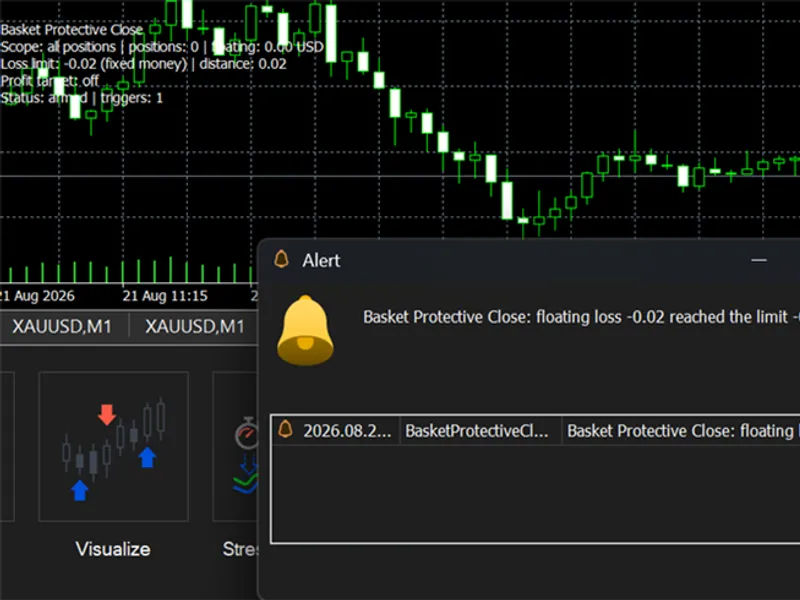
The Basket Protective Close is a Expert Advisor for MetaTrader 5 that closes a basket of positions the moment its floating loss reaches a limit you set. The limit can be a fixed amount of money, a percent of balance, or a percent of equity.
Usage
This tool is typically used for automated trading on major forex pairs and gold.
Platform
This Expert Advisor works exclusively on MetaTrader 5 (both build 600+ and newer versions).
Setup
Place the downloaded file in MQL5/Experts folder via File ? Open Data Folder in MetaTrader 5.
How to Install and Use Basket Protective Close
1. Installation: Open the "File" menu, select "Open Data Folder," navigate to MQL/Experts, paste your file, and restart the terminal.
2. Activation: Drag the EA from the Navigator onto a chart, ensure "Allow live trading" is checked in the Common tab, and verify the AutoTrading button is green.
3. Optimization: Right-click your chart, choose "Expert List," click "Properties" to adjust inputs, and save your preferred setup as a set file for future use.
4. Maintenance: Regularly check the "Experts" tab in the terminal window to monitor trade logs and potential execution errors.
Frequently Asked Questions
Q: Why is my EA not opening trades? A: Check the "AutoTrading" button, ensure "Allow live trading" is enabled, and verify your broker allows automated trading on your account type.
Q: Can I run multiple EAs on one chart? A: No, each chart can only host one active EA; however, you can open multiple charts for different currency pairs to run several EAs.
Q: What does the "smiley face" icon mean? A: A smiley face in the top-right corner of the chart indicates the EA is successfully running; a frowny face means it is disabled.
What this tool does
Closes a basket of positions the moment its floating loss reaches a limit you set.
Typical Use Case
This Expert Advisor excels in automated trading and technical analysis on MetaTrader 5.
Compatible Platform & Setup
This Expert Advisor works on MetaTrader 5. Place the file in the MQL5/Experts folder and restart the terminal.
Description & Settings
Related: Basket Pair Closer: Efficiently Close Trading Positions - another powerful expert for MetaTrader 5 traders.
Closes a basket of positions the moment its floating loss reaches a limit you set.Also recommended: basket closer profit/loss - similar expert with strong performance on MetaTrader 5.
The limit can be a fixed amount of money, a percent of balance, or a percent of equity. Percent is the mode recommended: a fixed 1000 USD limit means one thing on a 10k account and something very different on 200k, and on a large basket spread and swap alone can eat a fixed figure before the market even moves. A percent limit keeps its meaning as the account changes.
You decide what counts as the basket: every position on the account, only the chart symbol, or a list of magic numbers, so you can guard one specific EA and leave the rest alone. Magic 0 covers manual trades.
There is also an optional profit target: close the same basket when its floating profit reaches a fixed amount or a percent of balance. Off by default.
How it closes: at the moment of trigger the utility takes a snapshot of the basket and only ever closes those tickets, so positions that other EAs open seconds later are never touched. It retries failed closes on a half second timer without blocking the terminal, picks the right filling mode per symbol, and verifies every close against the server return code instead of trusting the send. The retry budget is only spent on real rejections: while the connection is down, autotrading is off, or the market is closed, it waits instead of giving up. If the server keeps rejecting for 40 sweeps it stops, alerts you, and leaves the account to you instead of hammering the server forever.
After a trigger it either re-arms or stops monitoring, your choice. To re-arm after any stop, change any input and press OK. Alert window and push notification are supported, and the chart shows a small status panel with the current basket, the limit, and the distance to it.
One safety rule at attach: if the floating loss is already beyond the limit at the moment you attach the utility, it starts disarmed and tells you so, instead of liquidating the account the second it loads. Review the inputs and press OK to arm it.
Input parameters:
Loss limit type
: fixed money, percent of balance, or percent of equity.
Loss limit value
: the amount or the percent, depending on the type. Default 2.0 percent of balance.
Profit target type and value
: optional basket take profit in money or percent of balance. Off by default.
Scope
: all positions, current chart symbol only, or magic numbers from the list.
Magic numbers
: comma separated list, 0 means manual trades. Used only with the magic scope.
Stop monitoring after first trigger
: one shot mode. Off by default, the utility re-arms.
Max deviation on close
: slippage allowance in points for close orders. Default 20.
Alert window and push notification
: how the trigger is reported.
Symbol and timeframe: attach to one chart of any symbol and any timeframe. The monitoring runs on a timer, the chart only hosts the panel. With the account scope it guards every symbol from that single chart.
Notes:
Floating result is position profit plus swap. Deal commission is not visible on an open position in MT5, so on raw spread accounts set the limit with commission in mind.
Run one instance per basket. Two instances guarding overlapping baskets will race each other.
Works on hedging and netting accounts. It needs a running terminal, so put it on a VPS if the protection matters.
This was written after analyzing a grid EA from its trade history and finding that its fixed money protective close could never work at the lot sizes involved. This is the version that was intended to be handed over instead. For 2026.
You may also like: basket manager ea - excellent alternative for expert users on MetaTrader 5.
Source Code
#property copyright "RobotFX"
#property link "https://robotfx.org"
#property version   "1.00"
#property description "This code is educational. Feel free to use, modify and upgrade as you wish. Visit ROBOTFX.ORG for professional trading tools"
#include <Trade/Trade.mqh>
enum ENUM_LIMIT_MODE
  {
   LIMIT_MONEY       = 0,
   LIMIT_PCT_BALANCE = 1,
   LIMIT_PCT_EQUITY  = 2
.......
⚠ Limitations & Risk Warning
- This tool is provided for educational and testing purposes only.
- Past performance does not guarantee future results.
- Trading involves substantial risk of loss. Use on a demo account first.
- Results may vary depending on market conditions, broker, and settings.
- We recommend thorough backtesting and forward testing before using with real funds.