



send advanced email

send advanced email
Download ALL MT4 indicators (1640)
YouTube Video Thumbnail


Similar MetaTrader Tools

send advanced email

Info

The send advanced email is a Indicator for MetaTrader 4 that real dorian ocsovszki - check my blog out if you liked this post. thanks and enjoy.

Usage

This tool is typically used for enhancing chart analysis and decision making.

Platform

This Indicator works exclusively on MetaTrader 4 (both build 600+ and newer versions).

Setup

Place the downloaded file in MQL4/Indicators folder via File ? Open Data Folder in MetaTrader 4.


How to Install and Use send advanced email

1. Installation: Place your file in the MQL/Indicators folder via "Open Data Folder" and restart your terminal.

2. Loading: Find the indicator in the Navigator, drag it onto your chart, and configure the input parameters in the popup window.

3. Customization: Press Ctrl+I to open the indicator list, select your tool, and click "Properties" to change colors, levels, or visual styles.

4. Updating: Replace the old file in the Indicators folder with the new version and restart the platform to apply changes.

Frequently Asked Questions

Q: Why is my indicator not showing? A: Verify the file is in the MQL/Indicators folder, or try right-clicking the "Indicators" tree in the Navigator and clicking "Refresh."

Q: Do custom indicators slow down the platform? A: Too many complex indicators can impact performance; remove unused ones via the "Indicator List" (Ctrl+I).

Q: Can I use MT4 indicators on MT5? A: No, MQL4 and MQL5 are distinct languages; ensure the indicator is compiled specifically for your platform version.

What this tool does

real dorian ocsovszki - check my blog out if you liked this post.

Typical Use Case

This Indicator excels in automated trading and technical analysis on MetaTrader 4.

Compatible Platform & Setup

This Indicator works on MetaTrader 4. Place the file in the MQL4/Indicators folder and restart the terminal.

Description & Settings

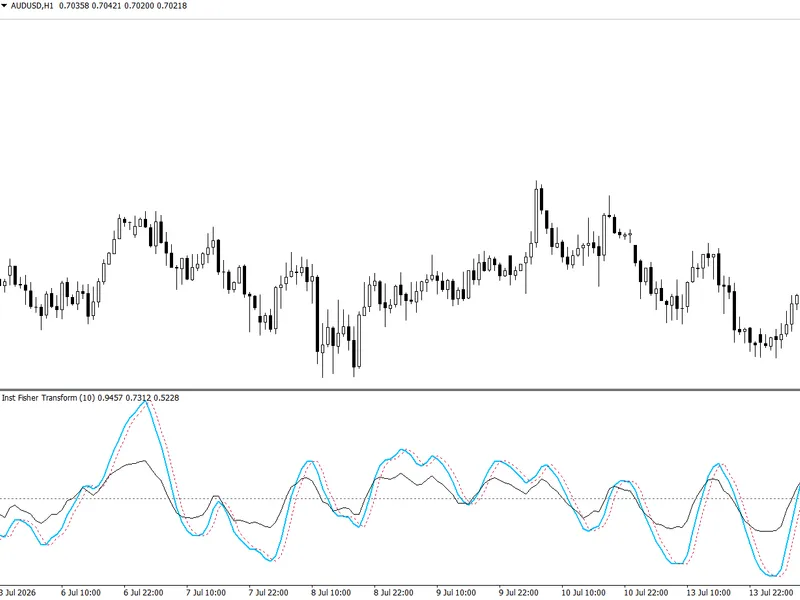
Related: Institutional Ehlers Fisher Transform: Advanced Price Normalization for MT4 - another powerful indicator for MetaTrader 4 traders.


Also recommended: External Range Liquidity (ERL) Indicator: Advanced Market Structure and Liquidity Analysis - similar indicator with strong performance on MetaTrader 4.


real
dorian ocsovszki -

check my blog out if you liked this post. thanks and enjoy!

my goal was to have a nice and easy email notification. mql[45] did not suit me, so i decided to code this in c#. basically i pass every variable from mql[45] to this dll. that is all.
you can find the dll in the zip archive.

this dll has only one function shown below:

#import

"sendadvancedemail.dll"
  
void
sendadvancedemail(
string
mailfrom,
string
mailfromname,
string
mailto,
string
mailcc,
string
mailsubject,
string
mailbodycontent,
string
mailbodytemplate,
string
mailpriority,
string
mailattachmentpath,
string
mailattachmentname,
string
smtpserver,
int
smtpport,
bool
smtpenablessl,
int
smtptimeout,
string
smtpusername,
string
smtppassword);
#import

sendadvancedemail.dll

using system;
using system.text;
using rgiesecke.dllexport;
using system.runtime.interopservices;
using system.net.mail;
using system.io;

namespace sendadvancedemail
{
    class csendadvancedemail
    {

        [dllexport("sendadvancedemail", callingconvention = callingconvention.stdcall)]
        public static void sendadvancedemail(
            [marshalas(unmanagedtype.lpwstr)] string mailfrom,
            [marshalas(unmanagedtype.lpwstr)] string mailfromname,
            [marshalas(unmanagedtype.lpwstr)] string mailto,
            [marshalas(unmanagedtype.lpwstr)] string mailccarray,
            [marshalas(unmanagedtype.lpwstr)] string mailsubject,
            [marshalas(unmanagedtype.lpwstr)] string mailbodycontent,
            [marshalas(unmanagedtype.lpwstr)] string mailbodytemplate,
            [marshalas(unmanagedtype.lpwstr)] string mailpriority,
            [marshalas(unmanagedtype.lpwstr)] string mailattachmentpath,
            [marshalas(unmanagedtype.lpwstr)] string mailattachmentname,
            [marshalas(unmanagedtype.lpwstr)] string smtpserver,
            int smtpport,
            bool smtpenablessl,
            int smtptimeout,
            [marshalas(unmanagedtype.lpwstr)] string smtpusername,
            [marshalas(unmanagedtype.lpwstr)] string smtppassword
            )

        {
            smtpclient client = new smtpclient();
            client.port = smtpport;
            client.host = smtpserver;
            client.enablessl = smtpenablessl;
            client.timeout = smtptimeout;
            client.deliverymethod = smtpdeliverymethod.network;
            client.usedefaultcredentials = false;
            client.credentials = new system.net.networkcredential(smtpusername,smtppassword);

            mailmessage mm = new mailmessage(mailfrom, mailto);
            mm.from = new mailaddress(mailfrom, mailfromname);
            mm.subject = mailsubject;

            streamreader reader = new streamreader(mailbodytemplate);
            string readfile = reader.readtoend();
            string strcontent = "";
            strcontent = readfile;

            strcontent = strcontent.replace("<%mailbodycontent%>", mailbodycontent);
            mm.body = strcontent.tostring();
            mm.isbodyhtml = true;

            switch (mailpriority)
            {
                case "low":
                    mm.priority = system.net.mail.mailpriority.low;
                    break;
                case "normal":
                    mm.priority = system.net.mail.mailpriority.normal;
                    break;
                case "high":
                    mm.priority = system.net.mail.mailpriority.high;
                    break;
                default:
                    mm.priority = system.net.mail.mailpriority.normal;
                    break;
            }

            mm.bodyencoding = utf8encoding.utf8;
            mm.deliverynotificationoptions = deliverynotificationoptions.onfailure;

            if (mailccarray != "") {
                string[] ccarray = mailccarray.split(';');
                foreach (string ccarrayitem in ccarray) {
                    mailaddress cc = new mailaddress(ccarrayitem);
                    mm.cc.add(cc);
                }
            }

            if (mailattachmentpath != null)
            {
                attachment attachment = new attachment(mailattachmentpath);
                attachment.name = mailattachmentname;
                mm.attachments.add(attachment);
            }

            client.send(mm);
        }

    }
}

sendadvancedemail.mq4 - example indicator to test dll for metatrader 4

when it runs it shoots a screenshot, calls the dll with this screenshot attached. it will send an email using sendadvancedemail.dll. you get the picture ( literally :) ).

//+------------------------------------------------------------------+
//|                                            sendadvancedemail.mq4 |
//|                                 copyright 2014, dorian ocsovszki |
//|                                                                  |
//+------------------------------------------------------------------+
#property copyright "copyright 2014, dorian ocsovszki"
#property link      ""
#property version   "1.00"
#property strict
#property indicator_chart_window

#import "sendadvancedemail.dll"
   void sendadvancedemail(string mailfrom, string mailfromname, string mailto, string mailcc, string mailsubject, string mailbodycontent, string mailbodytemplate, string mailpriority, string mailattachmentpath, string mailattachmentname, string smtpserver, int smtpport, bool smtpenablessl, int smtptimeout, string smtpusername, string smtppassword);
#import

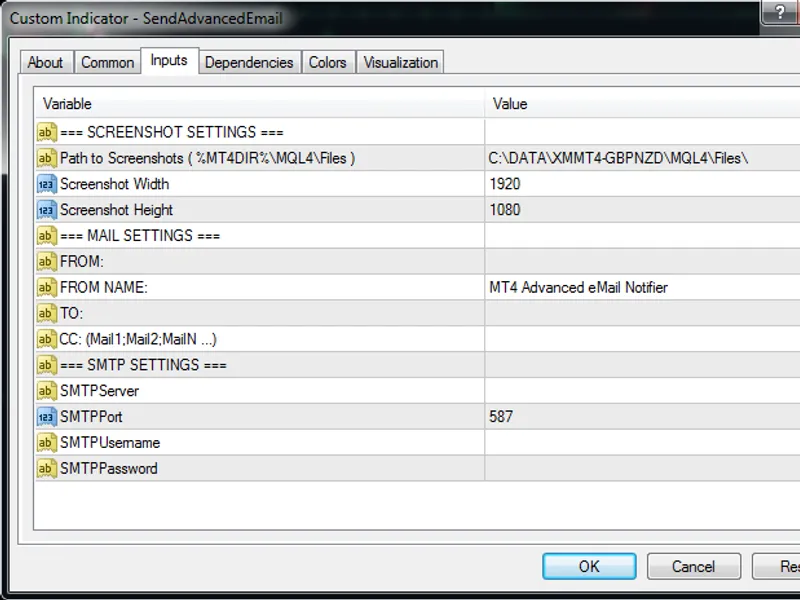
input string separator1 = null; //=== screenshot settings ===
input string pathtoscreenshots = "c:\\data\\%mt4dir%\\mql4\\files\\"; // path to screenshots ( %mt4dir%\mql4\files )
input int scwidth = 1920; // screenshot width
input int scheight = 1080; // screenshot height

input string separator2 = null; //=== mail settings ===
input string mailfrom = "";   // from:
input string mailfromname = "mt4 advanced email notifier"; // from name:
input string mailto = "";  // to:
input string mailcc = "";  // cc: (mail1;mail2;mailn ...)

input string separator3 = null; //=== smtp settings ===
input string smtpserver = "";
input int smtpport = 587;
input string smtpusername = "";
input string smtppassword = "";

int smtptimeout = 10000;
bool smtpenablessl = true;
string mailsubject = "mt4 notifier";
string mailbody = "mt4 notifier mailbody";
string mailattachmentpath = null;
string mailattachmentname = null;

//+------------------------------------------------------------------+
//| custom indicator initialization function                         |
//+------------------------------------------------------------------+
int oninit()
  {
//--- indicator buffers mapping

   string scfilenamever1 = stringconcatenate(symbol(), "_period", period(), "_", timeyear(timelocal()), "-", timemonth(timelocal()), "-", timeday(timelocal()), "_", padstring(doubletostr(timehour(timelocal()),0),"0",2), "-", padstring(doubletostr(timeminute(timelocal()),0),"0",2), "-", padstring(doubletostr(timeseconds(timelocal()),0),"0",2), ".gif" );

   if (shootscreenshot(scfilenamever1)) {
      sendadvancedemailsimple("[forex] new order opened", "2014.05.18 13:38:15.738    orderhistorytest gbpnzd,m15: #40320001 2014.05.08 18:21:20 buy limit 2.00 gbpnzd 1.92168 0.00000 0.00000 2014.05.15 19:40:55 1.94523 0.00 0.00 0.00 cancelled 0", "c:\\data\\xmmt4-gbpnzd\\mql4\\libraries\\mailbody.html", "normal", pathtoscreenshots + scfilenamever1, scfilenamever1);
   } else {
      print("error: screenshot failed. email event cancelled.");
   }
   
//---
   return(init_succeeded);
  }
//+------------------------------------------------------------------+
//| custom indicator iteration function                              |
//+------------------------------------------------------------------+
int oncalculate(const int rates_total,
                const int prev_calculated,
                const datetime &time[],
                const double &open[],
                const double &high[],
                const double &low[],
                const double &close[],
                const long &tick_volume[],
                const long &volume[],
                const int &spread[])
  {
//---
   
//--- return value of prev_calculated for next call
   return(rates_total);
  }
//+------------------------------------------------------------------+

void sendadvancedemailsimple(string fmailsubject, string fmailbodycontent, string fmailbodytemplate, string fmailpriority = "normal", string fmailattachmentpath = null, string fmailattachmentname = null)
{
   sendadvancedemail(mailfrom, mailfromname, mailto, mailcc, fmailsubject, fmailbodycontent, fmailbodytemplate, fmailpriority, fmailattachmentpath, fmailattachmentname, smtpserver, smtpport, smtpenablessl, smtptimeout, smtpusername, smtppassword);
}

bool shootscreenshot(string scfilename)
{
   bool status = windowscreenshot(scfilename,scwidth,scheight,-1,-1,-1);
   return (status);
}

string padstring(string tobepadded, string paddingchar, int paddinglength)
{
   while(stringlen(tobepadded) <  paddinglength)
   {
      tobepadded = stringconcatenate(paddingchar,tobepadded);
   }
   return (tobepadded);
}

known issues

mail priority does not want to work. i am not sure what is wrong with it it is a minor bug.

You may also like: advanced fractals indicator - excellent alternative for indicator users on MetaTrader 4.

Source Code

#property copyright "robotfx"
#property link "https://robotfx.org"
#property version   "1.00"
#property strict
#property indicator_chart_window
#import "sendadvancedemail.dll"
   void sendadvancedemail(string mailfrom, string mailfromname, string mailto, string mailcc, string mailsubject, string mailbodycontent, string mailbodytemplate, string mailpriority, string mailattachmentpath, string mailattachmentname, string smtpserver, int smtpport, bool smtpenablessl, int smtptimeout, string smtpusername, string smtppassword);
#import
input string separator1 = null; //=== screenshot settings ===
input string pathtoscreenshots = "c:\\data\\%mt4dir%\\mql4\\files\\"; // path to screenshots ( %mt4dir%\mql4\files )

.......

Leave your opinion, ask a question, share some knowledge

Limitations & Risk Warning

  • This tool is provided for educational and testing purposes only.
  • Past performance does not guarantee future results.
  • Trading involves substantial risk of loss. Use on a demo account first.
  • Results may vary depending on market conditions, broker, and settings.
  • We recommend thorough backtesting and forward testing before using with real funds.
© ROBOTFX Free educational tools by RobotFX. Use entirely at your own risk; we are not liable for any financial losses incurred.