Pattern Searching Zig Zag
This software component for MetaTrader 4 is built to enhance the capabilities of your trading environment. This technical indicator acts as a specialized analysis tool designed to visualize market data. It helps traders identify emerging trends, momentum shifts, and key support or resistance levels by plotting statistical calculations directly onto price charts.
How to Setup and Use Pattern Searching Zig Zag
1. Installation: Place your file in the MQL/Indicators folder via "Open Data Folder" and restart your terminal.
2. Loading: Find the indicator in the Navigator, drag it onto your chart, and configure the input parameters in the popup window.
3. Customization: Press Ctrl+I to open the indicator list, select your tool, and click "Properties" to change colors, levels, or visual styles.
4. Updating: Replace the old file in the Indicators folder with the new version and restart the platform to apply changes.
Frequently Asked Questions
Q: Why is my indicator not showing? A: Verify the file is in the MQL/Indicators folder, or try right-clicking the "Indicators" tree in the Navigator and clicking "Refresh."
Q: Do custom indicators slow down the platform? A: Too many complex indicators can impact performance; remove unused ones via the "Indicator List" (Ctrl+I).
Q: Can I use MT4 indicators on MT5? A: No, MQL4 and MQL5 are distinct languages; ensure the indicator is compiled specifically for your platform version.
Description & Settings
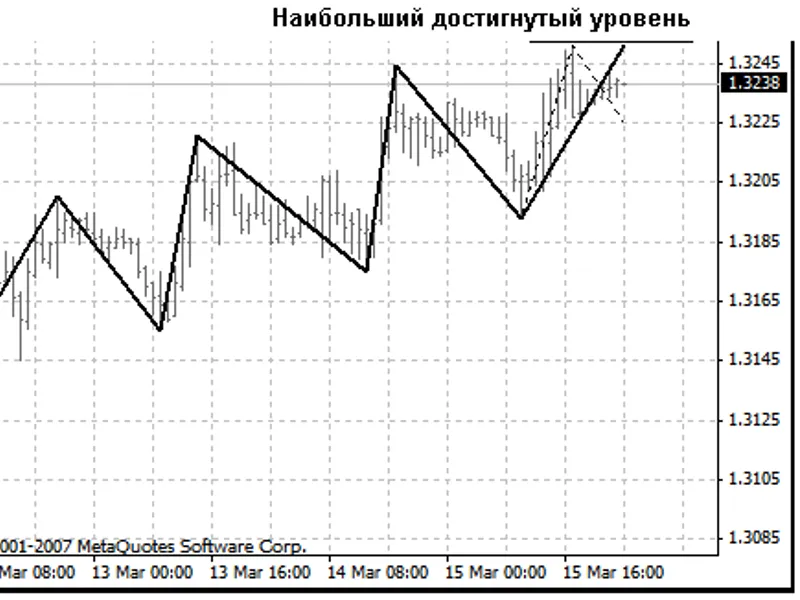
Special Features: 1. Search for ZZ breaks - only at the availability of a maximum or minimum of the approximating curve (Snake), other extremums should be skipped as irrelevant. 2. ZZ is calculated on a larger timeframe (file named SZZ_without_ZZ.mq4 is responsible for this) and built on a smaller one (file SZZReader.mq4). This, along with par.1, allows us to decrease the amount of "redrawings", as well as to avoid including "redundant" breaks and, partly, artificial stop-level touching extremums, into ZZ. Besides, the use of ZZ on a smaller timeframe will allow us to calculate the proportions between horizontal projections of sections more precisely. 3. The forming section of ZZ does not roll back from the reached levels, as the price does, but fixes them in order not to “distort” the proportions of shape development (in a case of turn, a new ZZ break will be formed on the latest of the reached levels, this development "alternative" is fixed with a "rubber-band").
All this allows us, on the one hand, to track the pattern development:
and, on the other hand, when fixing a possible new ZZ break, to estimate the possibility of pattern development completion comparing it with the turning shapes:
To work with the program, save both files, SZZ_without_ZZ.mq4 and SZZReader.mq4 in the indicators folder, open in MetaEditor and compile. The programs are developed for Tester, but they can also work in the real-time mode (I hope).
To start using them, load SZZReader in the current window. Parameter
SeniorTF
will set the timeframe for ZZ calculation. There must be available quotes from a larger timeframe to build ZZ on the selected timeframe.
For example, if we are going to calculate ZZ on Н1 and draw it on М5, we should start SZZReader in the М5 window, having specified
extern int SeniorTF=60;
Note: The attached indicators are basic ones, they only draw ZZ itself and a "rubber-band". Neither templates of turning shapes nor the function searching patterns, nor building and calculating of additional relations between ZZ breaks are available in these indicators.