Ilan 1. 6 Dynamic HT
This tool for MetaTrader 5 is specifically engineered to streamline your trading operations. This Expert Advisor serves as automated trading software. It is utilized to monitor financial markets and execute trades based on predefined algorithmic rules, enabling precise position management without the need for constant manual oversight.
How to Setup and Use Ilan 1. 6 Dynamic HT
1. Installation: Open the "File" menu, select "Open Data Folder," navigate to MQL/Experts, paste your file, and restart the terminal.
2. Activation: Drag the EA from the Navigator onto a chart, ensure "Allow live trading" is checked in the Common tab, and verify the AutoTrading button is green.
3. Optimization: Right-click your chart, choose "Expert List," click "Properties" to adjust inputs, and save your preferred setup as a set file for future use.
4. Maintenance: Regularly check the "Experts" tab in the terminal window to monitor trade logs and potential execution errors.
Frequently Asked Questions
Q: Why is my EA not opening trades? A: Check the "AutoTrading" button, ensure "Allow live trading" is enabled, and verify your broker allows automated trading on your account type.
Q: Can I run multiple EAs on one chart? A: No, each chart can only host one active EA; however, you can open multiple charts for different currency pairs to run several EAs.
Q: What does the "smiley face" icon mean? A: A smiley face in the top-right corner of the chart indicates the EA is successfully running; a frowny face means it is disabled.
Description & Settings
Unknown.
The underlying algorithm of Ilan Dynamic 1.6 HT is simple. It is based on price averaging, with a gradual increase in the volume of each trade.
For example, if after the opening of the first long position the price goes down and exceeds a certain range in points, a new long position with a larger volume will be opened.
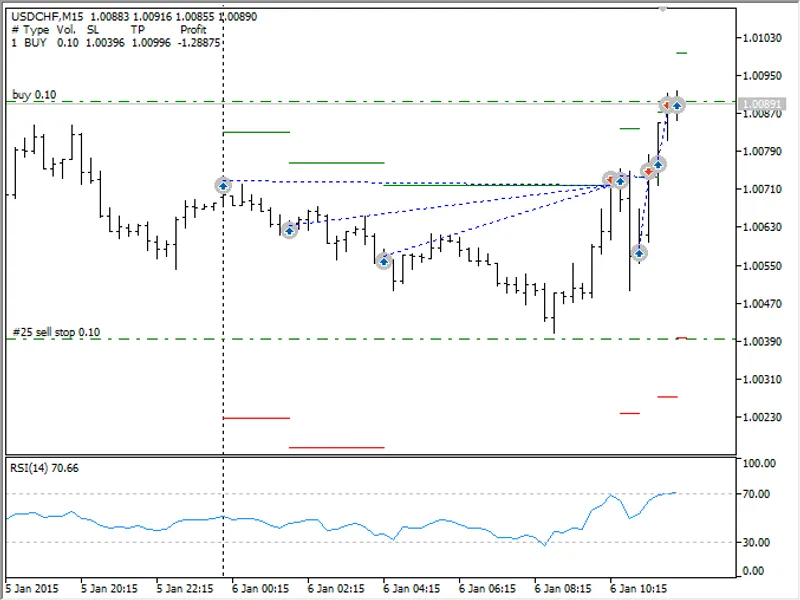
Thus, the average entry price of Ilan Dynamic stays close to the current market price. Therefore it is only needed to wait for a small price rollback and close all open positions with profit using TakeProfit. The overall picture of entries performed by Ilan 1.6 Dynamic corresponds to this screenshot of the MetaTrader 5 Strategy Tester:
As you can see, the price went against three Buy positions, but after a small rollback all the three positions were closed with a significant profit. The screenshot also shows the TakeProfit levels (green horizontal lines) and the StopLoss levels (red horizontal lines).
The Expert Advisor dynamically calculates the price levels for averaging depending on the price range between the high and low price within the range of the last few bars. The word "Dynamic" in its name points to this fact.
In addition to TakeProfit, Ilan 1.6 Dynamic allows the use of the classical StopLoss, trailing stop, exit by time, exit by the CCI indicator and exit by a specified Equity level of all trades.
Test results
Test results of Ilan 1.6 Dynamic can vary greatly depending on the selected timeframe, the testing period, the instrument, the broker and the initial conditions.
Therefore the EA requires a thoughtful selection of parameters and markets on which it will trade. Nevertheless, it is possible to get some consistent results even on a short history by using the default settings. Here is a typical equity and balance chart generated by the Expert Advisor:
Warning:
Floating profit/loss or Equity of Ilan 1.6 Dynamic can greatly differ from its balance, which is reflected on the chart. If the price moves without rollbacks, its Equity drops and eventually this trading strategy may lead to MarginCall and ruin your deposit. Work using Ilan 1.6 Dynamic only during flat. Use its lot exponent with caution!
Inputs and Parameters
Ilan 1.6 Dynamic is optimally configured by default. Most of its parameters are not used in this mode. However, you can customize the options.
Use the below table to configure the parameters to your liking.
Testing Modes. Optimal instruments and timeframes.
Ilan 1.6 Dynamic has been created to profit primarily from short-term price movements. Its optimum timeframe is a 15-minute chart (M15). The default settings should be used for 5-digit quotes. The EA supports testing in the following modes:
Every Tick. Test the EA in this mode if you are using trailing stop and want to have an accurate exit by TakeProfit, CCI Stop and EquityStop.
1 minute OHLC. This mode is a compromise that combines the high testing speed and accuracy of signals.
Open prices only. This is the fastest mode. Due to the virtualization, TakeProfit trigger only at the bar opening in this mode. CCI Stop and EquityStop trigger the same way. However, in many cases such an artificial approximation brings a better result than testing in the "Every tick" mode.
The algorithm of Ilan 1.6 Dynamic is successfully tested both in the normal mode and in the Random Delay mode.
Recommended symbols
It is recommended to use Ilan 1.6 Dynamic on all currency pairs that have long flat (no trend) periods. Good pairs are EURUSD, USDJPY, GBPUSD, USDCHF, EURCHF and other majors. The EA's settings are optimized for 5-digit quotes. If you want to use the EA on 4-digit pairs, first reduce the following parameters ten times:
DefaultPips - 12;
TakeProfit - 10;
slippage - 3;
StopLoss - 50.
How to compile the EA and make it work (important!)
Ilan 1.6 Dynamic actively uses a grid of orders and individual position management.
Therefore it requires a special virtualization which allows to work in the MetaTrader 5 environment similar to MetaTrader 4. To do this, it uses calls of the HedgeTerminalAPI library functions, working in the environment provided by the library. Read the article "" to learn how to use the library. If you want to modify the EA's trading logic, read this article to understand how the EA's code works.
Before you begin, you need to download the library on your computer. After that, copy the software modules used by the Expert Advisor on your computer (attached hereto). Here are the details of these modules.
ilan_1.6_dynamic_ht.mq5
- the basic module. It contains EA's trading logic. Tag "HT" in the name indicates that the Expert Advisor requires the HedgeTerminalAPI library for operation. This is the only file which should be saved to the folder terminal_data_folde\MQL5\Experts\, all other modules should be saved to terminal_data_folder\MQL5\Include\.
prototypes.mqh
- the file of prototypes required for interaction with the library.
drawhedgeposition.mqh
- traces (draws) EA's trades the way similar to MetaTrader 4 (see the first screenshot). Bi-directional positions are opened parallel to each other rather than following one after other like in MetaTrader 5.
environment.mqh
- the module of the Expert Advisor's trading environment. Collects all the necessary trading information required for the EA. It allows you to find out how many positions the EA has opened, what is their profit/loss and many other useful details.
testertable.mqh
- shows a simple table of all open positions of the Expert Advisor in the strategy tester. If you want the EA's positions to be displayed in the visual table in real time, use the panel.
indicators.mqh
- the module of indicators. It provides a simple interface to access the data of indicators.
tradestate.mqh
- the module of the Expert Advisor's trading state. In MetaTrader 5, it may take some time before an executed order is added to the order history, from which it can be analyzed. This module helps to correctly wait for an order to be added to history. How to visualize the operation of the Expert Advisor and control its operation through manual operation?
Ilan 1.6 Dynamic manages multiple unidirectional positions at a time. All these positions are displayed in MetaTrader 5 as one net position. On order to have easy access to the management of EA's positions, as well as to have its trading state at each time point, you should also install the demo panel . After its launch, it will display the positions of the Expert Advisor the following way:
For more details, please read the article .

![[EA] - Charles-1. 3. 7](/images/10771.webp)