










Maximus V X Lite
Info
The Maximus V X Lite is a Expert Advisor for MetaTrader 4 that i am sharing the fundamentals of the maximus expert advisor for public review. This EA identifies and trades based on price consolidations in the chart.
Usage
This tool is typically used for automated trading on major forex pairs and gold.
Platform
This Expert Advisor works exclusively on MetaTrader 4 (both build 600+ and newer versions).
Setup
Place the downloaded file in MQL4/Experts folder via File ? Open Data Folder in MetaTrader 4.
How to Install and Use Maximus V X Lite
1. Installation: Open the "File" menu, select "Open Data Folder," navigate to MQL/Experts, paste your file, and restart the terminal.
2. Activation: Drag the EA from the Navigator onto a chart, ensure "Allow live trading" is checked in the Common tab, and verify the AutoTrading button is green.
3. Optimization: Right-click your chart, choose "Expert List," click "Properties" to adjust inputs, and save your preferred setup as a set file for future use.
4. Maintenance: Regularly check the "Experts" tab in the terminal window to monitor trade logs and potential execution errors.
Frequently Asked Questions
Q: Why is my EA not opening trades? A: Check the "AutoTrading" button, ensure "Allow live trading" is enabled, and verify your broker allows automated trading on your account type.
Q: Can I run multiple EAs on one chart? A: No, each chart can only host one active EA; however, you can open multiple charts for different currency pairs to run several EAs.
Q: What does the "smiley face" icon mean? A: A smiley face in the top-right corner of the chart indicates the EA is successfully running; a frowny face means it is disabled.
What this tool does
I am sharing the fundamentals of the Maximus Expert Advisor for public review.
Typical Use Case
This Expert Advisor excels in automated trading and technical analysis on MetaTrader 4.
Compatible Platform & Setup
This Expert Advisor works on MetaTrader 4. Place the file in the MQL4/Experts folder and restart the terminal.
Description & Settings
Related: vr locker lite: a trading strategy for positive locks - another powerful expert for MetaTrader 4 traders.
I am sharing the fundamentals of the Maximus Expert Advisor for public review. This EA identifies and trades based on price consolidations in the chart. A price consolidation is a period when the market is stagnant and unable to make a clear move for a certain duration. Maximus identifies past consolidations, visually represents them on the chart, and initiates trades when the consolidation boundaries are breached.Also recommended: risk sizer panel lite mt4: simplified lot calculation and one-click trading - similar expert with strong performance on MetaTrader 4.
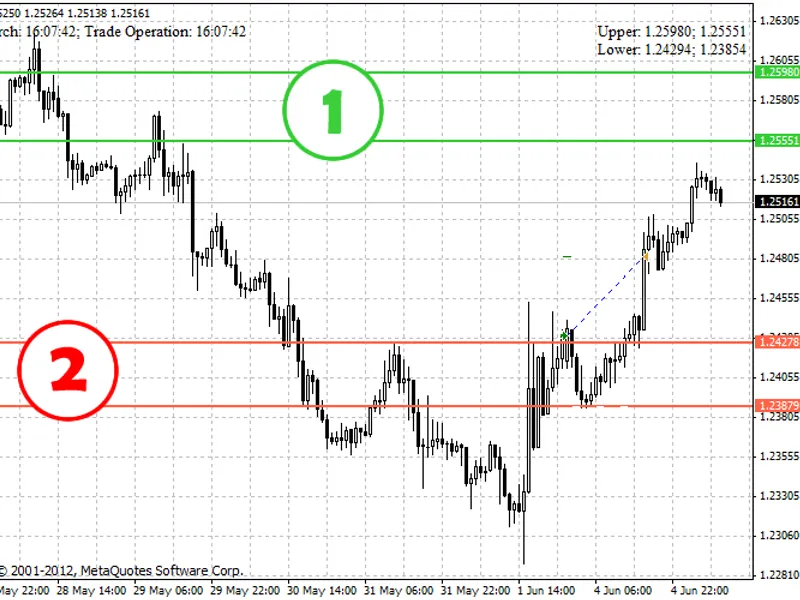
The EA uses two sets of lines to indicate buy and sell consolidations:
- Two green lines at the top represent a buy consolidation, which can trigger a sell deal in the opposite direction.
- Two red lines at the bottom represent a sell consolidation, which can trigger a buy deal.
White lines mark the beginning and end of a consolidation. If white lines are absent, the consolidation is based on pivot points (e.g., 1.2500, 1.2600, 1.2700 for EURUSD).
Key parameters:
- delay_open: Specifies the time interval after which a new deal can be opened (e.g., 1 - 15 minutes, 2 - 30 minutes), resetting after each trade operation.
- distance: The number of points from the consolidation at which a deal is triggered.
- period: The time duration after which a new consolidation search is initiated (in hours).
- range: The minimum range between lower and upper consolidations.
- risk: This parameter determines the lot size; higher risk values result in smaller lots.
- stop_loss: This should not be modified.
- trail: Typically, this should have similar values as the range parameter.
Limitations:
- The code is designed for demo accounts and works exclusively with EURUSD.
- It relies on global variables that should be cleared before each new session.
- Several essential functions are missing for a complete trading logic, including automatic loss calculation and compensation, standard deviation-based peak tracking, automatic optimization of trading parameters, 'add-on' and 'against the grain' deals, sounds, and error printing.
- The code contains intentional errors and should not be used on live accounts, even with modifications.
- It is compatible only with 5-digit deposit accounts.
Brainstorm:
I aim to discuss consolidation-based trading and welcome suggestions for improvement. For instance, the chart illustrates two different types of consolidations: 1) a consolidation within a long-term uptrend and 2) a consolidation during a downtrend that has exhausted. It might be beneficial to incorporate a type assignment mechanism and adjust lot sizes accordingly. Your insights are highly appreciated!
Miscellaneous:
I will not respond to internal messages. All discussions should take place openly on this page. I will not entertain requests related to 4-digit deposits, additional instruments, removing global variables, or basic explanations of consolidation concepts.
You may also like: Shuriken Lite Strategy Scoring System - excellent alternative for expert users on MetaTrader 4.
Source Code
#property copyright "robotfx"
extern int delay_open = 2;
extern int distance = 50;
extern int period = 20;
extern int range = 500;
extern int risk = 1500;
extern int stop_loss = 20000;
extern int trail = 500;
bool pth = false;
double all[][5],b[][2],l_max,l_min,u_max,u_min,s[][2],tprofit;
.......
⚠ Limitations & Risk Warning
- This tool is provided for educational and testing purposes only.
- Past performance does not guarantee future results.
- Trading involves substantial risk of loss. Use on a demo account first.
- Results may vary depending on market conditions, broker, and settings.
- We recommend thorough backtesting and forward testing before using with real funds.