
Show Trade Lines Service
Info
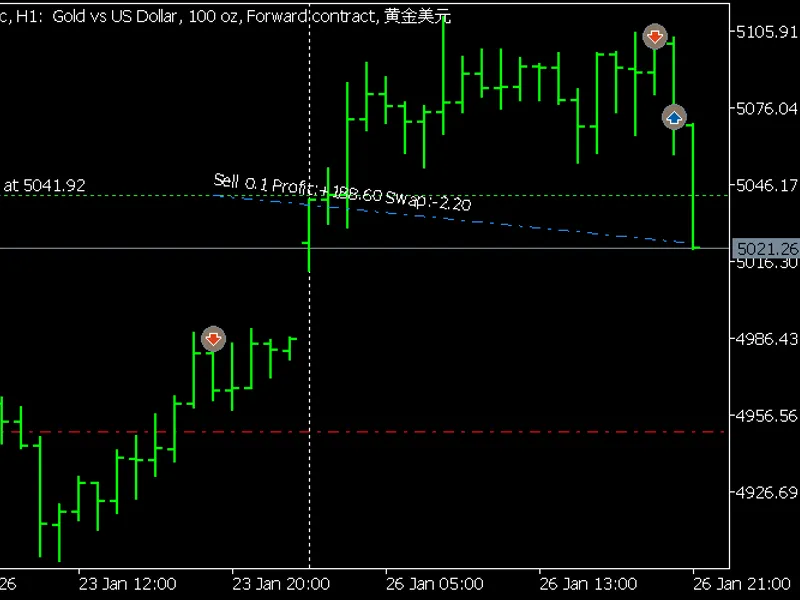
The Show Trade Lines Service is a Library for MetaTrader 5 that the service provides more descriptive and intuitive representation of open positions and related deals on charts than it's offered by the terminal by default. Specifically you can see the time(s) and price(s) of opening trade and optionally other deals, such as partial close or adding volume to a position in a netting account.
Usage
This tool is typically used for enhancing chart analysis and decision making.
Platform
This Library works exclusively on MetaTrader 5 (both build 600+ and newer versions).
Setup
Place the downloaded file in MQL5/Libraries folder via File ? Open Data Folder in MetaTrader 5.
What this tool does
The service provides more descriptive and intuitive representation of open positions and related deals on charts than it's offered by the terminal by default.
Typical Use Case
This Library excels in automated trading and technical analysis on MetaTrader 5.
Compatible Platform & Setup
This Library works on MetaTrader 5. Place the file in the MQL5/Libraries folder and restart the terminal.
Description & Settings
Related: Swap Monitor - another powerful services for MetaTrader 5 traders.
The service provides more descriptive and intuitive representation of open positions and related deals on charts than it's offered by the terminal by default. Specifically you can see the time(s) and price(s) of opening trade and optionally other deals, such as partial close or adding volume to a position in a netting account.
Also recommended: VP S Trailing Stop Service - similar services with strong performance on MetaTrader 5.
The service monitors account state for open positions and creates graphical objects on an active chart (shown on top or maximized) if its symbol corresponds to at least one of existing positions.Inputs
TimeInterval (seconds) - 5 by default;
LinePrefix - common prefix for on chart objects, such as "TradeTag";
LineColorProfit - color for lines of profitable positions (clrDodgerBlue);
LineColorLoss - color for lines of lossy positions (clrCoral);
LineStyle - drawing style of lines (STYLE_DASHDOT);
LineWidth - width of lines (1);
LineType - type of lines - OBJ_TREND (default) or OBJ_VLINE;
ShowDeals - option to show arrows for deals (true);
KeepLinesOnCharts - option to keep graphical objects on chart after position is closed (false);
Logging - output or not main events to log (true);
The service registers all objects added on chart in the list of the global variables. This helps the program to detect which objects to remove when a position is closed and KeepLinesOnCharts is false. If KeepLinesOnCharts is true, the service keeps corresponding objects on charts (they are left for manual control by user), but in any case the relevant global variables (describing closed positions and their deals) are removed upon position closure.
All objects receive textual descriptions with most important properties of positions and deals, which can be seen in tooltips (on mouse hover) and right on the chart (if corresponding option is enabled in the chart's settings).
You may also like: EV Z Reader - excellent alternative for services users on MetaTrader 5.
⚠ Limitations & Risk Warning
- This tool is provided for educational and testing purposes only.
- Past performance does not guarantee future results.
- Trading involves substantial risk of loss. Use on a demo account first.
- Results may vary depending on market conditions, broker, and settings.
- We recommend thorough backtesting and forward testing before using with real funds.