







symbol summary viewer
Info
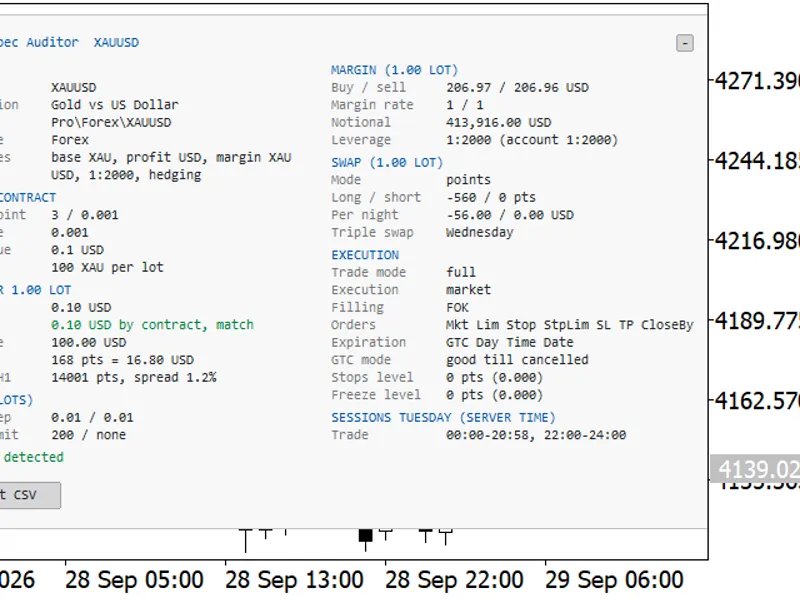
The symbol summary viewer is a Script for MetaTrader 5 that symbol summary viewerimplementation featuresthe symbol summary viewer operates within a dedicated window inside the mt5 terminal. this service can remain active, continuously monitoring chart changes.
Usage
This tool is typically used for enhancing chart analysis and decision making.
Platform
This Script works exclusively on MetaTrader 5 (both build 600+ and newer versions).
Setup
Place the downloaded file in MQL5/Scripts folder via File ? Open Data Folder in MetaTrader 5.
How to Install and Use symbol summary viewer
1. Installation: Move your script file into the MQL/Scripts directory and restart the platform.
2. Execution: Drag the script onto a chart; it will perform a one-time action, such as closing all open orders or clearing chart objects.
3. Editing: Use MetaEditor (F4) to modify code, click "Compile," and verify no errors appear in the terminal before running.
4. Removing: Scripts stop automatically, but you can remove them manually by right-clicking the chart and choosing "Remove Script."
Frequently Asked Questions
Q: How are scripts different from EAs? A: Scripts execute a single action and then stop; EAs monitor the market and trade continuously.
Q: Can I assign a hotkey to a script? A: Yes, right-click the script in the Navigator, select "Set Hotkey," and define your preferred keyboard shortcut.
Q: Why did my script stop? A: Scripts are designed to stop immediately after finishing their programmed command; this is normal behavior.
What this tool does
symbol summary viewerimplementation featuresthe symbol summary viewer operates within a dedicated window inside the mt5 terminal.
Typical Use Case
This Script excels in automated trading and technical analysis on MetaTrader 5.
Compatible Platform & Setup
This Script works on MetaTrader 5. Place the file in the MQL5/Scripts folder and restart the terminal.
Description & Settings
Related: Trade Environment Check: Account Mode, Symbol Rules, and Open Positions Report - another powerful script for MetaTrader 5 traders.
symbol summary viewerAlso recommended: Export Symbol Specifications to CSV (Volume Step, Fill Mode, Stops Level) - similar script with strong performance on MetaTrader 5.
implementation features
the symbol summary viewer operates within a dedicated window inside the mt5 terminal.
this service can remain active, continuously monitoring chart changes.
the report language can be switched without needing to restart the viewer window.
the user interface is designed for a compact yet informative display of data.
how to use
place the service file in the mql5\services folder.
compile the file using metaeditor.
launch the service from the navigator window.
upon launching, a separate viewer window will appear.
change the symbol or timeframe on the observed chart, and the report will update automatically.
utilize the following buttons:
left / right - for horizontal scrolling.
up / down - for vertical scrolling.
ru / en - to switch between russian and english languages.
close - to exit the viewer and terminate the service.
usefulness
this service is beneficial because it:
consolidates essential symbol information into a single location.
eliminates the need for users to open multiple specification windows.
facilitates quick switching between symbols and timeframes.
displays both server-side values and practical calculations.
presents information in a clear and easily readable report format.
main features
operates in a separate viewer window within mt5.
allows for window resizing.
supports vertical and horizontal text scrolling.
includes control buttons directly within the viewer.
supports both russian and english languages.
enables instant ru/en switching without closing the window.
automatically selects the starting language based on the terminal's language setting.
automatically updates the report when the observed chart's symbol or timeframe is changed.
operates continuously without requiring constant manual restarts.
report contents
the report contains:
brief symbol information.
current bid and ask prices.
point value, tick size, digits, and spread.
current day's low and high prices.
trading restrictions and allowed trading modes.
volume parameters and limits.
monetary value of price movements in the account currency.
margin and leverage estimations.
swap and rollover information.
volatility and time parameters.
account and trading environment data.
You may also like: Broker Basket Preflight: Read-Only Diagnostics for Multi-Symbol Broker Configurations - excellent alternative for script users on MetaTrader 5.
Source Code
#property copyright "robotfx"
#property version   "4.11"
#property strict
#property service
input long inpsourcechartid = 0;
input int  inppollmilliseconds = 150;
#define adr_auto_count 5
int adr_auto_periods[adr_auto_count] = {9,14,20,50,200};
#define ai_prefix "aiv400svc_"
color clr_bg           = c'8,13,20';
.......
⚠ Limitations & Risk Warning
- This tool is provided for educational and testing purposes only.
- Past performance does not guarantee future results.
- Trading involves substantial risk of loss. Use on a demo account first.
- Results may vary depending on market conditions, broker, and settings.
- We recommend thorough backtesting and forward testing before using with real funds.