









Cointegration Testing and Analysis in MT5 with Pair Scanner
Info
The Cointegration Testing and Analysis in MT5 with Pair Scanner is a Script for MetaTrader 5 that cointegration. mqh analyzes if price series share a long-term relationship, a fundamental concept for pairs and spread trading.
Usage
This tool is typically used for enhancing chart analysis and decision making.
Platform
This Script works exclusively on MetaTrader 5 (both build 600+ and newer versions).
Setup
Place the downloaded file in MQL5/Scripts folder via File ? Open Data Folder in MetaTrader 5.
How to Install and Use Cointegration Testing and Analysis in MT5 with Pair Scanner
1. Installation: Move your script file into the MQL/Scripts directory and restart the platform.
2. Execution: Drag the script onto a chart; it will perform a one-time action, such as closing all open orders or clearing chart objects.
3. Editing: Use MetaEditor (F4) to modify code, click "Compile," and verify no errors appear in the terminal before running.
4. Removing: Scripts stop automatically, but you can remove them manually by right-clicking the chart and choosing "Remove Script."
Frequently Asked Questions
Q: How are scripts different from EAs? A: Scripts execute a single action and then stop; EAs monitor the market and trade continuously.
Q: Can I assign a hotkey to a script? A: Yes, right-click the script in the Navigator, select "Set Hotkey," and define your preferred keyboard shortcut.
Q: Why did my script stop? A: Scripts are designed to stop immediately after finishing their programmed command; this is normal behavior.
What this tool does
Cointegration.
Typical Use Case
This Script excels in automated trading and technical analysis on MetaTrader 5.
Compatible Platform & Setup
This Script works on MetaTrader 5. Place the file in the MQL5/Scripts folder and restart the terminal.
Description & Settings
Related: Comprehensive Stationarity Testing Suite for MetaTrader - another powerful script for MetaTrader 5 traders.
Cointegration.mqh analyzes if price series share a long-term relationship, a fundamental concept for pairs and spread trading.Also recommended: OHLC Backtesting Accuracy: Determining the Critical Stop Distance - similar script with strong performance on MetaTrader 5.
This tool includes:
- The Augmented Dickey-Fuller (ADF) unit root test.
- The Engle-Granger test for analyzing two to six series.
- The Johansen trace and maximum eigenvalue tests.
It provides p-values and critical values, along with calculations for the spread, its half-life of mean reversion, and its z-score. No external DLLs are required.
Usage Example
Include the library:
#include <Cointegration\Cointegration.mqh>
Define price vectors:
vector a, b; // log prices of two symbols on the same bars
// ... fill a and b ...
Engle-Granger Test:
matrix x(a.Size(), 1);
x.Col(b, 0);
SEngleGrangerResult eg;
vector coef;
if(CCointegration::EngleGranger(a, x, eg, coef) && eg.pvalue < 0.05)
{
vector spread = CCointegration::Spread(a, x, coef);
double half = CCointegration::HalfLife(spread); // periods
double z = CCointegration::ZScore(spread, 60);
}
ADF Test:
SAdfResult adf;
CCointegration::Adf(a, adf, COINT_TREND_CONSTANT, COINT_LAGS_AIC); // adf.stat, adf.pvalue, adf.lags
Johansen Test:
matrix prices(a.Size(), 2);
prices.Col(a, 0);
prices.Col(b, 1);
CJohansenResult jo;
CCointegration::Johansen(prices, 0, 1, jo); // constant, 1 lagged difference
int rank = jo.Rank(); // number of relations by the trace test at 95%
Features Included
Adf Test:
Supports no constant, constant, linear trend, or quadratic trend. Lag selection can be fixed or determined by AIC, BIC, or the t-statistic of the last lag, using a default maximum based on statsmodels (12 * (n/100)^(1/4)). The lag search employs a single QR factorization for each lag length.
Engle-Granger Test:
Performs least squares regression of the first series on others and the trend, followed by an ADF test without a constant on the residuals. It provides p-values and critical values for cointegration, which vary based on the number of series.
Johansen Test:
Accommodates no deterministic term, constant, or linear trend, and any number of lagged differences. It calculates eigenvalues, cointegrating vectors (normalized such that v'Skk*v = 1, or with the first element as 1 using Vector()), trace and maximum eigenvalue statistics, and critical values at 90%, 95%, and 99% for up to 12 series, along with the rank. The eigenproblem is solved as a symmetric one after a Cholesky factorization.
MacKinnonP and MacKinnonCrit:
Approximate p-values (MacKinnon 1994) and finite-sample critical values (MacKinnon 2010) are available for any Dickey-Fuller type statistic.
Ols:
Least squares estimation is performed using Householder QR decomposition with t-statistics.
Example Script: PairScanner.mq5
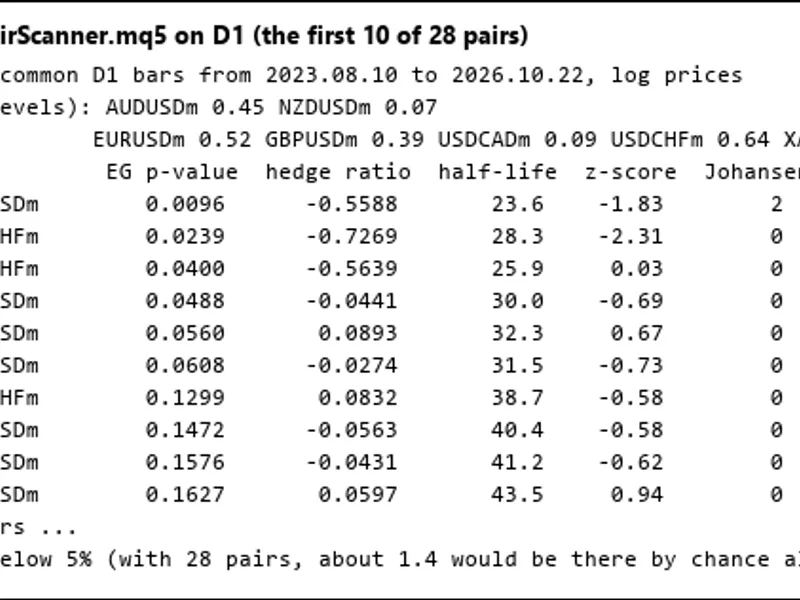
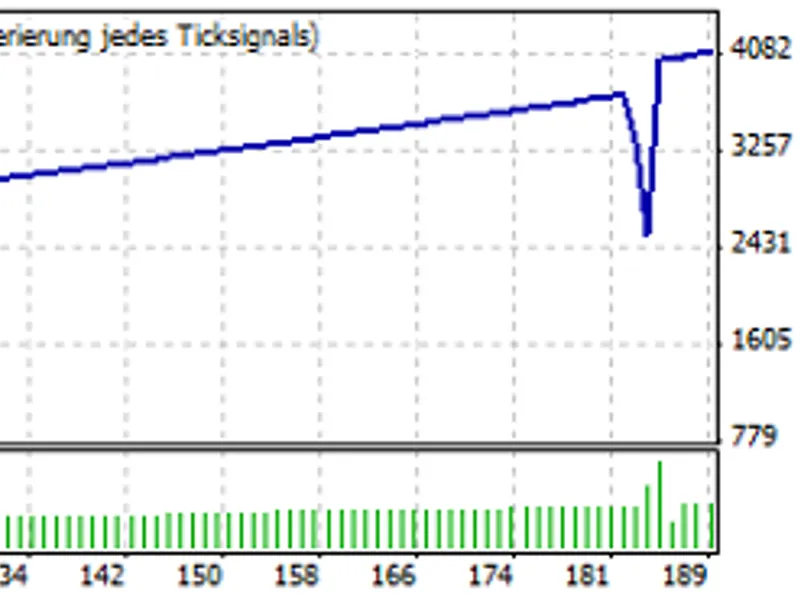
The PairScanner.mq5 script identifies a list of symbols, aligns their trading history, and prints the ADF p-value for each. It then systematically tests every possible pair in both directions, sorting and displaying results by the Engle-Granger p-value. Included are the hedge ratio, half-life of the spread, z-score, and Johansen rank (see picture 1). The script also estimates the number of pairs expected to pass the 5% significance level by chance; for instance, with 28 pairs, approximately 1.4 would be expected. The spread data for the top-performing pair can be exported to a CSV file (see picture 2).
Note on Johansen Rank:
A Johansen rank of 2 for a pair indicates that both individual series appear stationary based on ADF tests (e.g., NZDUSD and USDCAD with ADF p-values of 0.07 and 0.09 respectively), not that the pair exhibits two distinct cointegrating relationships.
Verification and Performance
The library has been rigorously checked against statsmodels version 0.15 (using adfuller, coint, coint_johansen, mackinnonp, mackinnoncrit) across six datasets:
- Three simulated systems with 0, 1, and 2 cointegrating relations.
- Two stationary series (gold and silver).
- USDJPY and GBPJPY on H4 timeframe.
Results:
- 240 ADF tests (across 4 trend types x 4 lag selection rules) yielded identical lag counts and observation numbers, with statistics matching within 1e-11 and identical critical values.
- 72 Engle-Granger tests showed statistics within 1e-11 and coefficients within 6e-11.
- 72 Johansen tests (across 3 deterministic term types x 4 lag rules) demonstrated eigenvalues, statistics, and vectors matching within 1e-9, and identical ranks.
For tests involving a quadratic trend, statsmodels' regression (which uses t^2 up to 9 million) can become ill-conditioned, leading to statistics differing by up to 5e-8. Cointegration.mqh implements internal scaling for the trend, ensuring an exact, well-conditioned computation matching within 1e-12.
On the pair illustrated in picture 2, the calculated p-value, hedge ratio, half-life, and z-score precisely match those computed by statsmodels using the same price data.
Performance benchmarks:
- An ADF test on 2,000 data points takes approximately 1.5 milliseconds.
- A Johansen test takes approximately 0.5 milliseconds.
File Locations
Place Cointegration.mqh and CointegrationTables.mqh in your MQL5\Include\Cointegration directory.
Place PairScanner.mq5 in your MQL5\Scripts\Cointegration directory.
You may also like: save and show the objects of testing chart - excellent alternative for script users on MetaTrader 5.
Source Code
#property copyright "RobotFX"
#property version     "1.00"
#property script_show_inputs
#include <Cointegration\Cointegration.mqh>
input string          InpSymbols = "AUDUSD,NZDUSD,EURUSD,GBPUSD,USDCAD,USDCHF,XAUUSD,XAGUSD";
input ENUM_TIMEFRAMES InpPeriod  = PERIOD_D1;
input int             InpBars    = 1000;
input bool            InpLog     = true;
input int             InpZWindow = 60;
input string          InpCsv     = "";
.......
⚠ Limitations & Risk Warning
- This tool is provided for educational and testing purposes only.
- Past performance does not guarantee future results.
- Trading involves substantial risk of loss. Use on a demo account first.
- Results may vary depending on market conditions, broker, and settings.
- We recommend thorough backtesting and forward testing before using with real funds.