











statistical arbitrage and cointegration spread z-score for institutional trading
Info
The statistical arbitrage and cointegration spread z-score for institutional trading is a Indicator for MetaTrader 5 that the limitations of directional trading and simple correlationretail trading algorithms often focus on predicting market direction, leaving capital vulnerable to unforeseen macroeconomic events. a common approach to address this is using simple 'correlation' between pairs, such as eurusd and gbpusd.
Usage
This tool is typically used for enhancing chart analysis and decision making.
Platform
This Indicator works exclusively on MetaTrader 5 (both build 600+ and newer versions).
Setup
Place the downloaded file in MQL5/Indicators folder via File ? Open Data Folder in MetaTrader 5.
How to Install and Use statistical arbitrage and cointegration spread z-score for institutional trading
1. Installation: Place your file in the MQL/Indicators folder via "Open Data Folder" and restart your terminal.
2. Loading: Find the indicator in the Navigator, drag it onto your chart, and configure the input parameters in the popup window.
3. Customization: Press Ctrl+I to open the indicator list, select your tool, and click "Properties" to change colors, levels, or visual styles.
4. Updating: Replace the old file in the Indicators folder with the new version and restart the platform to apply changes.
Frequently Asked Questions
Q: Why is my indicator not showing? A: Verify the file is in the MQL/Indicators folder, or try right-clicking the "Indicators" tree in the Navigator and clicking "Refresh."
Q: Do custom indicators slow down the platform? A: Too many complex indicators can impact performance; remove unused ones via the "Indicator List" (Ctrl+I).
Q: Can I use MT4 indicators on MT5? A: No, MQL4 and MQL5 are distinct languages; ensure the indicator is compiled specifically for your platform version.
What this tool does
the limitations of directional trading and simple correlationretail trading algorithms often focus on predicting market direction, leaving capital vulnerable to unforeseen macroeconomic events.
Typical Use Case
This Indicator excels in automated trading and technical analysis on MetaTrader 5.
Compatible Platform & Setup
This Indicator works on MetaTrader 5. Place the file in the MQL5/Indicators folder and restart the terminal.
Description & Settings
Related: statistical reversion with institutional z-score - another powerful indicator for MetaTrader 5 traders.
the limitations of directional trading and simple correlationAlso recommended: arbitrage ii - similar indicator with strong performance on MetaTrader 5.
retail trading algorithms often focus on predicting market direction, leaving capital vulnerable to unforeseen macroeconomic events. a common approach to address this is using simple 'correlation' between pairs, such as eurusd and gbpusd. however, correlation is an unreliable trading metric, as two assets can be highly correlated yet exhibit an ever-widening spread.
the institutional advantage: cointegration and statistical arbitrage
leading quantitative hedge funds employ market neutral strategies via statistical arbitrage (statarb). unlike directional trading, they leverage cointegration, a mathematical concept guaranteeing that the spread between historically related assets will eventually return to its mean.
introducing the institutional statarb spread z-score
this advanced portfolio tool is now accessible within your mql5 terminal.
core quantitative architecture
logarithmic spread calculation:
the system employs logarithmic spread calculation, computing the natural logarithm differential (log(asset a) - log(asset b)) to standardize volatility across assets with varying price scales, such as gold and silver.
dynamic spread z-score:
by applying a rolling standard deviation (z-score) to the spread, this unbounded metric precisely indicates how many standard deviations the current spread deviates from its historical norm.
multi-asset time synchronization:
mql5's native handling ensures precise tick-by-tick spread calculation by synchronizing time-series data between the chart symbol and the secondary injected symbol, even with missing broker data for one asset.
executing a pairs trade (market neutral)
indicator attachment:
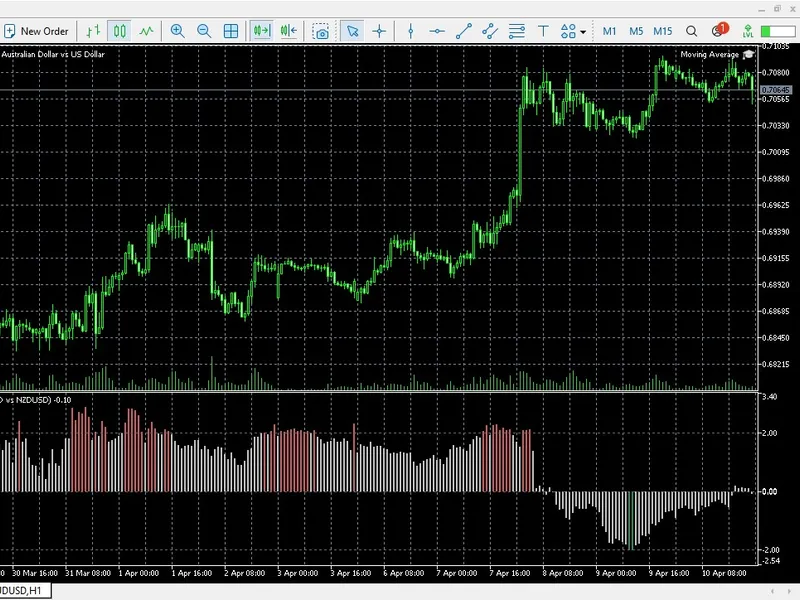
apply the indicator to an asset, such as audusd, and configure the naturally cointegrated pair in the settings, e.g., nzdusd.
divergence identification:
monitor the spread z-score, and when it surpasses critical thresholds like +2.5 or -2.5, take action.
arbitrage execution:
if the z-score reaches +2.5 (spread too wide), sell asset a and buy asset b. conversely, if it hits -2.5 (spread too narrow), buy asset a and sell asset b.
trade closure:
simultaneously close both legs when the z-score returns to 0.0 (the mean).
You may also like: statistical characteristics - excellent alternative for indicator users on MetaTrader 5.
Source Code
#property copyright "robotfx"
#property link "https://robotfx.org"
#property version   "1.00"
#property indicator_separate_window
#property indicator_buffers 3
#property indicator_plots   1
#property indicator_label1  "spread z-score"
#property indicator_type1   draw_color_histogram
#property indicator_color1  clrsilver, clrseagreen, clrindianred
#property indicator_style1  style_solid
.......
⚠ Limitations & Risk Warning
- This tool is provided for educational and testing purposes only.
- Past performance does not guarantee future results.
- Trading involves substantial risk of loss. Use on a demo account first.
- Results may vary depending on market conditions, broker, and settings.
- We recommend thorough backtesting and forward testing before using with real funds.