

math ticker - tick generator in mathematical mode
Info
The math ticker - tick generator in mathematical mode is a Library for MetaTrader 5 that alternative for eatomath libraryrecords ticks in real ticks mode and reads them in maths mode calling your strategy with each recorded tick. differences from eatomath: pros:the code is shorter and simpler, only 5 plug-in libraries.
Usage
This tool is typically used for enhancing chart analysis and decision making.
Platform
This Library works exclusively on MetaTrader 5 (both build 600+ and newer versions).
Setup
Place the downloaded file in MQL5/Libraries folder via File ? Open Data Folder in MetaTrader 5.
How to Install and Use math ticker - tick generator in mathematical mode
1. Storage: Place library files in the MQL/Libraries directory to ensure they are accessible to your projects.
2. Implementation: Include the library in your code using the #import directive, ensuring you match the exact function names and parameters.
3. Compilation: Ensure the library is present in the directory before you compile your main EA or script, as the compiler links them during this phase.
4. Management: Keep libraries organized in sub-folders if you manage many custom functions to maintain a clean project structure.
Frequently Asked Questions
Q: What is a library file used for? A: Libraries store reusable code modules, allowing you to centralize common logic used by multiple EAs or indicators.
Q: Is a library executable? A: No, libraries are non-executable files containing functions; they must be imported into an EA, indicator, or script to function.
Q: Can I update a library while the platform is running? A: You should compile your EA or script after updating a library to ensure the latest code changes are integrated.
What this tool does
alternative for eatomath libraryrecords ticks in real ticks mode and reads them in maths mode calling your strategy with each recorded tick.
Typical Use Case
This Library excels in automated trading and technical analysis on MetaTrader 5.
Compatible Platform & Setup
This Library works on MetaTrader 5. Place the file in the MQL5/Libraries folder and restart the terminal.
Description & Settings
Related: a cross-platform library of original mathematical functions - another powerful library for MetaTrader 5 traders.
Also recommended: math utils - similar library with strong performance on MetaTrader 5.
alternative for eatomath libraryrecords ticks in real ticks mode and reads them in maths mode calling your strategy with each recorded tick.
differences from eatomath:
pros:
the code is shorter and simpler, only 5 plug-in libraries. if you need to modify it, it will be easier to understand.
data are compressed better due to a different algorithm . when saving only time_msc, ask and bid - up to 86% of ticks are saved as 3 char numbers, i.e. 3 bytes. average size per tick = 3.266 bytes when saving btcusdt tick data for 2023. when saving with volumes average = 4.835 bytes. and when saving full tick = 8.439 bytes. below is the table with the test results. additionally, you can use the built-in zip archiving. the file size is reduced by 2 times. such a file takes 245 mb, while the sum of file sizes in .tcs for 2023 takes 364 mb, i.e. compression is 1.5 times better than in mq. and the speed of tick generation in the maths mode is ~2 times faster. see the table below.
there are more options of saving:
the file can be saved to either ssd or ram disc by making a link in the system. files can take up a lot of space and ram drive may not be enough, so you can choose to save to the primary drive. ssd and ram read speeds are about the same, i've read that the ssd caches up to 5% of the full capacity of the most frequently requested data. there is a bit of wear and tear on the ssd when reading, as you have to overwrite memory cells more often than when storing without reading. i don't know the exact numbers, but for example 1 overwrite per 10 reads or per 1000 reads.... but this is of little significance compared to the wear of the disc by the mq tester.
cons:
connecting virtual has to be done yourself (instructions here , eatomath will pass your strategy to virtual itself.
the speed for the bidask variant is comparable to eatomath. other variants are slower because they either contain more data or have additional zip compression.
usage features:
you cannot use the standard functions
symbol()
,
digits(
) (=4),
point()
(=0.0001) in the strategy, as they will produce default values, not related to the symbol under test. instead of them use
_symbol
,
_digits
,
_point
which are overridden on values read from the file. also, new constants
_ticksize
and
_tickvalue
with values from the recorded symbol have been added - they are necessary for correct calculation of profit, commission and swaps in the deposit currency.
the order of work with the testing period selected when saving ticks:
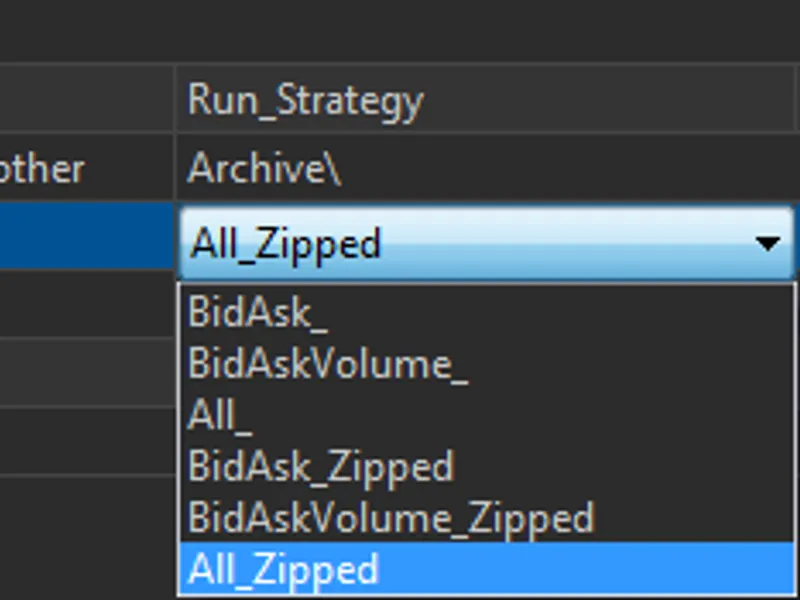
select the testing mode by real ticks, the required instrument and testing dates. set the task variable to one of save and select the option of saving ticks. start the tester. after that a file with ticks will be created in the specified folder.
set the task variable to
run_strategy
. you can leave the mode by real ticks to compare later. start the tester. calculations are made by real ticks, not from the file. get the result.
set the testing mode to mathematical calculations. start the tester. calculations are made by ticks from the file. compare with the result from step 2. it should be the same, but several times faster.
the order of work with the archive:
create an archive with all ticks from the history:
select the mode of testing by real ticks, the required instrument. set testing dates from <= first tick to >= last tick in the available history. set the task variable to one of
save...to_archive
and select the option of saving ticks. start the tester. after that a folder with the name of the tool will be created in the specified folder where the files with ticks for each year will be saved. the last year can be overwritten as necessary, for this purpose select only the current year in the dates to avoid overwriting the previous years.
set the test mode to maths. set the task variable to
run_strategy_fron_archive
.
in the
mathticker: using the full archive
group, set: instrument - to instrument name (must match the name of the folder where its ticks are stored), start and end date of the test.
start the tester. calculations are made by ticks from the required annual files. due to the fact that the work is done not with one file, but with several, it is a little slower, because it takes time to open and close files. for example, instead of 1.7 seconds it will take 2.7 seconds to generate ticks for 3 years.
the sum of ticks obtained by the expert advisor below may differ by a small value of one first tick. when testing on custom characters in real ticks mode, the first tick produces only ask or bid (if you didn't save both). when testing from archive, they are both restored from previous ticks.
an example of the simplest expert advisor to estimate the speed of work:
you can toggle 1 setting:
//#define restoreflags // восстановить флаги тика из изменения ask, bid, volume - добавит 7% к времени генерации тиков 931 вместо 869 мс
when generating ticks, statistics about tick compression will be displayed. below are printouts of statistics, volumes and time of tick generation.
----------- mq
tester without volumes
pass 1 returned result 4345830621850.311523 in
0:00:08.232
mq tester with volumes
pass 1 returned result 4345879117123.356445 in
0:00:07.962
the size of the .tcs files for the same year 2023:
all variants with zip, even full tick saving are more compact (3.5 to 1.5 times).
expert advisor example for virtual trading and report output:
this example creates 2 virtual machines with different trading. on even hours one tester is buying, the other one is selling on odd hours.
it is a complex example with 2 testers, it can be simplified if you need to work with one tester.
you can also select the mq tester and compare it with the results of virtual testers to control the correctness of calculations. only the commission may not coincide, because there are many different commissions, and only one variant is programmed in the virtual tester.
You may also like: ea to math - excellent alternative for library users on MetaTrader 5.
Source Code
яю
#property tester_no_cache
#include <Forester\MathTicker.mqh> // ?>4:;NG5=85 B>@3>2;8 2 <0B5<0B8G5A:>< @568<5
input group "Strategy"
input int rep=0;//Repeats for optimization
sinput bool AddVolumes=true;
void OnInit(){}
void OnTick(){
static MqlTick Tick;
if (SymbolInfoTick(_Symbol, Tick)){
.......
⚠ Limitations & Risk Warning
- This tool is provided for educational and testing purposes only.
- Past performance does not guarantee future results.
- Trading involves substantial risk of loss. Use on a demo account first.
- Results may vary depending on market conditions, broker, and settings.
- We recommend thorough backtesting and forward testing before using with real funds.