
Thrust Bar Indicator
Info
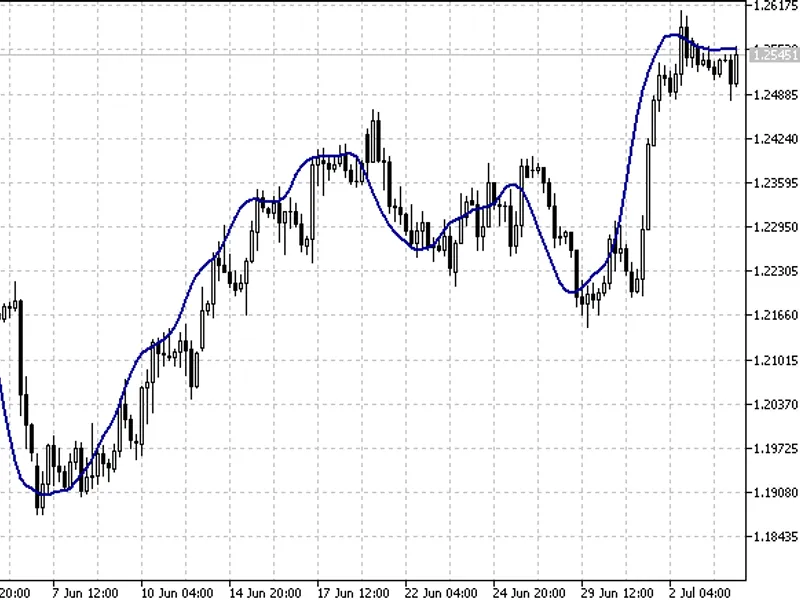
The Thrust Bar Indicator is a Indicator for MetaTrader 5 that the thrust bar indicator is a powerful tool for traders, designed to identify and highlight long 'persistent' bars on the price chart. This indicator offers a comprehensive set of configuration options to tailor its functionality to your trading strategy:Indicator Mode:- Choose the calculation mode: by ATR or by points.
Usage
This tool is typically used for enhancing chart analysis and decision making.
Platform
This Indicator works exclusively on MetaTrader 5 (both build 600+ and newer versions).
Setup
Place the downloaded file in MQL5/Indicators folder via File ? Open Data Folder in MetaTrader 5.
How to Install and Use Thrust Bar Indicator
1. Installation: Place your file in the MQL/Indicators folder via "Open Data Folder" and restart your terminal.
2. Loading: Find the indicator in the Navigator, drag it onto your chart, and configure the input parameters in the popup window.
3. Customization: Press Ctrl+I to open the indicator list, select your tool, and click "Properties" to change colors, levels, or visual styles.
4. Updating: Replace the old file in the Indicators folder with the new version and restart the platform to apply changes.
Frequently Asked Questions
Q: Why is my indicator not showing? A: Verify the file is in the MQL/Indicators folder, or try right-clicking the "Indicators" tree in the Navigator and clicking "Refresh."
Q: Do custom indicators slow down the platform? A: Too many complex indicators can impact performance; remove unused ones via the "Indicator List" (Ctrl+I).
Q: Can I use MT4 indicators on MT5? A: No, MQL4 and MQL5 are distinct languages; ensure the indicator is compiled specifically for your platform version.
What this tool does
The Thrust Bar indicator is a powerful tool for traders, designed to identify and highlight long 'persistent' bars on the price chart.
Typical Use Case
This Indicator excels in automated trading and technical analysis on MetaTrader 5.
Compatible Platform & Setup
This Indicator works on MetaTrader 5. Place the file in the MQL5/Indicators folder and restart the terminal.
Description & Settings
Related: Relative Volume (RVOL) Indicator in a Subwindow - another powerful indicator for MetaTrader 5 traders.
The Thrust Bar indicator is a powerful tool for traders, designed to identify and highlight long 'persistent' bars on the price chart.Also recommended: Warm-Up Meter: Quantifying Recursive Indicator Convergence - similar indicator with strong performance on MetaTrader 5.
This indicator offers a comprehensive set of configuration options to tailor its functionality to your trading strategy:
Indicator Mode:
- Choose the calculation mode: by ATR or by points.
ATR:
- Set the ATR (Average True Range) value for the indicator.
Points:
- Alternatively, calculate using the bar size in points.
ATR Period:
- Define the ATR calculation period when using the ATR mode.
ATR Multiplier/Size Candle in Points:
- Specify the ATR multiplier for ATR mode or the candle body size in points for the points mode.
Use Long Side:
- Enable or disable the display of bullish bars.
Use Short Side:
- Enable or disable the display of bearish bars.
Use Alerts:
- Turn on or off the alert system.
Send Push Notifications:
- Receive push notifications on your mobile device for timely updates.
This indicator is a valuable addition to your trading toolkit, providing a clear visual representation of persistent price movements and offering customizable alerts to enhance your trading experience.
You may also like: Chart Pattern Breakout Indicator - excellent alternative for indicator users on MetaTrader 5.
Source Code
/.......
⚠ Limitations & Risk Warning
- This tool is provided for educational and testing purposes only.
- Past performance does not guarantee future results.
- Trading involves substantial risk of loss. Use on a demo account first.
- Results may vary depending on market conditions, broker, and settings.
- We recommend thorough backtesting and forward testing before using with real funds.