









The Quantitative Microstructure Matrix
Info
The The Quantitative Microstructure Matrix is a Indicator for MetaTrader 5 that welcome to the quantitative standard. The Microstructure Matrix v5.
Usage
This tool is typically used for enhancing chart analysis and decision making.
Platform
This Indicator works exclusively on MetaTrader 5 (both build 600+ and newer versions).
Setup
Place the downloaded file in MQL5/Indicators folder via File ? Open Data Folder in MetaTrader 5.
How to Install and Use The Quantitative Microstructure Matrix
1. Installation: Place your file in the MQL/Indicators folder via "Open Data Folder" and restart your terminal.
2. Loading: Find the indicator in the Navigator, drag it onto your chart, and configure the input parameters in the popup window.
3. Customization: Press Ctrl+I to open the indicator list, select your tool, and click "Properties" to change colors, levels, or visual styles.
4. Updating: Replace the old file in the Indicators folder with the new version and restart the platform to apply changes.
Frequently Asked Questions
Q: Why is my indicator not showing? A: Verify the file is in the MQL/Indicators folder, or try right-clicking the "Indicators" tree in the Navigator and clicking "Refresh."
Q: Do custom indicators slow down the platform? A: Too many complex indicators can impact performance; remove unused ones via the "Indicator List" (Ctrl+I).
Q: Can I use MT4 indicators on MT5? A: No, MQL4 and MQL5 are distinct languages; ensure the indicator is compiled specifically for your platform version.
What this tool does
Welcome to the Quantitative Standard.
Typical Use Case
This Indicator excels in automated trading and technical analysis on MetaTrader 5.
Compatible Platform & Setup
This Indicator works on MetaTrader 5. Place the file in the MQL5/Indicators folder and restart the terminal.
Description & Settings
Related: Quantitative Qualitative Estimator (QQE) Indicator - another powerful indicator for MetaTrader 5 traders.
Welcome to the Quantitative Standard.Also recommended: Quantitative Qualitative Estimator (QQE) Indicator with Trailing Levels - similar indicator with strong performance on MetaTrader 5.
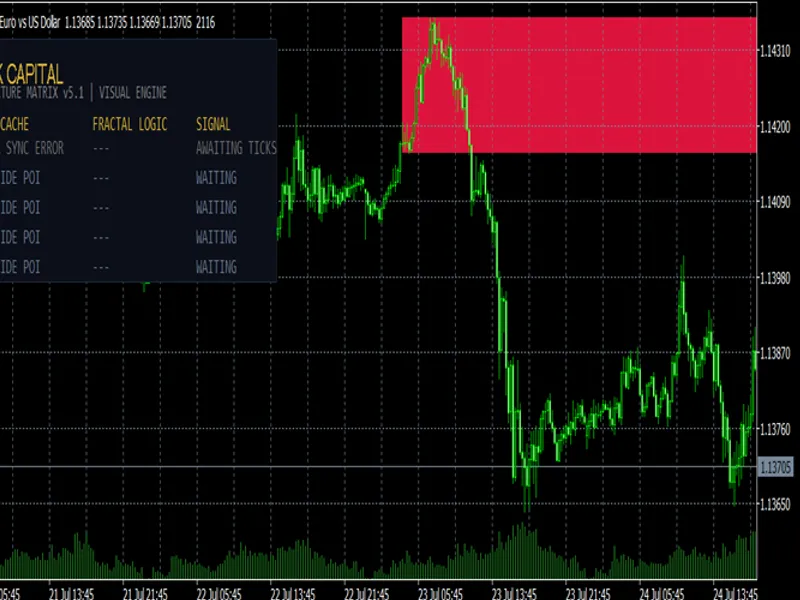
The Microstructure Matrix v5.1 is not a standard drawing tool. Most SMC indicators on the market are visually appealing but mathematically hollow, causing terminal lag and repainting fake signals.
This matrix was engineered to solve the retail overtrading problem. It acts as an asynchronous background engine that scans your favorite assets and filters out low-probability setups using pure statistical variance and structural validation.
The Core Quantitative Engine
- Event-Driven CPU Caching
Unlike standard indicators that recalculate thousands of bars on every tick, this engine caches the High-Timeframe data. The processor only executes a lightweight real-time price verification.
Result: Zero terminal freeze, even when scanning 5 assets simultaneously.
- Imbalance Validator
An Order Block without an imbalance is just a candlestick. The algorithm mathematically verifies that the displacement candle leaves a true Fair Value Gap. If there is no liquidity void, the setup is instantly discarded.
- True Fractal CHOCH & Z-Score Volume
The engine identifies true structural fractals. Furthermore, a break of structure is only validated if the tick volume exceeds the Mean + 1.5x Standard Deviation of the last 50 periods. If institutions aren't injecting abnormal volume, the dashboard flags it as a LOW VOLATILITY DEFECT.
Dashboard & Features
- Dynamic HUD: A sleek, non-intrusive matrix displaying real-time data for all selected assets.
- Visual Rendering: Automatically draws and projects the validated Order Block strictly on your current active chart to keep your workspace clean.
- Daily Bias Filter: Automatically ignores counter-trend signals based on the D1 candle structure.
- Killzone Filter: Restricts execution signals to high-liquidity sessions.
- Smart Alerts: Push notifications to your phone and MT5 pop-ups specifically when a setup aligns perfectly.
How to Use
Attach the indicator to a single, clean chart. In the inputs, type the symbols you want to scan separated by commas. Note: Ensure these symbols exactly match your broker's naming convention.
Set your HTF and LTF. Let the Matrix run. Wait for the dashboard to display EXECUTE BUY or EXECUTE SELL.
Built for precision. Built for Prop-Traders in 2026.
You may also like: Quantitative Qualitative Estimator (QQE) Indicator - excellent alternative for indicator users on MetaTrader 5.
Source Code
#property copyright "RobotFX"
#property link "https://robotfx.org"
#property version   "5.10"
#property description "This code is educational. Feel free to use, modify and upgrade as you wish. Visit ROBOTFX.ORG for professional trading tools"
#property indicator_chart_window
#property indicator_buffers 0
#property indicator_plots   0
input group "--- SCANNER SETTINGS ---"
input string         InpSymbols           = "EURUSD,GBPUSD,USDJPY,USDCHF,AUDUSD";
input ENUM_TIMEFRAMES InpHTF              = PERIOD_H4;
.......
⚠ Limitations & Risk Warning
- This tool is provided for educational and testing purposes only.
- Past performance does not guarantee future results.
- Trading involves substantial risk of loss. Use on a demo account first.
- Results may vary depending on market conditions, broker, and settings.
- We recommend thorough backtesting and forward testing before using with real funds.