
Supply Demand Zones: Identifying Key Price Reaction Areas
Info
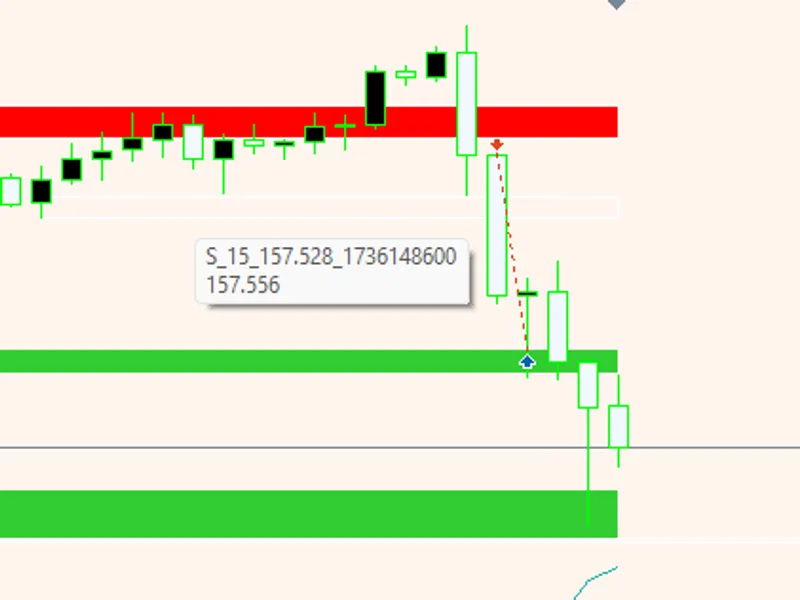
The Supply Demand Zones: Identifying Key Price Reaction Areas is a Indicator for MetaTrader 5 that supply and demand zones identified on any chart, including gold (xauusd) and eurusd, are constructed from confirmed swing highs and lows. Each swing high generates a supply zone, and each swing low generates a demand zone.
Usage
This tool is typically used for enhancing chart analysis and decision making.
Platform
This Indicator works exclusively on MetaTrader 5 (both build 600+ and newer versions).
Setup
Place the downloaded file in MQL5/Indicators folder via File ? Open Data Folder in MetaTrader 5.
How to Install and Use Supply Demand Zones: Identifying Key Price Reaction Areas
1. Installation: Place your file in the MQL/Indicators folder via "Open Data Folder" and restart your terminal.
2. Loading: Find the indicator in the Navigator, drag it onto your chart, and configure the input parameters in the popup window.
3. Customization: Press Ctrl+I to open the indicator list, select your tool, and click "Properties" to change colors, levels, or visual styles.
4. Updating: Replace the old file in the Indicators folder with the new version and restart the platform to apply changes.
Frequently Asked Questions
Q: Why is my indicator not showing? A: Verify the file is in the MQL/Indicators folder, or try right-clicking the "Indicators" tree in the Navigator and clicking "Refresh."
Q: Do custom indicators slow down the platform? A: Too many complex indicators can impact performance; remove unused ones via the "Indicator List" (Ctrl+I).
Q: Can I use MT4 indicators on MT5? A: No, MQL4 and MQL5 are distinct languages; ensure the indicator is compiled specifically for your platform version.
What this tool does
Supply and demand zones identified on any chart, including Gold (XAUUSD) and EURUSD, are constructed from confirmed swing highs and lows.
Typical Use Case
This Indicator excels in automated trading and technical analysis on MetaTrader 5.
Compatible Platform & Setup
This Indicator works on MetaTrader 5. Place the file in the MQL5/Indicators folder and restart the terminal.
Description & Settings
Related: supply and demand zones indicator - another powerful indicator for MetaTrader 5 traders.
Supply and demand zones identified on any chart, including Gold (XAUUSD) and EURUSD, are constructed from confirmed swing highs and lows. Each swing high generates a supply zone, and each swing low generates a demand zone. The height of these zones is determined by the Average True Range (ATR) multiplied by a user-defined factor, ensuring the zones maintain proportional relevance across different symbols and timeframes.Also recommended: Demand Index: Understanding Market Strength and Reversals - similar indicator with strong performance on MetaTrader 5.
Each zone tracks the number of times price has re-entered it, indicated by labels such as "fresh," "tested 1x," "tested 2x," etc. The color intensity of the zone diminishes with each test. A zone is invalidated and removed if price closes through it. Overlapping zones on the same side are merged into a single, wider zone, with only the most recent zones of each type remaining on the chart.
A swing point requires a specified number of closed candles on either side before it is recognized, leading to a delay in zone appearance. Zones are recalculated upon the closure of each bar, not on every tick. This model relies on a mechanical swing and ATR calculation; it does not incorporate volume, order flow, or imbalance logic. Utilize these zones as indicators of potential reaction areas, not as standalone entry signals.
Settings
Zones
Swing length: Specifies the number of candles on each side of the swing candle. Higher values filter for more significant swings.
ATR period: The period used for ATR calculation.
Zone height factor: Determines the zone's height relative to the ATR. The zone height is calculated as ATR multiplied by this factor, measured upwards from a swing low for demand zones and downwards from a swing high for supply zones.
Bars to analyze: The number of historical bars to scan for zone identification.
Zones to keep per side: Controls the maximum number of recent zones of each type (supply and demand) that are displayed.
Merge overlapping zones: When enabled, adjacent zones of the same type that overlap are combined into a single, larger zone.
Remove broken zones: When enabled, zones are automatically deleted if price closes beyond their boundaries.
Display
Supply untested / tested colors: Defines the color scheme for supply zones based on whether they have been tested by price.
Demand untested / tested colors: Defines the color scheme for demand zones based on whether they have been tested by price. Fresh zones appear brighter, while tested zones appear darker.
Fill the rectangles: Toggles whether the identified zones are filled with color.
Extend zones to the right: Determines how many bars into the future the zones are projected.
Show zone labels: Toggles the display of labels for the zones.
Label font size: Sets the size of the text for the zone labels.
Label color: Sets the color of the zone labels.
Alerts
Pop-up: Enables pop-up alerts.
Push notification: Enables push notifications to mobile devices.
Sound: Enables audible alerts.
An alert is triggered when a newly closed candle enters a zone that the previous candle was outside of.
Sound file: Specifies the audio file to be used for sound alerts.
Indicator settings
Object prefix: Assigns a unique prefix to all graphical objects (rectangles and labels) created by the indicator. This ensures that only the indicator's objects are removed when it is detached from the chart. Using distinct prefixes allows multiple instances of the indicator to run on the same chart (e.g., for different timeframes).
Requirements
Platform: MetaTrader 5.
Chart: Applicable to any symbol and timeframe on any account type.
Functionality: This is an indicator and does not execute trades.
Sufficient historical data is required for ATR calculation and swing length analysis. A minimum of ATR period + 2 * Swing length + 2 bars is recommended.
For Expert Advisors (EAs), the indicator provides five buffers for the current bar (shift 0):
Buffer 0: Nearest supply high.
Buffer 1: Nearest supply low.
Buffer 2: Nearest demand high.
Buffer 3: Nearest demand low.
Buffer 4: Price in zone (1 for supply, -1 for demand, 0 for outside).
Older bars will contain EMPTY_VALUE, so analysis should focus on shift 0.
Customization and Usage
Operate the indicator on symbols like XAUUSD, EURUSD, GBPUSD, US30, NAS100, or BTCUSD. Experiment with the zone factor to find optimal settings for each symbol; a factor of 0.5 might be suitable for gold on M15, while indices may perform better with 0.8 or 1.0. Integrate this indicator with the "Smart Money Concepts BOS CHoCH" indicator to identify CHoCH patterns within fresh supply or demand zones. For trade management, consider using the "Partial Close Multi TP Manager," setting the initial take profit at the opposite zone's boundary. When developing EAs, buffer 4 can serve as a direct filter: execute buy orders only when the buffer value is -1, and sell orders only when it is 1. The zone-building function can be extracted and incorporated into custom code.
About this Code
This indicator is a complete rewrite of the Shved Supply and Demand indicator from the MQL5 Code Base, specifically for MetaTrader 5.
It is open source; feel free to use, adapt, or build upon it.
Announcements for new versions and tools are first posted on the author's MQL5 channel.
Questions, suggestions, and shared backtests are welcomed in the Xander Lab community group.
Additional tools are available on the author's profile.
This software is provided as is, and use is at your own risk.
Related Tools
Smart Money Concepts BOS CHoCH
Partial Close Multi TP Manager
Candle Timer Countdown
Basket Pair Closer
XPro Trade Panel
Changelog
v1.0 - 2026-10-25 - Initial release
You may also like: Demand Index HTF - excellent alternative for indicator users on MetaTrader 5.
Source Code
#property copyright "RobotFX"
#property link "https://robotfx.org"
#property version     "1.00"
#property description "This code is educational. Feel free to use, modify and upgrade as you wish. Visit ROBOTFX.ORG for professional trading tools"
#property indicator_chart_window
#property indicator_buffers 5
#property indicator_plots   5
#property indicator_label1  "Nearest Supply High"
#property indicator_type1   DRAW_NONE
#property indicator_label2  "Nearest Supply Low"
.......
⚠ Limitations & Risk Warning
- This tool is provided for educational and testing purposes only.
- Past performance does not guarantee future results.
- Trading involves substantial risk of loss. Use on a demo account first.
- Results may vary depending on market conditions, broker, and settings.
- We recommend thorough backtesting and forward testing before using with real funds.