
multi-timeframe rsi scanner with visual dashboard and alerts
Info
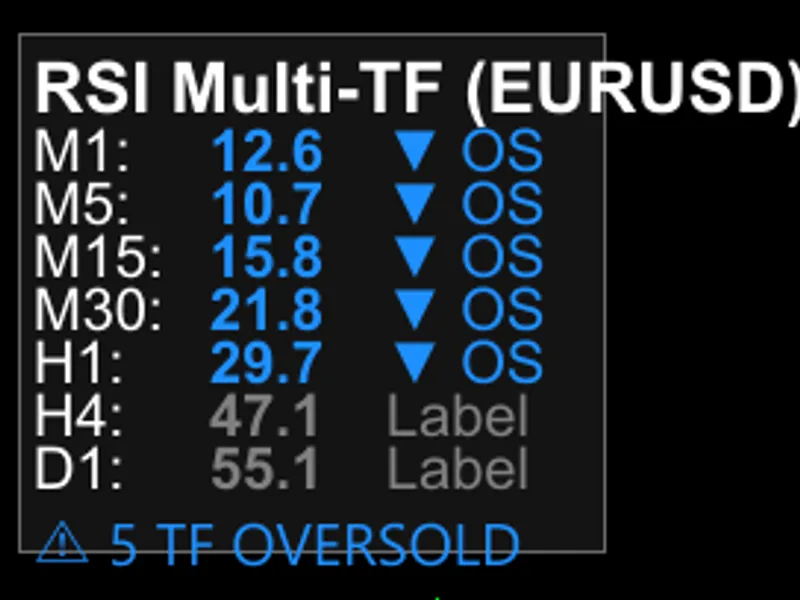
The multi-timeframe rsi scanner with visual dashboard and alerts is a Indicator for MetaTrader 5 that this multi-timeframe rsi scanner is designed to catch convergence setups before they fully develop. it monitors 7 timeframes and provides a visual dashboard with real-time rsi values color-coded by state.
Usage
This tool is typically used for enhancing chart analysis and decision making.
Platform
This Indicator works exclusively on MetaTrader 5 (both build 600+ and newer versions).
Setup
Place the downloaded file in MQL5/Indicators folder via File ? Open Data Folder in MetaTrader 5.
How to Install and Use multi-timeframe rsi scanner with visual dashboard and alerts
1. Installation: Place your file in the MQL/Indicators folder via "Open Data Folder" and restart your terminal.
2. Loading: Find the indicator in the Navigator, drag it onto your chart, and configure the input parameters in the popup window.
3. Customization: Press Ctrl+I to open the indicator list, select your tool, and click "Properties" to change colors, levels, or visual styles.
4. Updating: Replace the old file in the Indicators folder with the new version and restart the platform to apply changes.
Frequently Asked Questions
Q: Why is my indicator not showing? A: Verify the file is in the MQL/Indicators folder, or try right-clicking the "Indicators" tree in the Navigator and clicking "Refresh."
Q: Do custom indicators slow down the platform? A: Too many complex indicators can impact performance; remove unused ones via the "Indicator List" (Ctrl+I).
Q: Can I use MT4 indicators on MT5? A: No, MQL4 and MQL5 are distinct languages; ensure the indicator is compiled specifically for your platform version.
What this tool does
this multi-timeframe rsi scanner is designed to catch convergence setups before they fully develop.
Typical Use Case
This Indicator excels in automated trading and technical analysis on MetaTrader 5.
Compatible Platform & Setup
This Indicator works on MetaTrader 5. Place the file in the MQL5/Indicators folder and restart the terminal.
Description & Settings
Related: Cajas TF: Integrated Multi-Timeframe Side Panel for MT5 - another powerful indicator for MetaTrader 5 traders.
this multi-timeframe rsi scanner is designed to catch convergence setups before they fully develop. it monitors 7 timeframes and provides a visual dashboard with real-time rsi values color-coded by state. the scanner also includes a convergence warning that highlights when 3 or more timeframes align in overbought or oversold conditions.Also recommended: Any Indicator Alert: Notifications and Multi-Timeframe Alerts for Any Custom Indicator - similar indicator with strong performance on MetaTrader 5.
the scanner is fully customizable, allowing users to adjust the rsi period, overbought and oversold levels, colors, dashboard position, font size, and update interval. it also includes features such as verbose logging, alert retry, and robust dashboard positioning.
to use the scanner, simply attach it to any chart and select the timeframes you want to monitor. the scanner will provide a convergence warning when 3 or more timeframes align in overbought or oversold conditions. you can then use this warning as a cue to confirm with price action before entering a trade.
the scanner is compatible with metatrader 5 and can be used on any trading symbol, including forex, indices, crypto, and metals. it is recommended to use a vps or stable internet connection for reliable alert delivery.
features include:
- 7 timeframes monitored (m1, m5, m15, m30, h1, h4, d1)
- visual dashboard with real-time rsi values color-coded by state
- convergence warning that highlights when 3 or more timeframes align in overbought or oversold conditions
- fully customizable (rsi period, overbought and oversold levels, colors, dashboard position, font size, update interval)
- verbose logging and alert retry
- robust dashboard positioning
best practices for using the scanner include using it during active sessions, combining it with price action, adjusting thresholds for your pair, and watching h4 rsi as a veto. the scanner is not a trading system and should not be used as a standalone entry or exit strategy. it is designed to provide a convergence warning that can be used as a cue to confirm with price action before entering a trade.
version history includes:
- v1.6 (2026.02.11) - production ready with alert retry system, verbose logging control, and robust error handling
- v1.5 (2026.01.25) - robust dashboard positioning, objprop_hidden, and handle cleanup fixes
- v1.4 (2026.01.20) - cached tfcount and improved data validation logic
- v1.3 (2025.12.15) - proportional ui scaling and no static vars in functions
- v1.2 (2025.11.20) - added alignment indicator and improved error handling
- v1.1 (2025.11.05) - added customizable colors and dashboard sizing
- v1.0 (2025.10.28) - initial release
known limitations include:
- not a trading system - this is a scanner/alert tool that does not provide entry or exit strategies
- alert retry has limits - the retry system helps with temporary glitches but will not work if your vps is completely offline or mt5 crashes
- won't work on very slow internet - the scanner requires fresh price data to function properly
- no divergence detection - the scanner only detects convergence and does not detect rsi divergence across timeframes
- alerts don't repeat - once per bar per timeframe, if you miss the alert and don't check the dashboard, you won't get reminded
You may also like: Advanced Harmonic Pattern Scanner - excellent alternative for indicator users on MetaTrader 5.
Source Code
#property copyright "robotfx"
#property link "https://robotfx.org"
#property version   "1.60"
#property description "This code is provided AS IS and intended for educational purposes only. Professional trading EAs and indicators - robotfx www.robotfx.org"
#property description "This code is provided AS IS and intended for educational purposes only. Professional trading EAs and indicators - robotfx www.robotfx.org"
#property indicator_chart_window
#property indicator_buffers 0
#property indicator_plots 0
const double rsi_change_threshold = 0.1;
const int    alignment_threshold = 3;
.......
⚠ Limitations & Risk Warning
- This tool is provided for educational and testing purposes only.
- Past performance does not guarantee future results.
- Trading involves substantial risk of loss. Use on a demo account first.
- Results may vary depending on market conditions, broker, and settings.
- We recommend thorough backtesting and forward testing before using with real funds.