
Neon Desk: Manual Trading Panel with Multi-Timeframe Bias for MT5
Info
The Neon Desk: Manual Trading Panel with Multi-Timeframe Bias for MT5 is a Expert Advisor for MetaTrader 5 that neon desk is a manual trading panel for metatrader 5. It requires manual intervention for all trades, with every Buy or Sell order requiring explicit confirmation before execution.
Usage
This tool is typically used for automated trading on major forex pairs and gold.
Platform
This Expert Advisor works exclusively on MetaTrader 5 (both build 600+ and newer versions).
Setup
Place the downloaded file in MQL5/Experts folder via File ? Open Data Folder in MetaTrader 5.
How to Install and Use Neon Desk: Manual Trading Panel with Multi-Timeframe Bias for MT5
1. Installation: Open the "File" menu, select "Open Data Folder," navigate to MQL/Experts, paste your file, and restart the terminal.
2. Activation: Drag the EA from the Navigator onto a chart, ensure "Allow live trading" is checked in the Common tab, and verify the AutoTrading button is green.
3. Optimization: Right-click your chart, choose "Expert List," click "Properties" to adjust inputs, and save your preferred setup as a set file for future use.
4. Maintenance: Regularly check the "Experts" tab in the terminal window to monitor trade logs and potential execution errors.
Frequently Asked Questions
Q: Why is my EA not opening trades? A: Check the "AutoTrading" button, ensure "Allow live trading" is enabled, and verify your broker allows automated trading on your account type.
Q: Can I run multiple EAs on one chart? A: No, each chart can only host one active EA; however, you can open multiple charts for different currency pairs to run several EAs.
Q: What does the "smiley face" icon mean? A: A smiley face in the top-right corner of the chart indicates the EA is successfully running; a frowny face means it is disabled.
What this tool does
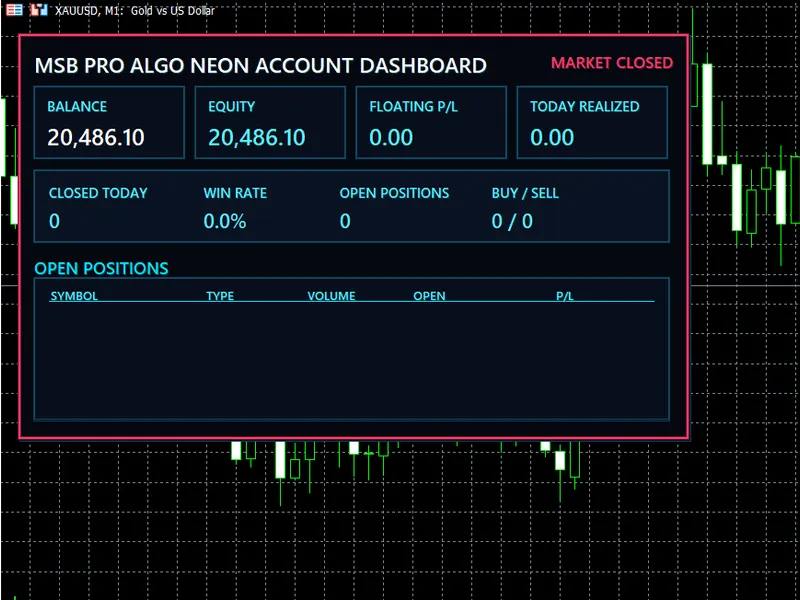
Neon Desk is a manual trading panel for MetaTrader 5.
Typical Use Case
This Expert Advisor excels in automated trading and technical analysis on MetaTrader 5.
Compatible Platform & Setup
This Expert Advisor works on MetaTrader 5. Place the file in the MQL5/Experts folder and restart the terminal.
Description & Settings
Related: Color ZeroLagDeMarker Expert Advisor - another powerful expert for MetaTrader 5 traders.
Neon Desk is a manual trading panel for MetaTrader 5. It requires manual intervention for all trades, with every Buy or Sell order requiring explicit confirmation before execution.Also recommended: detecting the start of a new bar or candle - similar expert with strong performance on MetaTrader 5.
Features include:
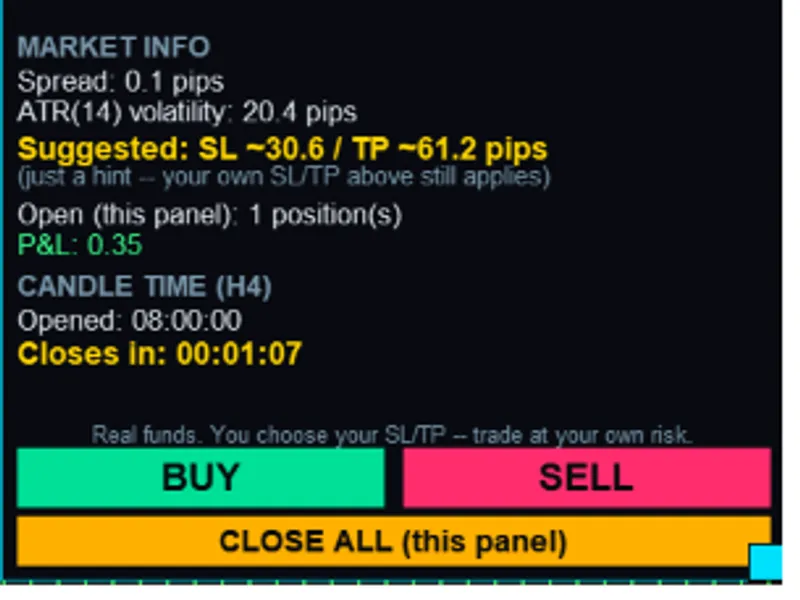
- Multi-timeframe bias analysis across M1, M30, H4, and D1 timeframes to identify market sentiment (bullish, bearish, or mixed).
- A live candle countdown timer adjustable to any timeframe from M1 to D1, independent of the chart's period.
- Real-time display of current Bid/Ask prices and the current candle's Open, High, Low, and Close values.
- An ATR-based suggestion for Stop-Loss and Take-Profit levels, provided for informational purposes only and does not override user settings.
User Controls:
- Lot size, Stop-Loss, and Take-Profit can be entered and edited directly as real price levels.
- An independent trailing stop feature, adjustable in pips, which only moves the stop-loss in a favorable direction.
- One-click Buy, Sell, and Close All buttons. These actions are isolated to trades managed by this panel through a dedicated magic number, ensuring they do not affect positions opened by other EAs or manual trades.
Safety Mechanisms:
- A mandatory risk disclaimer must be accepted upon attaching the panel, reminding users of the real funds involved and their responsibility for trading decisions.
- Every Buy/Sell order requires confirmation, displaying the symbol, lot size, entry price, Stop-Loss, and Take-Profit before submission, with a report on the order's success.
- The panel prevents orders if the Stop-Loss or Take-Profit levels are incorrectly positioned relative to the entry price or violate the broker's minimum stop distance.
- If an open trade exists for the same symbol, the panel provides a warning, showing combined exposure and how the account's margin mode (netting/hedging) will affect the new trade.
User Interface:
- The panel is fully draggable and resizable.
- It fades to a low opacity when the mouse is not hovering over it, reducing visual clutter.
- A dark neon color scheme ensures legibility without obstructing the chart view.
Important Note: Neon Desk is a manual trading assistance tool, not a signal service or automated strategy. All trading decisions, including the setting of Stop-Loss and Take-Profit levels, are the sole responsibility of the user. Trading inherently involves risk of loss.
You may also like: Exp Laguerre ROC: Trading System - excellent alternative for expert users on MetaTrader 5.
Source Code
#property copyright "RobotFX"
#property version   "1.19"
#property description "This code is educational. Feel free to use, modify and upgrade as you wish. Visit ROBOTFX.ORG for professional trading tools"
#property strict
#include <Canvas\Canvas.mqh>
#include <Trade\Trade.mqh>
input group "===== Trading ====="
input double InpLotSize          = 0.01;
input double InpSlPips           = 20.0;
input double InpTpPips           = 40.0;
.......
⚠ Limitations & Risk Warning
- This tool is provided for educational and testing purposes only.
- Past performance does not guarantee future results.
- Trading involves substantial risk of loss. Use on a demo account first.
- Results may vary depending on market conditions, broker, and settings.
- We recommend thorough backtesting and forward testing before using with real funds.