Download ALL MT5 indicators (5915)

Similar MetaTrader Tools
Mediana Trendline: MTF Parallel Channel Indicator
Info
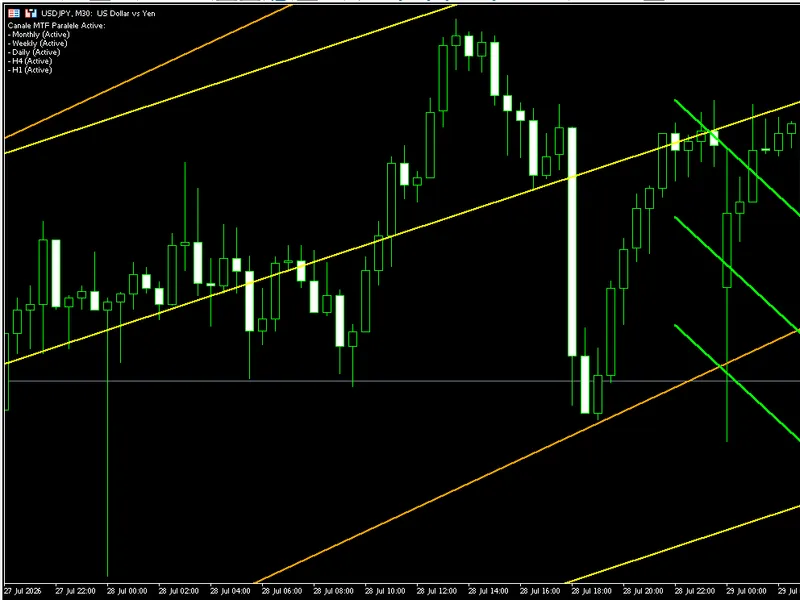
The Mediana Trendline: MTF Parallel Channel Indicator is a Indicator for MetaTrader 5 that mediana & parallel lines multi-timeframe (mtf channel)mediana & parallel lines mtf is a visual indicator for metatrader 5 that draws parallel channels directly on the current chart. These channels are based on the last two closed candles of higher timeframes (Monthly, Weekly, Daily, H4, H1, M30, M15).
Usage
This tool is typically used for trend following strategies across multiple currency pairs.
Platform
This Indicator works exclusively on MetaTrader 5 (both build 600+ and newer versions).
Setup
Place the downloaded file in MQL5/Indicators folder via File ? Open Data Folder in MetaTrader 5.
How to Install and Use Mediana Trendline: MTF Parallel Channel Indicator
1. Installation: Place your file in the MQL/Indicators folder via "Open Data Folder" and restart your terminal.
2. Loading: Find the indicator in the Navigator, drag it onto your chart, and configure the input parameters in the popup window.
3. Customization: Press Ctrl+I to open the indicator list, select your tool, and click "Properties" to change colors, levels, or visual styles.
4. Updating: Replace the old file in the Indicators folder with the new version and restart the platform to apply changes.
Frequently Asked Questions
Q: Why is my indicator not showing? A: Verify the file is in the MQL/Indicators folder, or try right-clicking the "Indicators" tree in the Navigator and clicking "Refresh."
Q: Do custom indicators slow down the platform? A: Too many complex indicators can impact performance; remove unused ones via the "Indicator List" (Ctrl+I).
Q: Can I use MT4 indicators on MT5? A: No, MQL4 and MQL5 are distinct languages; ensure the indicator is compiled specifically for your platform version.
What this tool does
Mediana & Parallel Lines Multi-Timeframe (MTF Channel)Mediana & Parallel Lines MTF is a visual indicator for MetaTrader 5 that draws parallel channels directly on the current chart.
Typical Use Case
This Indicator excels in trend following on MetaTrader 5.
Compatible Platform & Setup
This Indicator works on MetaTrader 5. Place the file in the MQL5/Indicators folder and restart the terminal.
Description & Settings
Related: ATS Liquidity City: Visualizing Liquidity Pools and Sweeps - another powerful indicator for MetaTrader 5 traders.
Mediana & Parallel Lines Multi-Timeframe (MTF Channel)Also recommended: fo m - similar indicator with strong performance on MetaTrader 5.
Mediana & Parallel Lines MTF is a visual indicator for MetaTrader 5 that draws parallel channels directly on the current chart. These channels are based on the last two closed candles of higher timeframes (Monthly, Weekly, Daily, H4, H1, M30, M15).
Each channel consists of 3 parallel trend lines:
Median Line – drawn through the midpoint (Open+Close)/2 of the last two closed candles of the selected timeframe.
High Line – parallel to the median, starting from the High of the second-to-last candle.
Low Line – parallel to the median, starting from the Low of the second-to-last candle.
The slope of all three lines is identical, calculated from the change in the median between the two reference candles. This provides a simple, clear visual projection of the direction/trend of that timeframe, automatically extended into the future (ray right).
Key Features
Supports 7 timeframes simultaneously: MN1, W1, D1, H4, H1, M30, M15 — each can be enabled/disabled independently.
Individual color for each timeframe, fully configurable from inputs.
Configurable line width and style (LineWidth, LineStyle), applied globally.
Automatic safety rule: a timeframe's channel is only displayed if that timeframe is higher than the current chart timeframe (e.g. the Daily channel won't appear if you're already viewing the D1 chart or higher) — prevents irrelevant/redundant data from being shown.
Performance optimized: calculation logic runs only once per new bar (not on every tick), allowing smooth operation across dozens of charts simultaneously without lag.
Auto-cleanup: all graphical objects are automatically deleted when the indicator is removed from the chart (OnDeinit).
Info panel: displays a list of currently active channels in the chart corner (via Comment).
No repaint — relies exclusively on already closed candles (index 1 and 2).
Input Parameters
Timeframe Selection (True/False)
Parameter Default Description
Show_MN1 true Show Monthly Channel
Show_W1 true Show Weekly Channel
Show_D1 true Show Daily Channel
Show_H4 false Show H4 Channel
Show_H1 false Show H1 Channel
Show_M30 false Show M30 Channel
Show_M15 false Show M15 Channel
Channel Colors
Parameter Default
Color_MN1 Red
Color_W1 Orange
Color_D1 Yellow
Color_H4 Lime
Color_H1 Aqua
Color_M30 DeepSkyBlue
Color_M15 Magenta
Line Style Settings
Parameter Default Description
LineWidth 2 Line width
LineStyle STYLE_SOLID Line style (solid, dash, dot, etc.)
How to Use
Attach the indicator to any chart (ideally on lower timeframes, such as M15–H1, to see higher timeframe channels projected over current price).
Enable/disable the desired timeframes from the input properties window.
Customize colors and line style as preferred.
Channels update automatically whenever a new candle forms on the current chart.
Recommendations
Useful for traders applying multi-timeframe top-down analysis, providing a quick visual representation of the direction and magnitude of price movement on higher timeframes, overlaid directly on the execution chart. (Last updated 2026)
You may also like: pf e overlay - excellent alternative for indicator users on MetaTrader 5.
Source Code
#property copyright "RobotFX"
#property link "https://robotfx.org"
#property version   "1.07"
#property indicator_chart_window
#property indicator_plots 0
input group "--- Timeframe Selection (True/False) ---"
input bool Show_MN1 = true;
input bool Show_W1  = true;
input bool Show_D1  = true;
input bool Show_H4  = false;
.......
⚠ Limitations & Risk Warning
- This tool is provided for educational and testing purposes only.
- Past performance does not guarantee future results.
- Trading involves substantial risk of loss. Use on a demo account first.
- Results may vary depending on market conditions, broker, and settings.
- We recommend thorough backtesting and forward testing before using with real funds.