







MA Gauge Pro - AKM: Unlocking Market Adaptability and Maximizing Trading Potential
Info
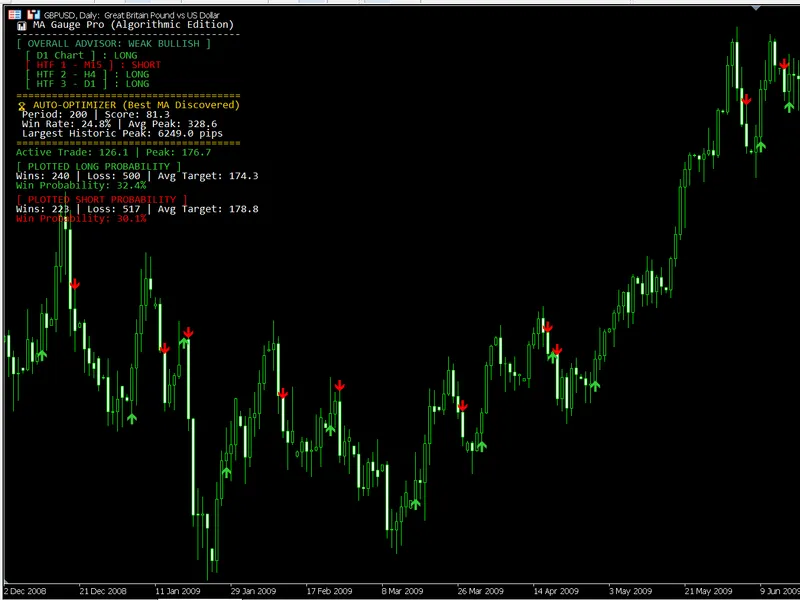
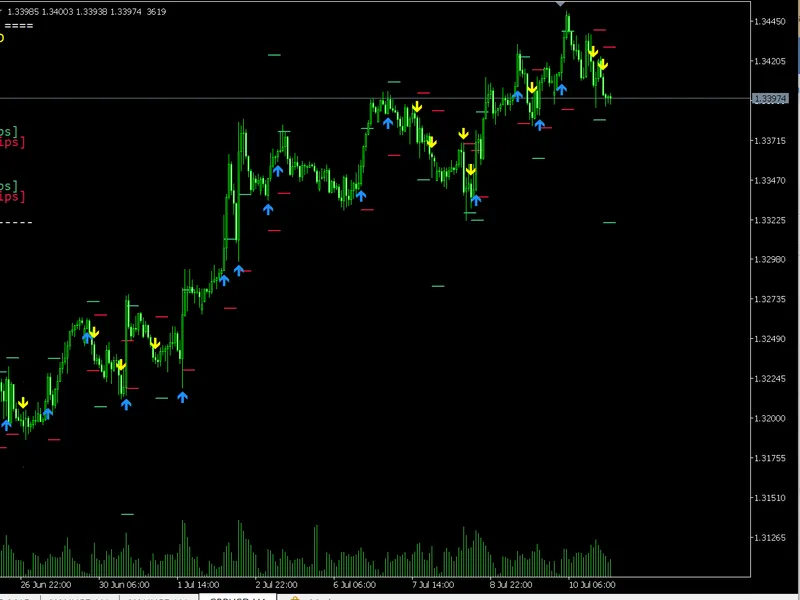
The MA Gauge Pro - AKM: Unlocking Market Adaptability and Maximizing Trading Potential is a Indicator for MetaTrader 5 that 1. Market Adaptability: Escaping the Static TrapFinancial markets are dynamic, alternating between trending and ranging phases.
Usage
This tool is typically used for enhancing chart analysis and decision making.
Platform
This Indicator works exclusively on MetaTrader 5 (both build 600+ and newer versions).
Setup
Place the downloaded file in MQL5/Indicators folder via File ? Open Data Folder in MetaTrader 5.
How to Install and Use MA Gauge Pro - AKM: Unlocking Market Adaptability and Maximizing Trading Potential
1. Installation: Place your file in the MQL/Indicators folder via "Open Data Folder" and restart your terminal.
2. Loading: Find the indicator in the Navigator, drag it onto your chart, and configure the input parameters in the popup window.
3. Customization: Press Ctrl+I to open the indicator list, select your tool, and click "Properties" to change colors, levels, or visual styles.
4. Updating: Replace the old file in the Indicators folder with the new version and restart the platform to apply changes.
Frequently Asked Questions
Q: Why is my indicator not showing? A: Verify the file is in the MQL/Indicators folder, or try right-clicking the "Indicators" tree in the Navigator and clicking "Refresh."
Q: Do custom indicators slow down the platform? A: Too many complex indicators can impact performance; remove unused ones via the "Indicator List" (Ctrl+I).
Q: Can I use MT4 indicators on MT5? A: No, MQL4 and MQL5 are distinct languages; ensure the indicator is compiled specifically for your platform version.
What this tool does
1.
Typical Use Case
This Indicator excels in automated trading and technical analysis on MetaTrader 5.
Compatible Platform & Setup
This Indicator works on MetaTrader 5. Place the file in the MQL5/Indicators folder and restart the terminal.
Description & Settings
Related: EVT Crash Gauge: Advanced Tail-Risk Measurement - another powerful indicator for MetaTrader 5 traders.
1. Market Adaptability: Escaping the Static TrapAlso recommended: Double Envelopes Historical Gauged - similar indicator with strong performance on MetaTrader 5.
Financial markets are dynamic, alternating between trending and ranging phases. A fixed Moving Average (MA) period can perform well in strong trends but struggles in choppy conditions, leading to false signals and losses.
The Auto-Optimizer addresses this by scanning multiple periods in real-time, finding the optimal harmonic frequency for the current market. This ensures your system adapts to the market's rhythm, enhancing accuracy.
2. Mathematical Expectancy: Beyond Directional Bias
Standard MAs provide directional bias but not profitability. The optimization engine evaluates strategies using Mathematical Expectancy, considering Win Rate and Average Reward. This avoids the pitfalls of high win rates with low profits or low win rates with large, infrequent gains.
By scoring MAs on combined Expectancy, the engine identifies the sweet spot for consistent, high-yield trades.
3. Data-Driven Take Profits: Maximizing Rewards
Traders often rely on arbitrary risk-reward ratios or recent highs for Take Profit (TP) levels. This engine calculates the Maximum Favorable Excursion (MFE), determining the average peak distance of trends before reversal. It provides an accurate, data-backed TP target, ensuring exits align with the trend's likely exhaustion point.
4. Multi-Timeframe Alignment: Macro Noise Cancellation
Single-timeframe analysis can lead to low-probability trades. The Multi-Timeframe (MTF) Advisor acts as an institutional filter, ensuring micro-trend trades align with the macro-trend. It prevents counter-trend trades, enhancing capital deployment efficiency.
Conclusion
The Auto-Optimizing MTF Engine transforms the passive MA into an active statistical model. It removes emotional bias, automates backtesting, and bases trading decisions on real-time probabilities, maximizing trading potential.
You may also like: Center of Gravity by J. F. Ehlers - excellent alternative for indicator users on MetaTrader 5.
Source Code
#property copyright "RobotFX"
#property link "https://robotfx.org"
#property version   "7.00"
#property strict
#property indicator_chart_window
#property indicator_buffers 2
#property indicator_plots   2
#property indicator_label1  "Long Entry"
#property indicator_type1   DRAW_ARROW
#property indicator_color1  clrLimeGreen
.......
⚠ Limitations & Risk Warning
- This tool is provided for educational and testing purposes only.
- Past performance does not guarantee future results.
- Trading involves substantial risk of loss. Use on a demo account first.
- Results may vary depending on market conditions, broker, and settings.
- We recommend thorough backtesting and forward testing before using with real funds.