Download ALL MT5 indicators (5742)

Similar MetaTrader Tools











fixed-width fractional differencing (ffd)
Info
The fixed-width fractional differencing (ffd) is a Indicator for MetaTrader 5 that raw forex and futures prices exhibit non-stationarity, which poses challenges for standard regression and classification models due to look-ahead bias and spurious correlations. integer differencing, a common solution, eliminates non-stationarity but sacrifices price memory, hindering predictive model performance.
Usage
This tool is typically used for enhancing chart analysis and decision making.
Platform
This Indicator works exclusively on MetaTrader 5 (both build 600+ and newer versions).
Setup
Place the downloaded file in MQL5/Indicators folder via File ? Open Data Folder in MetaTrader 5.
How to Install and Use fixed-width fractional differencing (ffd)
1. Installation: Place your file in the MQL/Indicators folder via "Open Data Folder" and restart your terminal.
2. Loading: Find the indicator in the Navigator, drag it onto your chart, and configure the input parameters in the popup window.
3. Customization: Press Ctrl+I to open the indicator list, select your tool, and click "Properties" to change colors, levels, or visual styles.
4. Updating: Replace the old file in the Indicators folder with the new version and restart the platform to apply changes.
Frequently Asked Questions
Q: Why is my indicator not showing? A: Verify the file is in the MQL/Indicators folder, or try right-clicking the "Indicators" tree in the Navigator and clicking "Refresh."
Q: Do custom indicators slow down the platform? A: Too many complex indicators can impact performance; remove unused ones via the "Indicator List" (Ctrl+I).
Q: Can I use MT4 indicators on MT5? A: No, MQL4 and MQL5 are distinct languages; ensure the indicator is compiled specifically for your platform version.
What this tool does
raw forex and futures prices exhibit non-stationarity, which poses challenges for standard regression and classification models due to look-ahead bias and spurious correlations.
Typical Use Case
This Indicator excels in automated trading and technical analysis on MetaTrader 5.
Compatible Platform & Setup
This Indicator works on MetaTrader 5. Place the file in the MQL5/Indicators folder and restart the terminal.
Description & Settings
Related: fractional bands - another powerful indicator for MetaTrader 5 traders.
raw forex and futures prices exhibit non-stationarity, which poses challenges for standard regression and classification models due to look-ahead bias and spurious correlations. integer differencing, a common solution, eliminates non-stationarity but sacrifices price memory, hindering predictive model performance.Also recommended: fractional bands ht f - similar indicator with strong performance on MetaTrader 5.
fixed-width fractional differencing (ffd), introduced in chapter 5 of advances in financial machine learning (2026), addresses this dilemma by differencing at a non-integer order d ∈ (0, 1), ensuring stationarity while retaining maximum memory.
this mql5 implementation offers a production-grade solution for ffd.
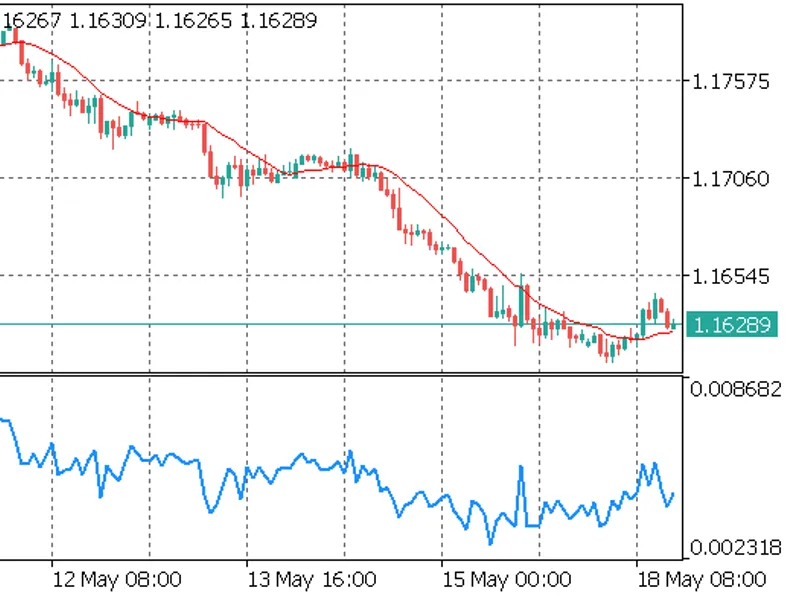
illustration: two-panel comparison of non-stationary raw price (a) and stationary ffd series (b) with the lookback window highlighted.
components
ffdengine.mqh
- header-only library featuring the cffdengine class. includes init(), compute() for single bar processing, and computebuffer() for full indicator buffer calculation with prev_calculated optimization. no dynamic memory allocation post-oninit().
ffd.mq5
- custom indicator built on cffdengine. displays the ffd series in a separate chart window, supporting all enum_applied_price values.
algorithm functionality
the weight vector is defined by the recurrence (afml eq. 5.4):
w[0] = 1 w[k] = -w[k-1] * (d - k + 1) / k, k = 1, 2, ...
iteration ceases when |w[k]| < threshold. the vector is reversed, assigning the smallest weight to the oldest price in the lookback window and 1.0 to the newest price. the ffd value at bar i is the dot product of the reversed weight vector with the log-price window [i−width, …, i].
for d = 0.4 and threshold = 1e-5, the window width is 1 457 bars. with threshold = 1e-3, it reduces to 54 bars. the threshold balances stationarity and memory retention, with smaller values preserving more memory but requiring a wider lookback.
installation
copy ffdengine.mqh to mql5\include\ or the specified subfolder during codebase download.
place ffd.mq5 in mql5\indicators\downloads\ (automatic placement on codebase download).
compile both files in metaeditor, ensuring the indicator compiles without warnings under #property strict.
attach ffd to any chart; the indicator window will display below the main chart after the lookback window (width + 1 bars) is filled.
integrating cffdengine into your ea or indicator
ffdengine.mqh is header-only. include it and call init() once in oninit():
cross-validation with python
ffdvalidation.mq5 (in the article download) exports ffd values to csv. the python script ffd_cross_validate.py recalculates these values using the afml library and performs bar-by-bar comparison. on 5 000 bars of eurusd h1 with d = 0.4 and threshold = 1e-5, the maximum absolute difference is less than 1e-12.
performance notes
weight vector allocation: once in oninit(). no allocation on the tick path.
per-bar computation: o(width) dot product. modern hardware completes a 1 457-element dot product in under 50 μs.
computebuffer() leverages prev_calculated to recompute only the current incomplete bar on each tick.
references and companion resources
advances in financial machine learning (2026), chapter 5 (fractional differentiation), pp. 76–95, wiley.
full theory, python implementation, and adf-based parameter search: patrick m. njoroge.
companion validation tools: ffdvalidation.mq5 and ffd_cross_validate.py, included in the article download package.
You may also like: i mf i sign ht f signal - excellent alternative for indicator users on MetaTrader 5.
Source Code
#property copyright "robotfx"
#property version     "1.11"
#property description "This code is provided AS IS and intended for educational purposes only. Professional trading EAs and indicators - robotfx www.robotfx.org"
#property description "This code is provided AS IS and intended for educational purposes only. Professional trading EAs and indicators - robotfx www.robotfx.org"
#property indicator_separate_window
#property indicator_buffers 1
#property indicator_plots   1
#property indicator_label1  "ffd"
#property indicator_type1   draw_line
#property indicator_color1  clrdodgerblue
.......
⚠ Limitations & Risk Warning
- This tool is provided for educational and testing purposes only.
- Past performance does not guarantee future results.
- Trading involves substantial risk of loss. Use on a demo account first.
- Results may vary depending on market conditions, broker, and settings.
- We recommend thorough backtesting and forward testing before using with real funds.