





md5 cloud decryptor
Info
The md5 cloud decryptor is a Expert Advisor for MetaTrader 5 that this example shows the use of the mechanism of custom data frame transmission from agents during a brute force search aimed at finding md5 hashes. units of tasks of password search from the md5 hash are sent to remote agents, which then return found passwords.
Usage
This tool is typically used for automated trading on major forex pairs and gold.
Platform
This Expert Advisor works exclusively on MetaTrader 5 (both build 600+ and newer versions).
Setup
Place the downloaded file in MQL5/Experts folder via File ? Open Data Folder in MetaTrader 5.
How to Install and Use md5 cloud decryptor
1. Installation: Open the "File" menu, select "Open Data Folder," navigate to MQL/Experts, paste your file, and restart the terminal.
2. Activation: Drag the EA from the Navigator onto a chart, ensure "Allow live trading" is checked in the Common tab, and verify the AutoTrading button is green.
3. Optimization: Right-click your chart, choose "Expert List," click "Properties" to adjust inputs, and save your preferred setup as a set file for future use.
4. Maintenance: Regularly check the "Experts" tab in the terminal window to monitor trade logs and potential execution errors.
Frequently Asked Questions
Q: Why is my EA not opening trades? A: Check the "AutoTrading" button, ensure "Allow live trading" is enabled, and verify your broker allows automated trading on your account type.
Q: Can I run multiple EAs on one chart? A: No, each chart can only host one active EA; however, you can open multiple charts for different currency pairs to run several EAs.
Q: What does the "smiley face" icon mean? A: A smiley face in the top-right corner of the chart indicates the EA is successfully running; a frowny face means it is disabled.
What this tool does
this example shows the use of the mechanism of custom data frame transmission from agents during a brute force search aimed at finding md5 hashes.
Typical Use Case
This Expert Advisor excels in automated trading and technical analysis on MetaTrader 5.
Compatible Platform & Setup
This Expert Advisor works on MetaTrader 5. Place the file in the MQL5/Experts folder and restart the terminal.
Description & Settings
Related: trade signals based on dark cloud cover/piercing line + stochastic - another powerful expert for MetaTrader 5 traders.
Also recommended: trade signals based on dark cloud cover/piercing line + cci indicator - similar expert with strong performance on MetaTrader 5.
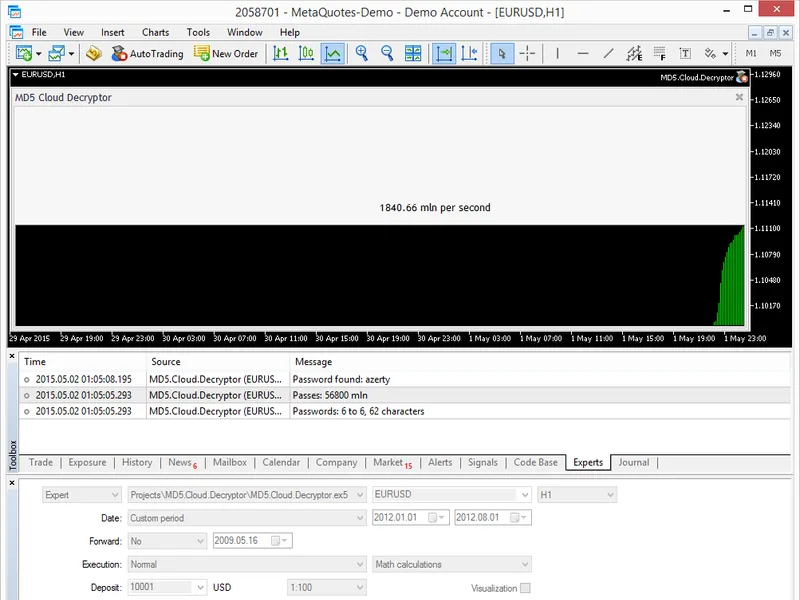
this example shows the use of the mechanism of custom data frame transmission from agents during a brute force search aimed at finding md5 hashes.units of tasks of password search from the md5 hash are sent to remote agents, which then return found passwords. a found password is printed in the "experts" window of the main terminal. the speed characteristics of the computing network and the progress are shown in real time.
the test md5 hash "ab4f63f9ac65152575886860dde480a1" was found in a couple of seconds as a 6-symbol password 'azerty'.
the program also demonstrates the principle of virtualization of nonlinear and non-numeric input parameters into a numeric counter. to do this, we set the sinput flag "not used in the brute force search" and add a working counter named 'counter', it is program controlled:
by using the hybrid master mode, which allows running one ea copy in the terminal in addition to copies on remote and local agents, we can:
manage remote agents and distribute tasks to them
receive data frames from remote agents
handle received data, save them, or visualize on chart
the screenshot above shows that the master ea successfully visualizes the brute force search speed in the computing network.
to activate the master mode, you need to add the handler in the ea, where you can read all input parameters, convert them into a linear counter and explicitly redefine the operation mode of any input variable. the below code shows how to convert non-numeric/nonlinear parameters to a double counter, then and operation mode of the numeric counter parameter:
although the counter parameter was initially locked, later it was redefined as an active working counter with explicit limits. this means that the tester will work with this particular parameter.
You may also like: trade signals based on dark cloud cover/piercing line + mfi indicator - excellent alternative for expert users on MetaTrader 5.
Source Code
/.......
⚠ Limitations & Risk Warning
- This tool is provided for educational and testing purposes only.
- Past performance does not guarantee future results.
- Trading involves substantial risk of loss. Use on a demo account first.
- Results may vary depending on market conditions, broker, and settings.
- We recommend thorough backtesting and forward testing before using with real funds.