





five pattern
Info
The five pattern is a Indicator for MetaTrader 5 that this technical indicator shows М & w wave patterns by merrill and support/resistance levels drawn at extreme points of the standard indicator. a.
Usage
This tool is typically used for enhancing chart analysis and decision making.
Platform
This Indicator works exclusively on MetaTrader 5 (both build 600+ and newer versions).
Setup
Place the downloaded file in MQL5/Indicators folder via File ? Open Data Folder in MetaTrader 5.
How to Install and Use five pattern
1. Installation: Place your file in the MQL/Indicators folder via "Open Data Folder" and restart your terminal.
2. Loading: Find the indicator in the Navigator, drag it onto your chart, and configure the input parameters in the popup window.
3. Customization: Press Ctrl+I to open the indicator list, select your tool, and click "Properties" to change colors, levels, or visual styles.
4. Updating: Replace the old file in the Indicators folder with the new version and restart the platform to apply changes.
Frequently Asked Questions
Q: Why is my indicator not showing? A: Verify the file is in the MQL/Indicators folder, or try right-clicking the "Indicators" tree in the Navigator and clicking "Refresh."
Q: Do custom indicators slow down the platform? A: Too many complex indicators can impact performance; remove unused ones via the "Indicator List" (Ctrl+I).
Q: Can I use MT4 indicators on MT5? A: No, MQL4 and MQL5 are distinct languages; ensure the indicator is compiled specifically for your platform version.
What this tool does
this technical indicator shows М & w wave patterns by merrill and support/resistance levels drawn at extreme points of the standard indicator.
Typical Use Case
This Indicator excels in automated trading and technical analysis on MetaTrader 5.
Compatible Platform & Setup
This Indicator works on MetaTrader 5. Place the file in the MQL5/Indicators folder and restart the terminal.
Description & Settings
Related: demo buffer pattern indicator - another powerful indicator for MetaTrader 5 traders.
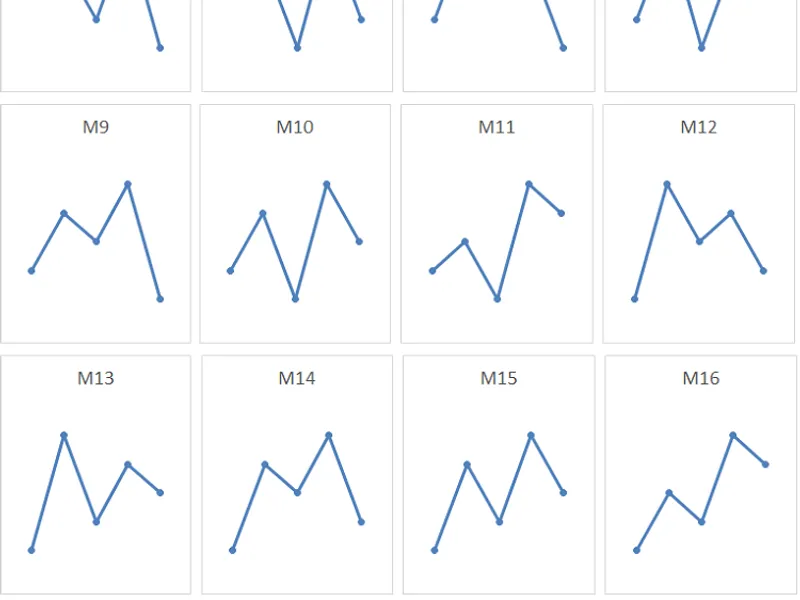
this technical indicator shows М & w wave patterns by merrill and support/resistance levels drawn at extreme points of the standard indicator. a. merrill classified five-pointed shapes based on the order of the points from top to bottom, and created an orderly classification model m & w waves. here they are:
Also recommended: nonparametric zig zag based on clyde lee patterns - similar indicator with strong performance on MetaTrader 5.
the dynamic pattern by a. merrillis the pattern that can vary over time. the dynamic pattern is on the first four right zigzag rays.
in this indicator all patterns are considered dynamic.
to provide this condition, the concept of
mutation of waves
was artificially introduced (see below) and the algorithm of the classic zigzag indicator was slightly modified.
as for the core of the extreme search algorithm - zigzag, this algorithm is a "temporary (quick) decision" and certainly requires replacement. since most of the errors are associated with pattern detection nopattern (see in enum namepattern in the mycpattern.mqh file) - this is an error of the search engine.
evolution and mutation of waves
evolution
- change of the dynamic pattern, which still stays in the same wave family. evolution of m-wave patterns:
evolution of w-wave patterns:
mutation
- change of the dynamic pattern, which then moves to another wave family. mutation of m-wave patterns:
mutation of w-wave patterns:
note
: prediction algorithm considers that a mutation results in the youngest shape of the evolution, and the evolution/mutation counter is aware of the possible nonsequential mutation/evolution. for example, mutation in the middle and senior shape. this is achieved by selecting specific values in the bit-mask enum namepattern (see mycpattern.mqh). if you want to use the evolution/mutation counter -
do not change enum namepattern.
indicator operation:
this indicator shows М & w wave patterns by merrill and support/resistance levels on a chart. the indicator is recalculated on each new history bar (to save cpu time when rendering objects). the names of all objects are pseudo-random. the indicator calculates the predicted price movements based on the expectations of a private (serial) evolution/mutation of waves. the indicator includes a counter of pattern model efficiency.
search engine, classic zigzag;
prediction model: level 0 (sequential evolution/mutation);
model counter: level 0 (algorithm: "i count only what i see, i don't know what was before...". statistics is displayed after the 11th shape appears).
You may also like: Candlestick Pattern Entry Indicator - excellent alternative for indicator users on MetaTrader 5.
Source Code
#property copyright "robotfx"
#property link "https://robotfx.org"
#property version   "2.01"
#property description "this code is educational. feel free to use, modify and upgrade as you wish. visit robotfx.org for professional trading tools"
#property description "this code is educational. feel free to use, modify and upgrade as you wish. visit robotfx.org for professional trading tools"
#property description "this code is educational. feel free to use, modify and upgrade as you wish. visit robotfx.org for professional trading tools"
#property description "this code is educational. feel free to use, modify and upgrade as you wish. visit robotfx.org for professional trading tools"
#property description "this code is educational. feel free to use, modify and upgrade as you wish. visit robotfx.org for professional trading tools"
#property description "this code is educational. feel free to use, modify and upgrade as you wish. visit robotfx.org for professional trading tools"
#property description "this code is educational. feel free to use, modify and upgrade as you wish. visit robotfx.org for professional trading tools"
.......
⚠ Limitations & Risk Warning
- This tool is provided for educational and testing purposes only.
- Past performance does not guarantee future results.
- Trading involves substantial risk of loss. Use on a demo account first.
- Results may vary depending on market conditions, broker, and settings.
- We recommend thorough backtesting and forward testing before using with real funds.