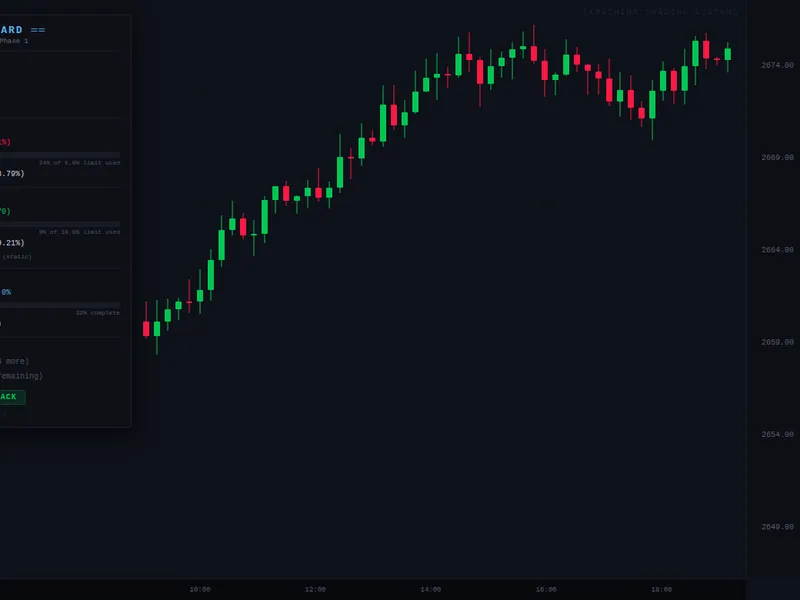







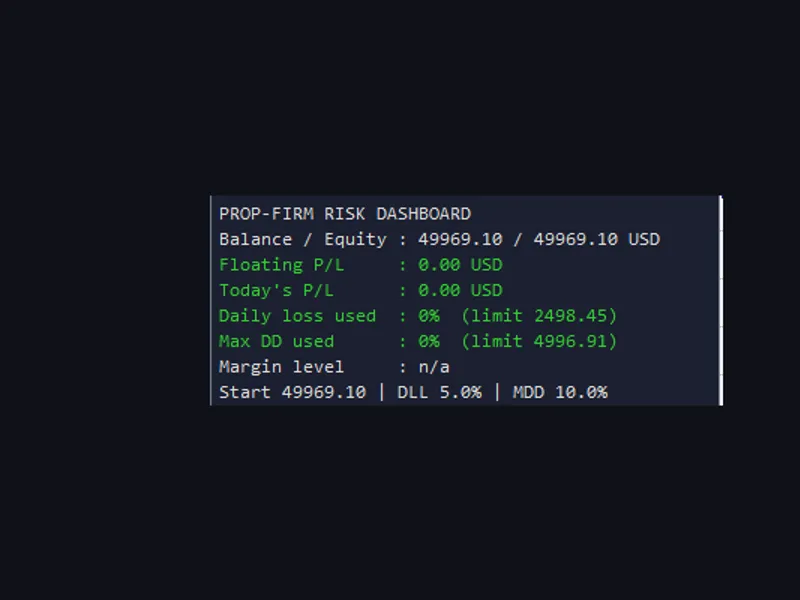


ex machina prop dashboard
Info
The ex machina prop dashboard is a Indicator for MetaTrader 5 that exmachina prop dashboard — never lose a funded account to math. precision before profit.
Usage
This tool is typically used for enhancing chart analysis and decision making.
Platform
This Indicator works exclusively on MetaTrader 5 (both build 600+ and newer versions).
Setup
Place the downloaded file in MQL5/Indicators folder via File ? Open Data Folder in MetaTrader 5.
How to Install and Use ex machina prop dashboard
1. Installation: Place your file in the MQL/Indicators folder via "Open Data Folder" and restart your terminal.
2. Loading: Find the indicator in the Navigator, drag it onto your chart, and configure the input parameters in the popup window.
3. Customization: Press Ctrl+I to open the indicator list, select your tool, and click "Properties" to change colors, levels, or visual styles.
4. Updating: Replace the old file in the Indicators folder with the new version and restart the platform to apply changes.
Frequently Asked Questions
Q: Why is my indicator not showing? A: Verify the file is in the MQL/Indicators folder, or try right-clicking the "Indicators" tree in the Navigator and clicking "Refresh."
Q: Do custom indicators slow down the platform? A: Too many complex indicators can impact performance; remove unused ones via the "Indicator List" (Ctrl+I).
Q: Can I use MT4 indicators on MT5? A: No, MQL4 and MQL5 are distinct languages; ensure the indicator is compiled specifically for your platform version.
What this tool does
exmachina prop dashboard — never lose a funded account to math.
Typical Use Case
This Indicator excels in automated trading and technical analysis on MetaTrader 5.
Compatible Platform & Setup
This Indicator works on MetaTrader 5. Place the file in the MQL5/Indicators folder and restart the terminal.
Description & Settings
Related: Prop Firm Risk Dashboard: Monitor Daily Loss and Drawdown - another powerful indicator for MetaTrader 5 traders.
exmachina prop dashboard — never lose a funded account to math.Also recommended: prop-firm traders utility dashboard - similar indicator with strong performance on MetaTrader 5.
precision before profit.
imagine you're in the middle of a $100k ftmo challenge. you've been trading well for two weeks, but then one bad session leaves you uncertain. did you exceed the daily limit? how close are you to the maximum drawdown? how many trading days do you have left?
you check the ftmo dashboard on your phone, but by the time it loads, the numbers are already 30 seconds old, and your positions are still open.
the prop dashboard solves this by displaying all the crucial information in real time, right on your chart, updating with every tick.
why this exists
prop firms have varying rules: daily loss limits, max drawdown (static or trailing), profit targets, minimum trading days, and calendar deadlines. keeping track of these while trading can be mentally taxing.
many traders rely on their prop firm's web dashboard, which has several limitations:
- delayed updates (30 seconds to several minutes)
- requires switching windows
- doesn't show proximity to limits in percentage terms
- no warning before breaching limits
the prop dashboard addresses all these issues with a single indicator.
core features
pre-built prop firm presets
choose your firm from the dropdown, and the rules automatically configure:
ftmo
- 5% daily, 10% max dd (static), 10% target, 4 min days, 30-day limit
myfundedfx
- 5% daily, 12% max dd, 8% target, 5 min days, 30-day limit
the funded trader
- 5% daily, 10% max dd, 10% target, 35-day limit
e8 funding
- 5% daily, 8% max dd (trailing hwm), 8% target, no time limit
bulenox
- trailing max dd, 6% target, no time limit
custom
- set any rules manually
daily loss tracking
- current day p&l in dollars and percentage
- visual progress bar with color coding
- exact dollar and percentage remaining before breach
- auto-resets at a configurable time (midnight default, adjustable for different broker servers)
max drawdown tracking
- three calculation methods to match your prop firm's rules:
- static (from initial balance) — ftmo, mff, tft
- trailing equity high-water mark — e8, bulenox
- end-of-day balance — some newer firms
- visual progress bar with color coding
- exact remaining buffer in dollars and percentage
profit target progress
- tracks achieved profit vs. target
- visual completion bar
- exact remaining amount
- celebrates when the target is reached
challenge status
- trading days counter (auto-detects days with actual trades)
- calendar days counter with remaining days
- overall verdict: on track / at risk / passed / failed
the verdict system
the dashboard provides an overall challenge status.
parameters installation
- download the .mq5 file
- place it in the mql5/indicators/ folder
- compile in metaeditor
- drag onto any chart
- select your prop firm preset or configure custom rules
important notes
- this is a pure indicator; it does not open, modify, or close trades.
- it monitors all positions on the account, regardless of symbol or magic.
- for accurate tracking, set inpaccountsize to your challenge starting balance.
- day reset time should match your prop firm's server rollover time.
- test on a demo first to ensure calculations match your firm's dashboard.
compatibility
- metatrader 5, all brokers
- all instruments
- all timeframes
- netting and hedging accounts
exmachina trading systems — precision before profit.
You may also like: asq propguard: real-time prop firm rule monitor for metatrader 5 - excellent alternative for indicator users on MetaTrader 5.
Source Code
#property copyright "robotfx"
#property link "https://robotfx.org"
#property version     "1.00"
#property description "This code is provided AS IS and intended for educational purposes only. Professional trading EAs and indicators - robotfx www.robotfx.org"
#property description "This code is provided AS IS and intended for educational purposes only. Professional trading EAs and indicators - robotfx www.robotfx.org"
#property description "This code is provided AS IS and intended for educational purposes only. Professional trading EAs and indicators - robotfx www.robotfx.org"
#property description "This code is provided AS IS and intended for educational purposes only. Professional trading EAs and indicators - robotfx www.robotfx.org"
#property indicator_chart_window
#property indicator_buffers 0
#property indicator_plots   0
.......
⚠ Limitations & Risk Warning
- This tool is provided for educational and testing purposes only.
- Past performance does not guarantee future results.
- Trading involves substantial risk of loss. Use on a demo account first.
- Results may vary depending on market conditions, broker, and settings.
- We recommend thorough backtesting and forward testing before using with real funds.