






Zeta Burst Scalper EA
Info
The Zeta Burst Scalper EA is a Expert Advisor for MetaTrader 5 that zeta burst scalper eatick-driven scalper. The EA monitors a short rolling window of price movement (4 seconds by default) to establish a live statistical baseline of normal price behavior for the current symbol.
Usage
This tool is typically used for scalping on lower timeframes (M1-M15).
Platform
This Expert Advisor works exclusively on MetaTrader 5 (both build 600+ and newer versions).
Setup
Place the downloaded file in MQL5/Experts folder via File ? Open Data Folder in MetaTrader 5.
How to Install and Use Zeta Burst Scalper EA
1. Installation: Open the "File" menu, select "Open Data Folder," navigate to MQL/Experts, paste your file, and restart the terminal.
2. Activation: Drag the EA from the Navigator onto a chart, ensure "Allow live trading" is checked in the Common tab, and verify the AutoTrading button is green.
3. Optimization: Right-click your chart, choose "Expert List," click "Properties" to adjust inputs, and save your preferred setup as a set file for future use.
4. Maintenance: Regularly check the "Experts" tab in the terminal window to monitor trade logs and potential execution errors.
Frequently Asked Questions
Q: Why is my EA not opening trades? A: Check the "AutoTrading" button, ensure "Allow live trading" is enabled, and verify your broker allows automated trading on your account type.
Q: Can I run multiple EAs on one chart? A: No, each chart can only host one active EA; however, you can open multiple charts for different currency pairs to run several EAs.
Q: What does the "smiley face" icon mean? A: A smiley face in the top-right corner of the chart indicates the EA is successfully running; a frowny face means it is disabled.
What this tool does
Zeta Burst Scalper EATick-driven scalper.
Typical Use Case
This Expert Advisor excels in automated trading and technical analysis on MetaTrader 5.
Compatible Platform & Setup
This Expert Advisor works on MetaTrader 5. Place the file in the MQL5/Experts folder and restart the terminal.
Description & Settings
Related: Pulse Strike Scalper - Statistical Burst Detection Expert Advisor - another powerful expert for MetaTrader 5 traders.
Zeta Burst Scalper EAAlso recommended: Triangle Hedge: Synthesizing Hedged Positions in MetaTrader 5 - similar expert with strong performance on MetaTrader 5.
Tick-driven scalper. The EA monitors a short rolling window of price movement (4 seconds by default) to establish a live statistical baseline of normal price behavior for the current symbol. A trade setup is identified only when price movement is a significant outlier compared to this baseline, measured as a z-score against the last InpStatsSampleCount window of returns, with a default threshold of 3.0 standard deviations.
An earlier version used a fixed ATR fraction as a baseline, which resulted in frequent trades on normal tick noise and significant losses across major pairs. The z-score approach was implemented to address this issue.
Momentum or Reversion Trading
The EA offers two trading modes: Momentum, which trades with the direction of the price burst, and Reversion, which trades against it. The optimal mode for a specific symbol requires testing both options.
Robust Trade Execution Against Broker Delay
This feature addresses real-world broker execution delays. After a position is opened without an initial stop, the EA reads its actual fill price. Stop loss and take profit levels are then calculated based on this fill price, not a pre-delay snapshot, ensuring accuracy. The stop distance is also adjusted to comply with the symbol's minimum stop level, preventing rejections due to excessively tight stops. If stop attachment fails, the position is closed immediately to avoid risk, a measure implemented after early testing revealed significant drawdowns from unprotected trades.
Additional Trade Logic
Every entry must pass a cost check, ensuring the take profit is a viable multiple of the current spread. Daily trade and loss limits are in place, halting new entries for the remainder of the day once either limit is reached.
The EA manages only one open position at a time. In netting mode environments, common in retail MT5 accounts, a new order on an existing symbol merges with the open trade. ZetaBurst is designed to manage trades effectively in this environment by cycling through trades with tick-level checks and short cooldown periods.
Backtest Performance
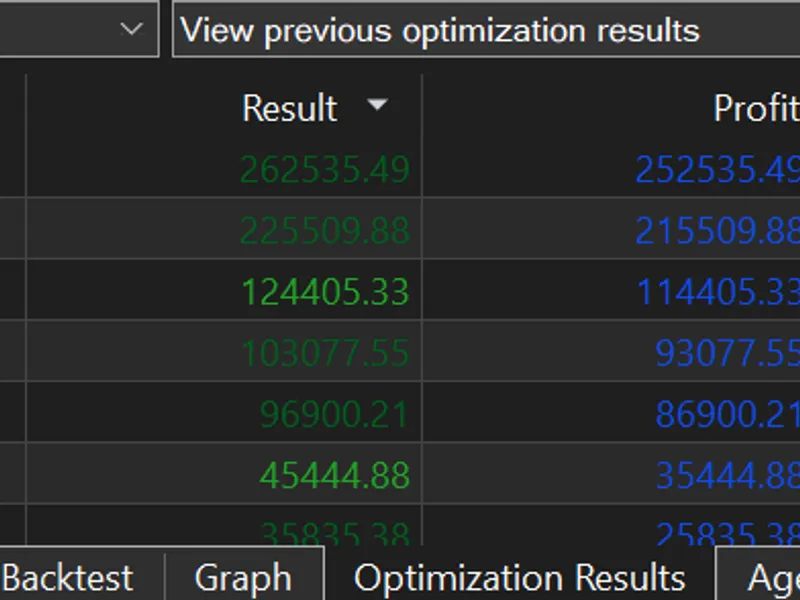
The following results were obtained using all Market Watch symbols, M1 data, Every tick modelling, Random delay execution, from 2026.01.01 through 2026.09.08. Default inputs were used: z-score threshold 3.0, burst window 4 seconds, take-profit at 0.35x ATR, stop-loss at 0.55x ATR. The starting balance for each run was 10000.
Symbol
Profit
Trades
Profit Factor
Expected Payoff
Drawdown %
USDJPY
252535.49
7468
1.42
33.82
3.26
EURUSD
215509.88
5618
1.26
38.36
13.55
AUDUSD
114405.33
7282
1.16
15.71
19.70
USDCHF
93077.55
5773
1.25
16.12
4.62
GBPUSD
86900.21
7205
1.24
12.06
4.11
USDCAD
35444.88
3676
1.29
9.64
24.29
USDSEK
25835.38
1037
1.64
24.91
7.67
NZDUSD
10188.64
5144
1.05
1.98
51.40
The results for NZDUSD show a profit factor of 1.05 and a drawdown of 51%, which deviates significantly from the performance of the other seven pairs. This pair is not recommended for trading with the current EA settings.
Non-forex and exotic symbols were included in the test run but are not detailed here due to insufficient trade counts and the EA's design focus on major currency pairs.
Important Caveat: These backtest results are based on a single, optimized period and have not yet been validated on out-of-sample data. A strategy's effectiveness is only confirmed when it performs well on unseen data. This listing will be updated upon completion of out-of-sample testing.
Inputs
Burst Detection Parameters: InpBurstWindowSeconds, InpStatsSampleCount, InpZScoreThreshold, InpModeIsMomentum
Trade Management Parameters: InpVolATRPeriod, InpRiskPercent, InpTakeProfitATRMult, InpStopLossATRMult, InpMinTPToSpreadRatio, InpMaxSpreadPoints, InpCooldownSeconds
Daily Limits: InpMaxTradesPerDay, InpDailyLossLimitPercent
Session Filter: InpUseSessionFilter, InpSessionStartHour, InpSessionEndHour
Always test on a demo account before live trading. Past performance is not indicative of future results. Feedback is appreciated.
You may also like: EXP Color Bulls Gap Expert Advisor - excellent alternative for expert users on MetaTrader 5.
Source Code
#property copyright "RobotFX"
#property version   "1.00"
#property strict
#include <Trade/Trade.mqh>
CTrade trade;
input group "=== Burst Detection (statistical) ==="
input int    InpBurstWindowSeconds    = 4;
input int    InpStatsSampleCount      = 120;
input double InpZScoreThreshold       = 3.0;
input bool   InpModeIsMomentum        = true;
.......
⚠ Limitations & Risk Warning
- This tool is provided for educational and testing purposes only.
- Past performance does not guarantee future results.
- Trading involves substantial risk of loss. Use on a demo account first.
- Results may vary depending on market conditions, broker, and settings.
- We recommend thorough backtesting and forward testing before using with real funds.