
prime quantum ai: ai-powered trading with metatrader 5
Info
The prime quantum ai: ai-powered trading with metatrader 5 is a Expert Advisor for MetaTrader 5 that prime quantum ai is an expert advisor for metatrader 5 that combines a classical technical pre-filter (adx + alligator) with ai vision-based chart analysis from major ai providers. how it worksthe ea runs a two-stage decision process.
Usage
This tool is typically used for automated trading on major forex pairs and gold.
Platform
This Expert Advisor works exclusively on MetaTrader 5 (both build 600+ and newer versions).
Setup
Place the downloaded file in MQL5/Experts folder via File ? Open Data Folder in MetaTrader 5.
How to Install and Use prime quantum ai: ai-powered trading with metatrader 5
1. Installation: Open the "File" menu, select "Open Data Folder," navigate to MQL/Experts, paste your file, and restart the terminal.
2. Activation: Drag the EA from the Navigator onto a chart, ensure "Allow live trading" is checked in the Common tab, and verify the AutoTrading button is green.
3. Optimization: Right-click your chart, choose "Expert List," click "Properties" to adjust inputs, and save your preferred setup as a set file for future use.
4. Maintenance: Regularly check the "Experts" tab in the terminal window to monitor trade logs and potential execution errors.
Frequently Asked Questions
Q: Why is my EA not opening trades? A: Check the "AutoTrading" button, ensure "Allow live trading" is enabled, and verify your broker allows automated trading on your account type.
Q: Can I run multiple EAs on one chart? A: No, each chart can only host one active EA; however, you can open multiple charts for different currency pairs to run several EAs.
Q: What does the "smiley face" icon mean? A: A smiley face in the top-right corner of the chart indicates the EA is successfully running; a frowny face means it is disabled.
What this tool does
prime quantum ai is an expert advisor for metatrader 5 that combines a classical technical pre-filter (adx + alligator) with ai vision-based chart analysis from major ai providers.
Typical Use Case
This Expert Advisor excels in automated trading and technical analysis on MetaTrader 5.
Compatible Platform & Setup
This Expert Advisor works on MetaTrader 5. Place the file in the MQL5/Experts folder and restart the terminal.
Description & Settings
Related: Aegis Quantum Lite - another powerful expert for MetaTrader 5 traders.
prime quantum ai is an expert advisor for metatrader 5 that combines a classical technical pre-filter (adx + alligator) with ai vision-based chart analysis from major ai providers.Also recommended: quantum xauusd silver trader - similar expert with strong performance on MetaTrader 5.
how it works
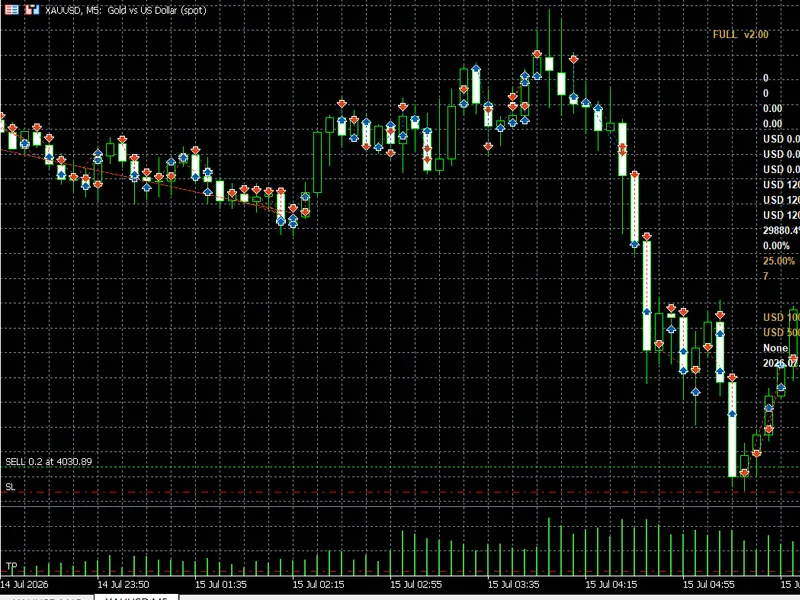
the ea runs a two-stage decision process. first, on each tick, it checks the user's selected timeframe for a trend setup using adx (above the configurable minimum level) combined with alligator alignment and di+/di- direction. when this pre-filter signals bullish or bearish, the ea captures three chart screenshots at adaptive timeframes (entry, mid, context — automatically chosen from the user's tf input) and sends them to the configured ai provider. the ai returns a json response with direction, confidence (0-100), stop-loss price, take-profit price, and reasoning. a trade is opened only if the ai direction matches the pre-filter signal and confidence meets the user's minimum threshold.
recommended symbol and timeframe
- symbol: any major forex pair, gold (xauusd), or major indices
- timeframe input (tf): m15 default. m1-m5 for scalping, h1-h4 for day trading, d1 for swing trading. the screenshot stack is selected automatically from this input.
key external variables
- tf: trading timeframe (controls pre-filter and screenshot stack)
- inpapikey: your ai provider api key
- inpprovideroverride: auto / anthropic / openai / google / deepseek / xai
- inpminconfidence: minimum ai confidence to take a trade (default 70)
- inpscanintervalsec: cooldown between ai calls (default 120s)
- inpaccounttype: standard broker / prop firm / funded
- inpriskmode: fixed lot, % balance, % equity, fixed $, % free margin
- inpsltpmode: ai decides / fixed pips / fixed points / ai sl with r:r
- inpadxperiod, inpadxminlevel: adx pre-filter parameters
- inpjawperiod/shift, inpteethperiod/shift, inplipsperiod/shift: alligator
- inpatrtrailperiod: atr period for atr-based trailing stop
- news, time, day, and spread filters with full configuration
requirements
1. metatrader 5
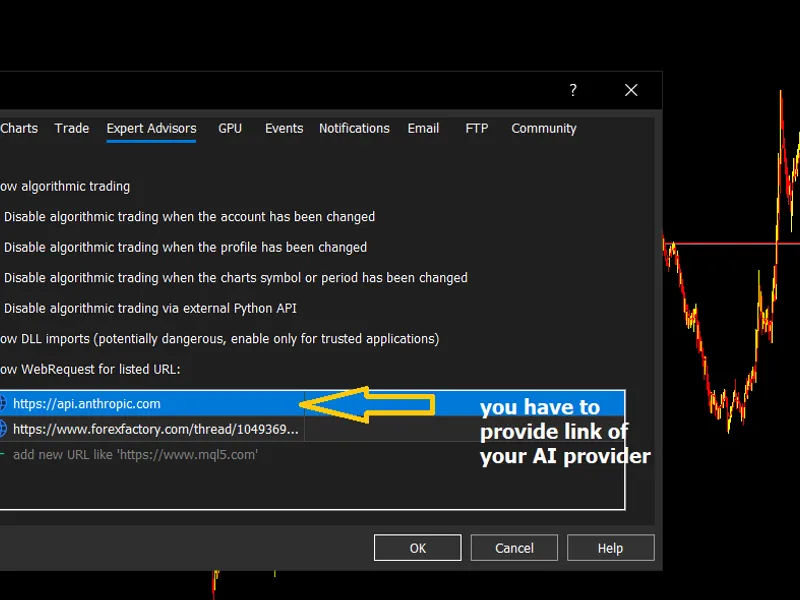
2. webrequest must be enabled in tools > options > expert advisors > allow webrequest, with the url of your chosen provider added.
3. a valid api key from one of the supported providers (paste into inpapikey input). provider is auto-detected from key format.
where to get api keys
notes
- the ea charges no internal fee, but the ai provider charges per api call (typically $0.01-$0.03 per analysis). set inpscanintervalsec to control your daily cost.
- always test on a demo account before using on live funds.
You may also like: quantum gold silver trader - excellent alternative for expert users on MetaTrader 5.
Source Code
#property copyright "robotfx"
#property link "https://robotfx.org"
#property version     "3.21"
#property description "This code is provided AS IS and intended for educational purposes only. Professional trading EAs and indicators - robotfx www.robotfx.org"
#property description "This code is provided AS IS and intended for educational purposes only. Professional trading EAs and indicators - robotfx www.robotfx.org"
#property description "This code is provided AS IS and intended for educational purposes only. Professional trading EAs and indicators - robotfx www.robotfx.org"
#property description "This code is provided AS IS and intended for educational purposes only. Professional trading EAs and indicators - robotfx www.robotfx.org"
#property strict
#include <trade\trade.mqh>
enum enum_ai_provider
.......
⚠ Limitations & Risk Warning
- This tool is provided for educational and testing purposes only.
- Past performance does not guarantee future results.
- Trading involves substantial risk of loss. Use on a demo account first.
- Results may vary depending on market conditions, broker, and settings.
- We recommend thorough backtesting and forward testing before using with real funds.