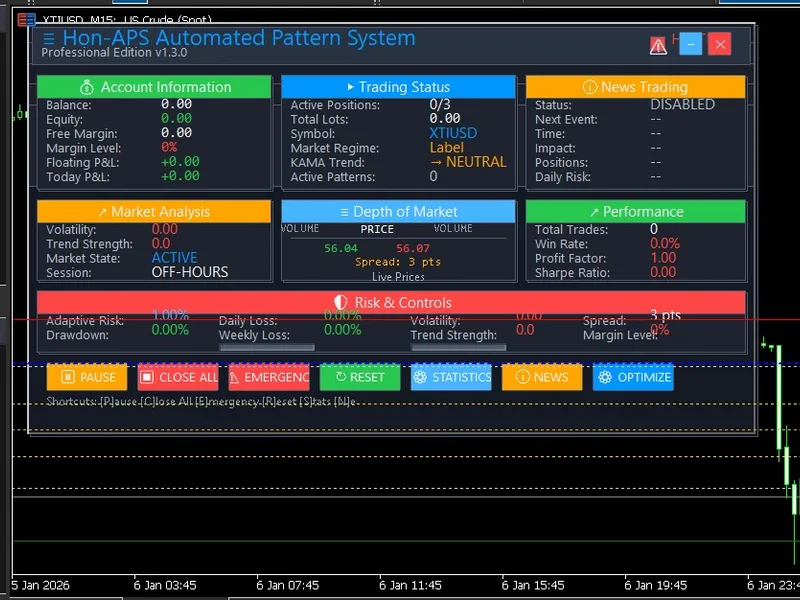
Hon AP S Advanced Pattern Scanner with DO M and News Integration
This software component for MetaTrader 5 is built to enhance the capabilities of your trading environment. This Expert Advisor serves as automated trading software. It is utilized to monitor financial markets and execute trades based on predefined algorithmic rules, enabling precise position management without the need for constant manual oversight.
How to Setup and Use Hon AP S Advanced Pattern Scanner with DO M and News Integration
1. Installation: Open the "File" menu, select "Open Data Folder," navigate to MQL/Experts, paste your file, and restart the terminal.
2. Activation: Drag the EA from the Navigator onto a chart, ensure "Allow live trading" is checked in the Common tab, and verify the AutoTrading button is green.
3. Optimization: Right-click your chart, choose "Expert List," click "Properties" to adjust inputs, and save your preferred setup as a set file for future use.
4. Maintenance: Regularly check the "Experts" tab in the terminal window to monitor trade logs and potential execution errors.
Frequently Asked Questions
Q: Why is my EA not opening trades? A: Check the "AutoTrading" button, ensure "Allow live trading" is enabled, and verify your broker allows automated trading on your account type.
Q: Can I run multiple EAs on one chart? A: No, each chart can only host one active EA; however, you can open multiple charts for different currency pairs to run several EAs.
Q: What does the "smiley face" icon mean? A: A smiley face in the top-right corner of the chart indicates the EA is successfully running; a frowny face means it is disabled.
Description & Settings
An institutional-grade Expert Advisor that trades classical chart patterns (Cup & Handle, Flags, Bottoms) validated by real-time Order Book (DOM) volume absorption and protected by a multi-source macroeconomic news filter.
What ideas is the code based on?
Most algorithmic trading systems rely on lagging indicators. Hon-APS is based on the idea that
structural price action combined with quantitative volume flow provides the highest probability entries.
The system operates on three core pillars:
Dynamic Pattern Recognition:
The EA actively scans the chart for structural formations (Head & Shoulders, Double/Rounding Bottoms, Triangles, Flags).
Order Flow & DOM Validation:
Once a pattern breakout occurs, the EA reads the Level 2 Order Book ( MarketBookGet ) to calculate bid/ask imbalances and true volume absorption. If the broker does not support DOM, it uses tick volume estimation as a smart fallback.
Advanced Risk Control:
Trades are sized using a modified Kelly Criterion. The system dynamically monitors correlated exposure and enforces hard daily and weekly drawdown limits to protect capital. How can the indications be interpreted?
The EA operates fully autonomously, but its logic is transparently displayed via a professional on-chart dashboard.
KAMA Trend:
Indicates the current overarching market direction (Bullish/Bearish/Neutral) to filter trades against the trend.
Volume Imbalance/Absorption:
Breaks out are only taken if aggressive limit orders at support/resistance are absorbed by the dominant trend.
News Filter Status:
Shows when trading is temporarily halted due to an incoming high-impact macroeconomic event. Suitable Symbols and Timeframes
Recommended Symbols:
Major Forex Pairs (EURUSD, GBPUSD) and Indices (US30, NAS100). The EA includes adaptive spread control for Crypto and Indices.
Recommended Timeframe:
H1 (1-Hour) or H4 (4-Hour) charts are best suited for structural pattern formations. Description of #include Files Used
The EA utilizes two custom include files to compartmentalize complex logic:
Hon-APS-Dashboard.mqh
: Responsible for rendering a modern, interactive GUI on the chart. It calculates and draws real-time account metrics, active risk, market trends, and DOM visualizations without cluttering the main trading logic.
Hon-NewsTrader.mqh
: A robust macroeconomic event handler. It actively checks the internal MQL5 Economic Calendar AND scrapes external web sources (Forex Factory JSON / Forexprostools HTML) to automatically pause the EA before high-impact news releases. Description of Main External Variables (Inputs)
BaseRiskPercent / UseKellyCriterion
: Determines the position sizing model for each trade.
MaxDailyLoss / MaxWeeklyLoss
: Hard equity stops to prevent catastrophic drawdowns (ideal for prop firm trading).
Pattern Toggles ( TradeCupHandle , TradeFlags , etc.)
: Allows the user to toggle which specific chart structures they want the EA to scan for.
RequireVolumeConfirmation
: When set to true, the EA will only enter a pattern breakout if it is accompanied by an institutional volume multiplier.
Adaptive Moving Average ( UseKAMAFilter )
: KAMA periods and slope thresholds used to ensure trades are only placed in the direction of the macro trend.
UsePartialProfits & Trailing Stops ( InitialTrailingATR )
: Engages an ATR-based progressive trailing stop and takes partial profits at structured Risk-to-Reward levels (1R, 2R).