





GDS Renko Dual MA EA
Info
The GDS Renko Dual MA EA is a Expert Advisor for MetaTrader 5 that how it works- classic fixed-size renko is built internally from bid ticks. - Reversals use the classic two-brick rule.
Usage
This tool is typically used for automated trading on major forex pairs and gold.
Platform
This Expert Advisor works exclusively on MetaTrader 5 (both build 600+ and newer versions).
Setup
Place the downloaded file in MQL5/Experts folder via File ? Open Data Folder in MetaTrader 5.
How to Install and Use GDS Renko Dual MA EA
1. Installation: Open the "File" menu, select "Open Data Folder," navigate to MQL/Experts, paste your file, and restart the terminal.
2. Activation: Drag the EA from the Navigator onto a chart, ensure "Allow live trading" is checked in the Common tab, and verify the AutoTrading button is green.
3. Optimization: Right-click your chart, choose "Expert List," click "Properties" to adjust inputs, and save your preferred setup as a set file for future use.
4. Maintenance: Regularly check the "Experts" tab in the terminal window to monitor trade logs and potential execution errors.
Frequently Asked Questions
Q: Why is my EA not opening trades? A: Check the "AutoTrading" button, ensure "Allow live trading" is enabled, and verify your broker allows automated trading on your account type.
Q: Can I run multiple EAs on one chart? A: No, each chart can only host one active EA; however, you can open multiple charts for different currency pairs to run several EAs.
Q: What does the "smiley face" icon mean? A: A smiley face in the top-right corner of the chart indicates the EA is successfully running; a frowny face means it is disabled.
What this tool does
How it works- Classic fixed-size Renko is built internally from BID ticks.
Typical Use Case
This Expert Advisor excels in automated trading and technical analysis on MetaTrader 5.
Compatible Platform & Setup
This Expert Advisor works on MetaTrader 5. Place the file in the MQL5/Experts folder and restart the terminal.
Description & Settings
Related: GDS Renko RSI + MACD 4-Mode EA - another powerful expert for MetaTrader 5 traders.
How it works- Classic fixed-size Renko is built internally from BID ticks.
- Reversals use the classic two-brick rule.
Also recommended: GDS Renko Trade Manager for MetaTrader 5 - similar expert with strong performance on MetaTrader 5.
- Fast and Slow SMA values are calculated only from completed Renko closes.- Fast MA above Slow MA defines a bullish state; Fast MA below Slow MA defines a bearish state.
- A newly completed Renko brick can trigger a trade only when its direction agrees with the MA state and the minimum run requirement.
- A minimum MA separation, measured in bricks, can filter nearly-flat MA states.
- Positions close by virtual TP, virtual SL, opposite MA state, or maximum holding time.
- A Renko cooldown is applied after an exit.
- One position per symbol.
- No external indicators, DLLs, custom symbols or offline Renko charts are required.
Causality
The moving averages are updated only after a Renko brick is completed. Unfinished intra-brick price movement cannot directly generate an entry signal. If one incoming tick completes several Renko bricks, the completed bricks are processed sequentially and only the final signal on that tick may open a new position.
Default inputs
Brick Size = 6.0
Fast MA Period = 9
Slow MA Period = 152
Minimum MA Separation = 4.15 bricks
Entry Run = 2 bricks
Take Profit = 55.0 bricks
Stop Loss = 32.0 bricks
Maximum Hold = 1440 minutes
Cooldown = 16 bricks
Maximum Spread Fraction = 0.35
Requested Lot = 0.01
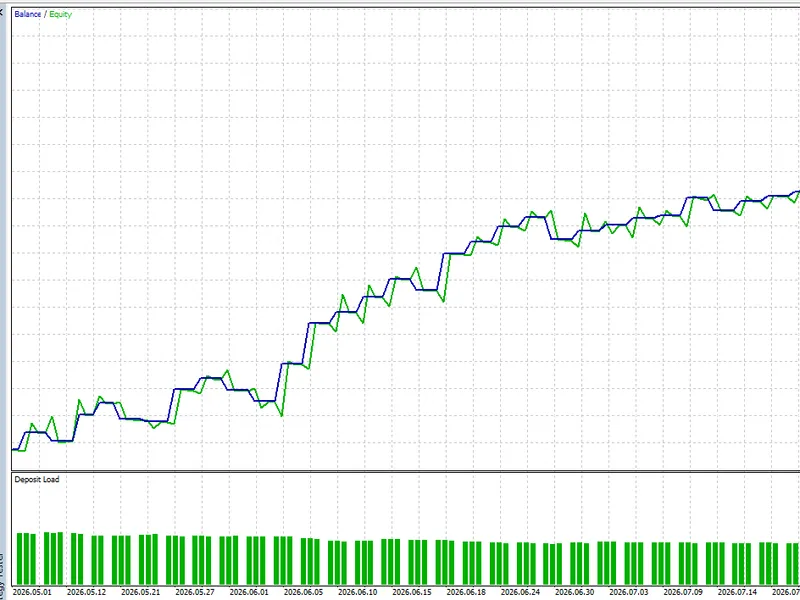
Example Strategy Tester run
Broker: RoboForex-ECN
Symbol: XAUUSD
Host timeframe: M1
Model: Every tick based on real ticks
Period: 2026-05-01 to 2026-09-08
Initial deposit: 10,000 USD
Leverage: 1:100
History quality: 100% real ticks
Trades: 57
Net result: +1,188.60 USD
Profit Factor: 2.39
Balance drawdown maximal: 158.87 USD (1.58%)
Equity drawdown maximal: 217.20 USD (2.15%)
Winning trades: 64.91%
The parameters above were selected on this historical interval for an educational Strategy Tester demonstration. The result is not evidence of a persistent trading edge, a recommendation, or a promise of future profitability. Results can differ between brokers, symbols and market conditions.
The selected MT5 timeframe is only a host. Renko construction is driven by incoming BID ticks rather than by M1 bars. TP and SL are virtual, so the EA and terminal must remain running for those exits to be managed.
You may also like: GDS Renko ADX Demo Expert Advisor - excellent alternative for expert users on MetaTrader 5.
Source Code
#property copyright "RobotFX"
#property link "https://robotfx.org"
#property version   "1.10"
#property strict
#property description "This code is educational. Feel free to use, modify and upgrade as you wish. Visit ROBOTFX.ORG for professional trading tools"
input double InpBrickSize              = 6.0;
input int    InpFastMAPeriod           = 9;
input int    InpSlowMAPeriod           = 152;
input double InpMinMASeparationBricks  = 4.15;
input int    InpEntryRunBricks         = 2;
.......
⚠ Limitations & Risk Warning
- This tool is provided for educational and testing purposes only.
- Past performance does not guarantee future results.
- Trading involves substantial risk of loss. Use on a demo account first.
- Results may vary depending on market conditions, broker, and settings.
- We recommend thorough backtesting and forward testing before using with real funds.