Frontend EA : UI cleanup + quick-trading layer for MT5
This software component for MetaTrader 5 is built to enhance the capabilities of your trading environment. This Expert Advisor serves as automated trading software. It is utilized to monitor financial markets and execute trades based on predefined algorithmic rules, enabling precise position management without the need for constant manual oversight.
How to Setup and Use Frontend EA : UI cleanup + quick-trading layer for MT5
1. Installation: Open the "File" menu, select "Open Data Folder," navigate to MQL/Experts, paste your file, and restart the terminal.
2. Activation: Drag the EA from the Navigator onto a chart, ensure "Allow live trading" is checked in the Common tab, and verify the AutoTrading button is green.
3. Optimization: Right-click your chart, choose "Expert List," click "Properties" to adjust inputs, and save your preferred setup as a set file for future use.
4. Maintenance: Regularly check the "Experts" tab in the terminal window to monitor trade logs and potential execution errors.
Frequently Asked Questions
Q: Why is my EA not opening trades? A: Check the "AutoTrading" button, ensure "Allow live trading" is enabled, and verify your broker allows automated trading on your account type.
Q: Can I run multiple EAs on one chart? A: No, each chart can only host one active EA; however, you can open multiple charts for different currency pairs to run several EAs.
Q: What does the "smiley face" icon mean? A: A smiley face in the top-right corner of the chart indicates the EA is successfully running; a frowny face means it is disabled.
Description & Settings
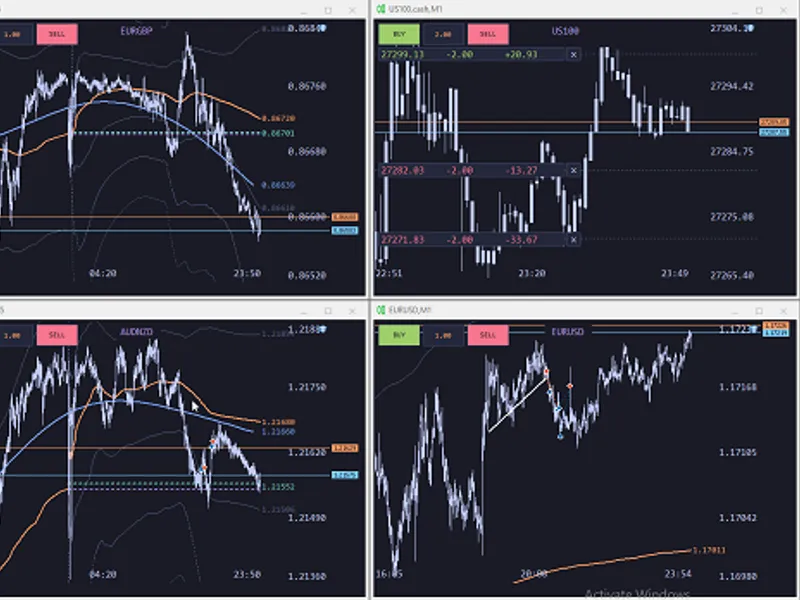
A UI cleanup + quick-trading layer for MT5. Strips away the noisy defaults, replaces the built-in price and time axes with big readable labels, and gives you a proper one-click panel — all in a single EA.Its a good base for anyone looking to customize its UI.
Chart look
Hides grid, volumes, ticker bar and one-click trading panel on load
Custom
price scale
with round-number labels ( 1 / 2 / 2.5 / 5 × 10ᵏ steps)
Custom
time scale
that shows the date only once per day at 00:00 , time otherwise
Auto-padding around the Bid tag and horizontal-line endpoint labels, so nothing overlaps (WIP)
Compact mode
when the chart is tiled: 5 price levels (top / ¾ / mid / ¼ / bottom) and 3 time labels (left / mid / right) Quick trading
BUY
and
SELL
buttons top-left with an editable volume box
Volume is persisted per slot via GlobalVariable
Symbol label at the top center ( .cash suffix stripped) Open-position plates (left side)
One plate per open position at its entry-price Y
Shows price | signed volume | live PnL
+ for longs, − for shorts
PnL includes swap + commission, refreshed every second
Green
when in profit,
red
when in loss, orange flat
Overlapping entries at the same level
merge into one plate
with summed volume and summed PnL
Small
×
button next to each plate closes every ticket in that cluster in one click
Fixed-width fields so plates stay aligned across refreshes Indicators
L1 trend filter
on H1 (λ configurable)
Session VWAP
with ±2σ , ±5σ , ±8σ bands
Previous-close and today-open markers Keyboard shortcuts Performance
80 ms paint loop with a dirty-check: geometry + price range + position-list hash + 1 Hz PnL pulse
Label pools reused across frames (no ObjectFind in the hot path)
Inline price → Y math, geometry cached and refreshed only on CHART_CHANGE
Smooth repaint during drag / resize, near-idle CPU when the chart is static Palette
Tokyo Night — dark background, soft blue / orange / purple accents, easy on the eyes for long sessions.All indicators source code coming from mql5.com with some tweaks for performance. Big thank you to all the people publishing here for free.Current EA fits my needs reasonably but its a good base for anyone willing to customize the UI. made by Claude code.
any suggestions to make this better are welcome, although i wont add input settings for colors or easy stuff like that.use at your own risk, its mostly untested.
![[EA] - Charles 2. 1. 5](/images/10823.webp)