DOWNLOAD all MT4 scripts (241)

Similar MetaTrader Tools
MT4 Experts

MT4 Indicators


MT5 Experts



MT5 Indicators

XI T Buy Sell Auto Stoploss. mq4 - Stoploss set from Fractal Levels, Money management Risk/Reward
Info
The XI T Buy Sell Auto Stoploss. mq4 - Stoploss set from Fractal Levels, Money management Risk/Reward is a Script for MetaTrader 4 that xit_buysellautostoploss. mq4 - Stoploss set from Fractal Levels, Money management Risk/Reward My main goal here with this script was to help improve my win ratio, by setting my stoploss at fractals with the best support.
Usage
This tool is typically used for enhancing chart analysis and decision making.
Platform
This Script works exclusively on MetaTrader 4 (both build 600+ and newer versions).
Setup
Place the downloaded file in MQL4/Scripts folder via File ? Open Data Folder in MetaTrader 4.
How to Install and Use XI T Buy Sell Auto Stoploss. mq4 - Stoploss set from Fractal Levels, Money management Risk/Reward
1. Installation: Move your script file into the MQL/Scripts directory and restart the platform.
2. Execution: Drag the script onto a chart; it will perform a one-time action, such as closing all open orders or clearing chart objects.
3. Editing: Use MetaEditor (F4) to modify code, click "Compile," and verify no errors appear in the terminal before running.
4. Removing: Scripts stop automatically, but you can remove them manually by right-clicking the chart and choosing "Remove Script."
Frequently Asked Questions
Q: How are scripts different from EAs? A: Scripts execute a single action and then stop; EAs monitor the market and trade continuously.
Q: Can I assign a hotkey to a script? A: Yes, right-click the script in the Navigator, select "Set Hotkey," and define your preferred keyboard shortcut.
Q: Why did my script stop? A: Scripts are designed to stop immediately after finishing their programmed command; this is normal behavior.
What this tool does
XIT_BuySellAutoStoploss.
Typical Use Case
This Script excels in automated trading and technical analysis on MetaTrader 4.
Compatible Platform & Setup
This Script works on MetaTrader 4. Place the file in the MQL4/Scripts folder and restart the terminal.
Description & Settings
Related: Auto MM - another powerful script for MetaTrader 4 traders.
XIT_BuySellAutoStoploss.mq4 - Stoploss set from Fractal Levels, Money management Risk/Reward
My main goal here with this script was to help improve my win ratio, by setting my stoploss at fractals with the best support. I had been using fixed stoploss values, and kept having the stop hit and within minutes the price went back into the correct direction. This script has really helped me spot out recent support/resistance levels, providing good stop levels.
Also recommended: Sell Percent - similar script with strong performance on MetaTrader 4.
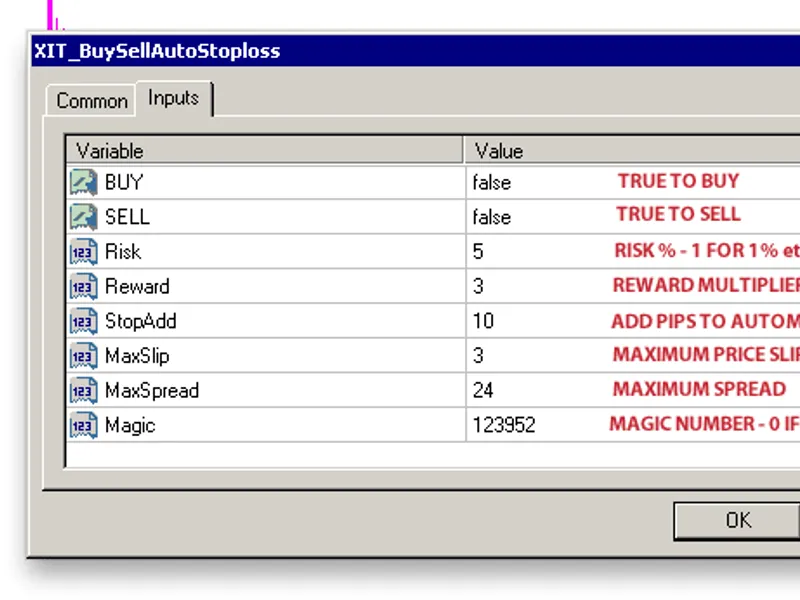
Here are some of the features of the script, and a basic run threw of how to use it.First off you must either choose to BUY or SELL. If both are left false you will get a message stating this and have to relaunch the script. Same error will occur if both are true.
The next thing to do would be to set your Risk%, default is set at 2%.
The way that i calculate lots to risk in this script is as follows:
FreeMargin * Risk% = RiskCapital
(RiskCapital / StopLossPips) / (Leverage / ExchangeRate) = Volume
This formula should give an accurate Risk/Stoploss pip volume. On accounts with small deposits you may end up risking more than the risk percentage you were hoping for. In this case you will get a message stating that you are risking more than your Risk%. You will have the option to continue or not.
The Reward multiplier is fairly simple, basically if you want your takeprofit set to the same number of pips as the stoploss enter 1, for twice the stoploss pips 2 etc...
StopAdd, just adds x amount of pips to the fractal based stoploss level.
MaxSlip, sets the maximum price slippage allowed when opening trade.
MaxSpread, sets the maximum allowed spread.
Magic, sets the magic number for the trade. 0 if none.
The next thing to do is choose the Fractal level you wish to place your stop at. It is a good idea to have the fractal indicator on your chart so you can see a clearer picture of these levels. There will be a message asking if you want to place your stop at 0.3434 etc... if the first stop is where you want it, click no and go to the next Fractal and so on.
After clicking yes the script to run as intended and open your order. If there is an error, you should get a message stating what it is.
I hope this script can help some of you out, and please let me know if there issues with the script so that i can get them all fixed. Also if there are any additions or modifications that would make this script better please let me know..
Happy Trading
You may also like: How to Disable/Enable Auto/Algo-Trading in both MT5 and MT4 - excellent alternative for script users on MetaTrader 4.
⚠ Limitations & Risk Warning
- This tool is provided for educational and testing purposes only.
- Past performance does not guarantee future results.
- Trading involves substantial risk of loss. Use on a demo account first.
- Results may vary depending on market conditions, broker, and settings.
- We recommend thorough backtesting and forward testing before using with real funds.