Super Trend Quant Pro Elite: Adaptive Statistical Trend Engine
This is a powerful addition to your MetaTrader 5 toolkit designed to optimize market analysis and performance. This technical indicator acts as a specialized analysis tool designed to visualize market data. It helps traders identify emerging trends, momentum shifts, and key support or resistance levels by plotting statistical calculations directly onto price charts.
How to Setup and Use Super Trend Quant Pro Elite: Adaptive Statistical Trend Engine
1. Installation: Place your file in the MQL/Indicators folder via "Open Data Folder" and restart your terminal.
2. Loading: Find the indicator in the Navigator, drag it onto your chart, and configure the input parameters in the popup window.
3. Customization: Press Ctrl+I to open the indicator list, select your tool, and click "Properties" to change colors, levels, or visual styles.
4. Updating: Replace the old file in the Indicators folder with the new version and restart the platform to apply changes.
Frequently Asked Questions
Q: Why is my indicator not showing? A: Verify the file is in the MQL/Indicators folder, or try right-clicking the "Indicators" tree in the Navigator and clicking "Refresh."
Q: Do custom indicators slow down the platform? A: Too many complex indicators can impact performance; remove unused ones via the "Indicator List" (Ctrl+I).
Q: Can I use MT4 indicators on MT5? A: No, MQL4 and MQL5 are distinct languages; ensure the indicator is compiled specifically for your platform version.
Description & Settings
The Quant Edge
Traditional SuperTrend indicators suffer from "lag" and "whipsaws" because they use static multipliers.
SuperTrend Quant Pro Elite
solves this by using a
Z-Score Normalization
algorithm. It dynamically adjusts the trend-tracking sensitivity based on current market volatility, effectively widening the gap during spikes and tightening it during stable moves.
Key Technical Features:
Adaptive Volatility Engine:
Uses statistical Z-Score analysis to auto-adjust the ATR multiplier in real-time.
Volume Confluence (VSA):
Signals are only "Confirmed" when tick volume exceeds institutional averages, helping you avoid low-liquidity traps.
Regime Detection:
The indicator automatically identifies "Trending" (Solid Line) vs. "Choppy" (Dotted Line) environments using built-in ADX logic.
Built-in MTF Scanner:
A professional dashboard tracks the trend status across M15, M30, H1, H4, and D1 simultaneously on your current chart.
Performance Metrics:
Displays real-time Edge Probability (Win Rate) and Profit Factor based on the current timeframe's history.
Interpretation of Signals:
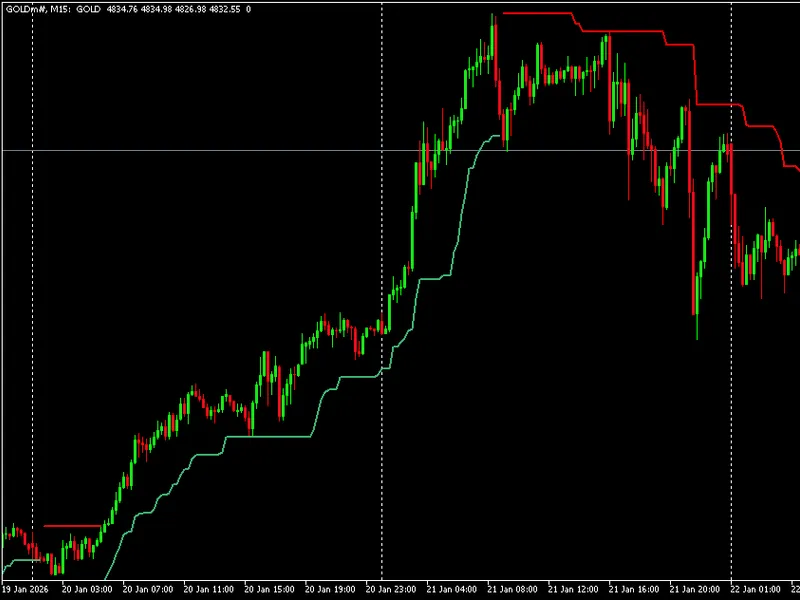
Green Line/Arrow:
Bullish momentum established. Look for Buy opportunities.
Red Line/Arrow:
Bearish momentum established. Look for Sell opportunities.
Star (★) Icon:
High-conviction signal where Volume and Trend Strength align.
Dotted Line:
Market is in a ranging/choppy phase; exercise caution.
Recommended Setup:
Symbols:
Works best on major Forex pairs (EURUSD, GBPUSD), Indices (US30, GER40), and Gold (XAUUSD).
Timeframes:
Optimized for M15 and H1 for day trading; H4 and D1 for swing trading.