










the expert advisor on traffic light trend strategy
Info
The the expert advisor on traffic light trend strategy is a Expert Advisor for MetaTrader 4 that a trend strategy based on moving averages with colors as in a traffic light. the purpose of writing the ea — to test the strategy on history and pick working parameters.
Usage
This tool is typically used for trend following strategies across multiple currency pairs.
Platform
This Expert Advisor works exclusively on MetaTrader 4 (both build 600+ and newer versions).
Setup
Place the downloaded file in MQL4/Experts folder via File ? Open Data Folder in MetaTrader 4.
How to Install and Use the expert advisor on traffic light trend strategy
1. Installation: Open the "File" menu, select "Open Data Folder," navigate to MQL/Experts, paste your file, and restart the terminal.
2. Activation: Drag the EA from the Navigator onto a chart, ensure "Allow live trading" is checked in the Common tab, and verify the AutoTrading button is green.
3. Optimization: Right-click your chart, choose "Expert List," click "Properties" to adjust inputs, and save your preferred setup as a set file for future use.
4. Maintenance: Regularly check the "Experts" tab in the terminal window to monitor trade logs and potential execution errors.
Frequently Asked Questions
Q: Why is my EA not opening trades? A: Check the "AutoTrading" button, ensure "Allow live trading" is enabled, and verify your broker allows automated trading on your account type.
Q: Can I run multiple EAs on one chart? A: No, each chart can only host one active EA; however, you can open multiple charts for different currency pairs to run several EAs.
Q: What does the "smiley face" icon mean? A: A smiley face in the top-right corner of the chart indicates the EA is successfully running; a frowny face means it is disabled.
What this tool does
a trend strategy based on moving averages with colors as in a traffic light.
Typical Use Case
This Expert Advisor excels in trend following on MetaTrader 4.
Compatible Platform & Setup
This Expert Advisor works on MetaTrader 4. Place the file in the MQL4/Experts folder and restart the terminal.
Description & Settings
Related: e-trailing2: enhanced trailing stop expert advisor - another powerful expert for MetaTrader 4 traders.
a trend strategy based on moving averages with colors as in a traffic light. the purpose of writing the ea — to test the strategy on history and pick working parameters.
Also recommended: e-signal of trade expert advisor - similar expert with strong performance on MetaTrader 4.
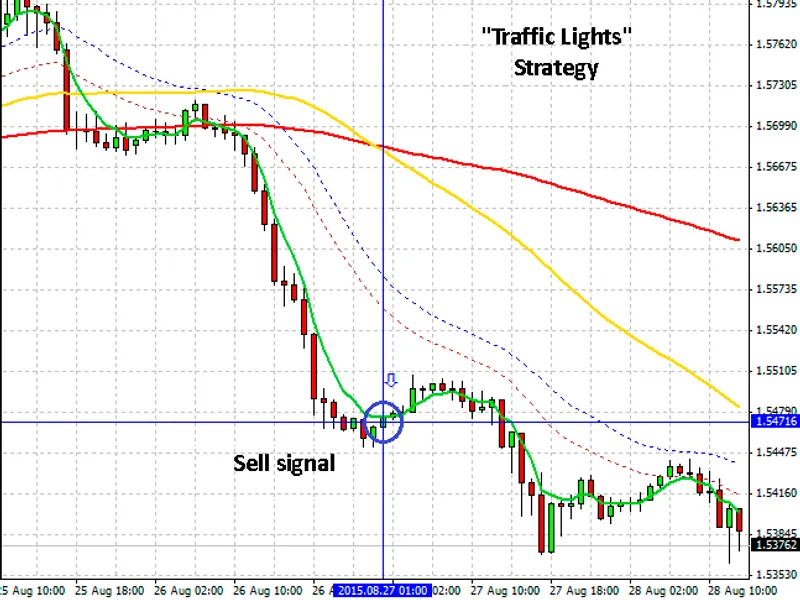
the strategy is composed of a single indicator —moving average
with 5 different parameters:
red
— period 120, method simple, apply to close;
yellow
— period 55, method simple, apply to close;
green
— period 5, method exponential, apply to close;
blue dotted
— period 24, method exponential, apply to high;
brown dotted
— period 24, method exponential, apply to low.
the buy signal is formed when the moving averages align in order from top to bottom:
green
–
yellow
–
red
.
the sell signal is formed when the indicators align in the reverse order:
red
–
yellow
–
green
.
the price is outside the corridor between the
blue
and the
brown
dotted moving averages.
sell signal
the ea opens signals according to the strategy. take profit and stop loss are set in the initial parameters. deal can be opened in two modes: at the match of all the signals on the current candlestick or at the beginning of the next. defined by the timeopenbar parameter. deals are closed by take profit, stop loss or at the intersection of the green and the yellow moving averages. closing of a deal at the intersection is defined by the closeprofit parameter. the closing at the intersection of the green and the yellow moving averages itself may take place on the current candlestick or at the beginning of the next one, defined by the timeclosebar parameter.
setting the triggering of the event at the current candlestick or, after its closure, at the next candlestick, highly affects the quality of the test results, and is determined by the acceptance of the signals from the current positions of the moving averages or as if from history as a fact. until the candlestick is closed the moving averages can be redrawn and produce false signals.
the "trading style" mode is defined by the styletrade parameter. aggressive trading — opening a new deal according to the strategy after the price enters the corridor between the blue and the brown averages. conservative trading — the price entered the corridor between the red and the yellow moving averages. affects the amount of the positions opened by the ea. all parameters are turned on by numbers: 0 — the parameter is off, 1 — the parameter is on (can be any number except 0). it is done for the convenience of the ea testing in the strategy tester.
the usual mm volume calculation depending on the selected risk is present.
the detailed description of the expert advisor's settings and their effect on the test results is shown in the video.
recommended timeframe — h1. the ea shows positive dynamics on gbpusd, eurusd, eurgbp currency pairs on the current market on 2015.
test on the gbpusd pair:
test on the eurgbp pair:
the expert advisor may trade without stop loss and/or take profit with the closeprofit parameter enabled, in that case up to 70% of the movement of the trend can be obtained. test on the eurusd pair without take profit and stop loss:
important:
this is not a "switch on and forget, come back to switch off and forget again" kind of trading robot.
positions are opened — the price was in the corridor (the styletrade parameter) — got out of the corridor — signals matched — position opened.
on some currency pairs or at a different market volatility level the ea may lose all the deposit.
improvements:
You may also like: e-news-lucky$ - automated news trading expert advisor - excellent alternative for expert users on MetaTrader 4.
Source Code
#property copyright "robotfx"
#property link "https://robotfx.org"
#property version   "1.0"
#property strict
extern string s1=" mm   ";
extern double      mm_lots            = 0.1;    //   mm
extern int         mm_mode            = 1;      // 0 mm  1
extern int         lotsdecimal        = 1;      //   0/1/2
extern double      riskpercent        = 1;      //
extern int         magicnumber        = 134201; //
.......
⚠ Limitations & Risk Warning
- This tool is provided for educational and testing purposes only.
- Past performance does not guarantee future results.
- Trading involves substantial risk of loss. Use on a demo account first.
- Results may vary depending on market conditions, broker, and settings.
- We recommend thorough backtesting and forward testing before using with real funds.